8
•
Clean the inside of the refrigerator properly with warm water and
household detergent and dry carefully with a soft cloth.
•
Ensure that the DC electricity supply is connected and turned on.
6. Switching on the refrigerator
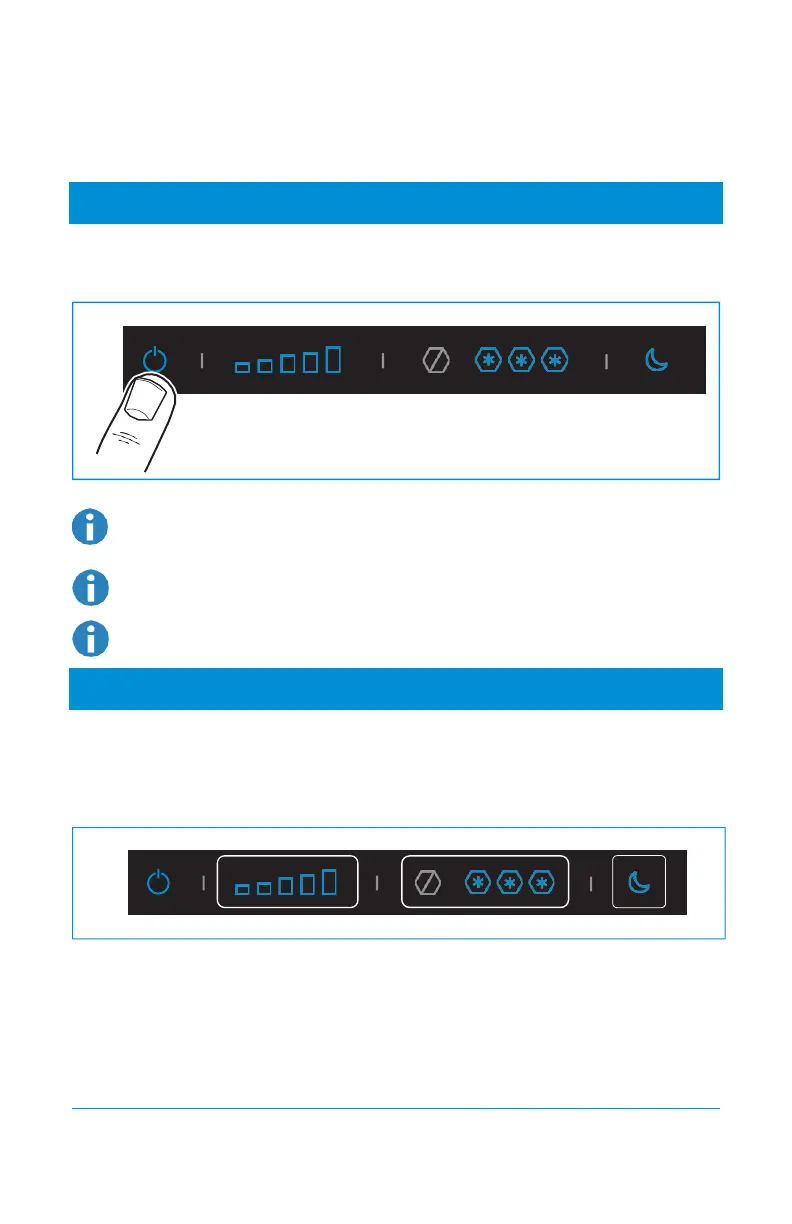
To switch on the refrigerator:
•
Push the on/off button and hold it for a few seconds.
After a few seconds the control panel will change to stand−by and locked mode. The
blue on/off button indicates the refrigerator is still in function.
To switch off the refrigerator, push and hold the on/off button for a few seconds.
For optimal performance, switch on the refrigerator 4 hours before placing food.
7. Selecting cooling level
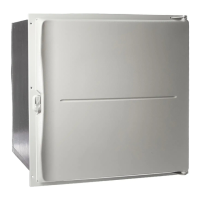
To select the cooling level:
•
First unlock the control panel, if applicable. Press the Fresh Food, Frozen Food or night mode
area and hold it for a few seconds until the icons start blinking.
•
Slide or press the temperature icons to select the desired cooling level.
•
After a few seconds, the control panel will save the settings and go to the locked stand−by
mode.
•
When display is locked, the icons will turn off, only on/off and night mode will stay
illuminated.



 To Next Page