EasyManua.ls Logo

Nordson EFD ValveMate 7100 - User Manual

Nordson EFD ValveMate 7100
28 pages
Print Icon
To Next Page IconTo Next Page
Loading...
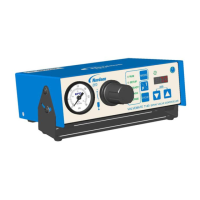
ValveMate
7100 Controller
Operating Manual
Electronic pdf files of
EFD manuals are also available
at www.nordsonefd.com
IMPORTANT!
Save this Sheet.
Forward to Maintenance
or Tool Crib Supervisors
www.nordsonefd.com info@nordsonefd.com Sales and service of Nordson EFD dispensing systems are available worldwide.

Questions and Answers

Summary

Introduction

The EFD Pledge

A statement of commitment to customer satisfaction and product quality.

System Overview and Safety

ValveMate 7100 Features

Highlights key features of the ValveMate 7100 dispensing controller.

General Safety Precautions

General guidance for safe operation and reading the safety statement.

Product Safety Statement

WARNING: Electric Shock Hazard

Details the risks and precautions related to electrical shock.

CAUTION: Read Manual

Emphasizes the importance of reading the manual for safe operation.

Pressure Hazards

Outlines maximum air input, burst, and release pressures.

Material and Personnel Safety

Halogenated Hydrocarbon Solvent Hazards

Warns about using halogenated solvents with aluminum components.

High Pressure Fluids Safety

Warns about the dangers of high-pressure fluid injection and skin penetration.

Medical Alert for Injection Injuries

Provides critical information for physicians treating injection injuries.

Qualified Personnel Requirements

Defines who is qualified to operate and service the equipment.

Operational Guidelines and Compliance

Intended Use of Equipment

Defines the proper applications and examples of unintended use.

Regulations and Approvals

States the need for rated and approved equipment for the operating environment.

Personal Safety Instructions

Lists essential safety practices for preventing injury during operation.

Safety Procedures and Disposal

Fire Safety Instructions

Steps to prevent fires or explosions during operation.

Action in Case of Malfunction

Steps to take when the system malfunctions, including power cutoff.

Equipment Disposal Guidance

Guidance on disposing of equipment and materials according to local codes.

Preventative Maintenance and Compliance

Preventative Maintenance Checks

Simple checks to maintain continuous trouble-free use of the product.

China RoHS Declaration

China RoHS hazardous material declaration for components.

System Specifications

Physical Specifications

Specifies the physical dimensions and weight of the controller unit.

Electrical Specifications

Details power input, connector types, and adapter specifications.

Operating Environment Specifications

Lists temperature, humidity, and altitude limits for operation.

Product Classification Standards

Indicates installation category and pollution degree classifications.

Front Panel Controls and Modes

Power and RUN Mode Operation

How to turn the unit on/off and its default power-up mode.

SETUP, STEADY, TEACH, PURGE Modes

Explains the function of different operating modes.

TIME SET and CYCLE Button Functionality

How to adjust dispense time and use the cycle function.

Alarm Conditions and MODE Button

Describes alarm conditions and how to cycle through setup modes.

Indicator Lamps

Dispense Valve Actuation Indicator

Describes the lamp that illuminates when the valve is actuated.

Operation Mode Indicator Lamps

Explains the five indicator lamps showing the current operation mode.

Operational Procedures

On-the-Fly (OTF) Time Adjustments

How to make real-time adjustments to valve open time in RUN mode.

Setting the STEADY Mode

Steps to switch the controller into STEADY mode for operation.

Using the TEACH Mode

Procedure for setting dispense time using the TEACH function.

Executing the PURGE Mode

Steps to initiate the PURGE function for valve purging.

System Configuration and Settings

Enabling;Disabling Low Air Pressure Alarm

Steps to configure the low air pressure alarm feature.

Selecting Pressure Units (PSI;BAR)

Guide to switching between PSI and BAR units for pressure display.

CC INIT I;O for External Alarm Input

Steps to configure CC INIT for use as an external alarm input.

Typical System Setup

Air Supply and Regulator Setup

Illustrates the connection of air lines and regulators for the system.

Fluid Reservoir and Valve Connection

Shows how the fluid reservoir connects to the dispense valve.

Reservoir Depressurization Caution

Important safety warning on how to depressurize the reservoir before opening.

Mounting the ValveMate 7100

Universal Mounting Bracket Usage

How to use the included bracket for mounting the controller.

Optional Panel Mount Kit Information

Information about an optional kit for panel mounting the unit.

Power and Panel Markings

External Power Adapter Details

Details the included universal 24VDC remote power supply.

Back Panel Cautionary Markings

Explains caution symbols and markings on the back panel.

Input;Output Connections Overview

Terminal Strip Pinout and Function

Details the 10-pin terminal strip and its functions.

External I;O Port Identification

Identifies the physical I/O ports on the back of the unit.

I;O Connection Details

Initiate Input Connection Types

Describes the different ways to initiate a dispense cycle.

Alarm Output Connection Function

Describes the alarm output circuit and its capabilities.

Alarm Input Connection Configuration

Explains the use of CC INIT as an external alarm input.

End-of-Cycle (EOC) Output Function

Details the EOC circuit for acknowledging dispense cycles.

24 VDC Courtesy Output Use

Describes the courtesy 24 VDC output for auxiliary functions.

I;O Schematics and Wiring

External I;O Wiring Diagram

Shows external wiring connections for inputs and outputs.

Internal I;O Electrical Schematic

Provides the internal electrical schematic for I/O connections.

Air Connections and Setup

Dispense Valve Air Hose Connection

Guidance on connecting the valve actuating air hose.

Plant Air Input Connection

Steps for connecting the plant air supply to the unit.

Air Output Fitting Safety Note

Critical note about the air output push-in fitting's safety feature.

Final Setup Checklist

Verify Air Pressure Setting

Checklist item for confirming correct air pressure to the unit.

Check Initiate and I;O Wiring

Verifying that initiate connections and I/O are wired correctly.

Confirm Valve and Reservoir Connections

Ensuring proper connection of the valve and fluid reservoir.

Verify Dispensing Tip Installation

Ensuring the dispensing tip is correctly installed as per guide.

Confirm Power and Indicator Status

Verifying power is on and indicator lamps/display are lit.

Testing the Dispense Valve

Set Tank Pressure for Testing

Guidance on setting tank pressure based on fluid viscosity for testing.

Purge Air and Material from System

Steps to purge air and material using the PURGE mode.

Set Initial Dispense Time

How to set the initial dispense time for deposit size control.

Adjust Deposit Size

Fine-tuning deposit size by adjusting time or tank pressure.

Troubleshooting Guide

LED Toggles Between Air;Pressure Value

Addresses issues with the LED display and initiate signal acceptance.

Unit Not Responding to Initiate Signal

Solutions for when the unit fails to respond to initiate signals.

Timer Function Inoperative

Troubleshooting steps for an inoperative timer function.

Blinking LED Indicating External Alarm

Explains blinking LED related to external alarm conditions.

Replacement Parts List

ValveMate 7100 Component Parts

Lists part numbers and descriptions for ValveMate 7100 components.

Warranty and Support Information

One Year Limited Warranty Terms

Details the one-year limited warranty terms and conditions.

Global Sales and Service Contacts

Provides contact details for sales and service globally.

Summary

Introduction

The EFD Pledge

A statement of commitment to customer satisfaction and product quality.

System Overview and Safety

ValveMate 7100 Features

Highlights key features of the ValveMate 7100 dispensing controller.

General Safety Precautions

General guidance for safe operation and reading the safety statement.

Product Safety Statement

WARNING: Electric Shock Hazard

Details the risks and precautions related to electrical shock.

CAUTION: Read Manual

Emphasizes the importance of reading the manual for safe operation.

Pressure Hazards

Outlines maximum air input, burst, and release pressures.

Material and Personnel Safety

Halogenated Hydrocarbon Solvent Hazards

Warns about using halogenated solvents with aluminum components.

High Pressure Fluids Safety

Warns about the dangers of high-pressure fluid injection and skin penetration.

Medical Alert for Injection Injuries

Provides critical information for physicians treating injection injuries.

Qualified Personnel Requirements

Defines who is qualified to operate and service the equipment.

Operational Guidelines and Compliance

Intended Use of Equipment

Defines the proper applications and examples of unintended use.

Regulations and Approvals

States the need for rated and approved equipment for the operating environment.

Personal Safety Instructions

Lists essential safety practices for preventing injury during operation.

Safety Procedures and Disposal

Fire Safety Instructions

Steps to prevent fires or explosions during operation.

Action in Case of Malfunction

Steps to take when the system malfunctions, including power cutoff.

Equipment Disposal Guidance

Guidance on disposing of equipment and materials according to local codes.

Preventative Maintenance and Compliance

Preventative Maintenance Checks

Simple checks to maintain continuous trouble-free use of the product.

China RoHS Declaration

China RoHS hazardous material declaration for components.

System Specifications

Physical Specifications

Specifies the physical dimensions and weight of the controller unit.

Electrical Specifications

Details power input, connector types, and adapter specifications.

Operating Environment Specifications

Lists temperature, humidity, and altitude limits for operation.

Product Classification Standards

Indicates installation category and pollution degree classifications.

Front Panel Controls and Modes

Power and RUN Mode Operation

How to turn the unit on/off and its default power-up mode.

SETUP, STEADY, TEACH, PURGE Modes

Explains the function of different operating modes.

TIME SET and CYCLE Button Functionality

How to adjust dispense time and use the cycle function.

Alarm Conditions and MODE Button

Describes alarm conditions and how to cycle through setup modes.

Indicator Lamps

Dispense Valve Actuation Indicator

Describes the lamp that illuminates when the valve is actuated.

Operation Mode Indicator Lamps

Explains the five indicator lamps showing the current operation mode.

Operational Procedures

On-the-Fly (OTF) Time Adjustments

How to make real-time adjustments to valve open time in RUN mode.

Setting the STEADY Mode

Steps to switch the controller into STEADY mode for operation.

Using the TEACH Mode

Procedure for setting dispense time using the TEACH function.

Executing the PURGE Mode

Steps to initiate the PURGE function for valve purging.

System Configuration and Settings

Enabling;Disabling Low Air Pressure Alarm

Steps to configure the low air pressure alarm feature.

Selecting Pressure Units (PSI;BAR)

Guide to switching between PSI and BAR units for pressure display.

CC INIT I;O for External Alarm Input

Steps to configure CC INIT for use as an external alarm input.

Typical System Setup

Air Supply and Regulator Setup

Illustrates the connection of air lines and regulators for the system.

Fluid Reservoir and Valve Connection

Shows how the fluid reservoir connects to the dispense valve.

Reservoir Depressurization Caution

Important safety warning on how to depressurize the reservoir before opening.

Mounting the ValveMate 7100

Universal Mounting Bracket Usage

How to use the included bracket for mounting the controller.

Optional Panel Mount Kit Information

Information about an optional kit for panel mounting the unit.

Power and Panel Markings

External Power Adapter Details

Details the included universal 24VDC remote power supply.

Back Panel Cautionary Markings

Explains caution symbols and markings on the back panel.

Input;Output Connections Overview

Terminal Strip Pinout and Function

Details the 10-pin terminal strip and its functions.

External I;O Port Identification

Identifies the physical I/O ports on the back of the unit.

I;O Connection Details

Initiate Input Connection Types

Describes the different ways to initiate a dispense cycle.

Alarm Output Connection Function

Describes the alarm output circuit and its capabilities.

Alarm Input Connection Configuration

Explains the use of CC INIT as an external alarm input.

End-of-Cycle (EOC) Output Function

Details the EOC circuit for acknowledging dispense cycles.

24 VDC Courtesy Output Use

Describes the courtesy 24 VDC output for auxiliary functions.

I;O Schematics and Wiring

External I;O Wiring Diagram

Shows external wiring connections for inputs and outputs.

Internal I;O Electrical Schematic

Provides the internal electrical schematic for I/O connections.

Air Connections and Setup

Dispense Valve Air Hose Connection

Guidance on connecting the valve actuating air hose.

Plant Air Input Connection

Steps for connecting the plant air supply to the unit.

Air Output Fitting Safety Note

Critical note about the air output push-in fitting's safety feature.

Final Setup Checklist

Verify Air Pressure Setting

Checklist item for confirming correct air pressure to the unit.

Check Initiate and I;O Wiring

Verifying that initiate connections and I/O are wired correctly.

Confirm Valve and Reservoir Connections

Ensuring proper connection of the valve and fluid reservoir.

Verify Dispensing Tip Installation

Ensuring the dispensing tip is correctly installed as per guide.

Confirm Power and Indicator Status

Verifying power is on and indicator lamps/display are lit.

Testing the Dispense Valve

Set Tank Pressure for Testing

Guidance on setting tank pressure based on fluid viscosity for testing.

Purge Air and Material from System

Steps to purge air and material using the PURGE mode.

Set Initial Dispense Time

How to set the initial dispense time for deposit size control.

Adjust Deposit Size

Fine-tuning deposit size by adjusting time or tank pressure.

Troubleshooting Guide

LED Toggles Between Air;Pressure Value

Addresses issues with the LED display and initiate signal acceptance.

Unit Not Responding to Initiate Signal

Solutions for when the unit fails to respond to initiate signals.

Timer Function Inoperative

Troubleshooting steps for an inoperative timer function.

Blinking LED Indicating External Alarm

Explains blinking LED related to external alarm conditions.

Replacement Parts List

ValveMate 7100 Component Parts

Lists part numbers and descriptions for ValveMate 7100 components.

Warranty and Support Information

One Year Limited Warranty Terms

Details the one-year limited warranty terms and conditions.

Global Sales and Service Contacts

Provides contact details for sales and service globally.

Nordson EFD ValveMate 7100 Specifications

General IconGeneral
BrandNordson EFD
ModelValveMate 7100
CategoryController
LanguageEnglish

Related product manuals