2.3.1 TRACKING
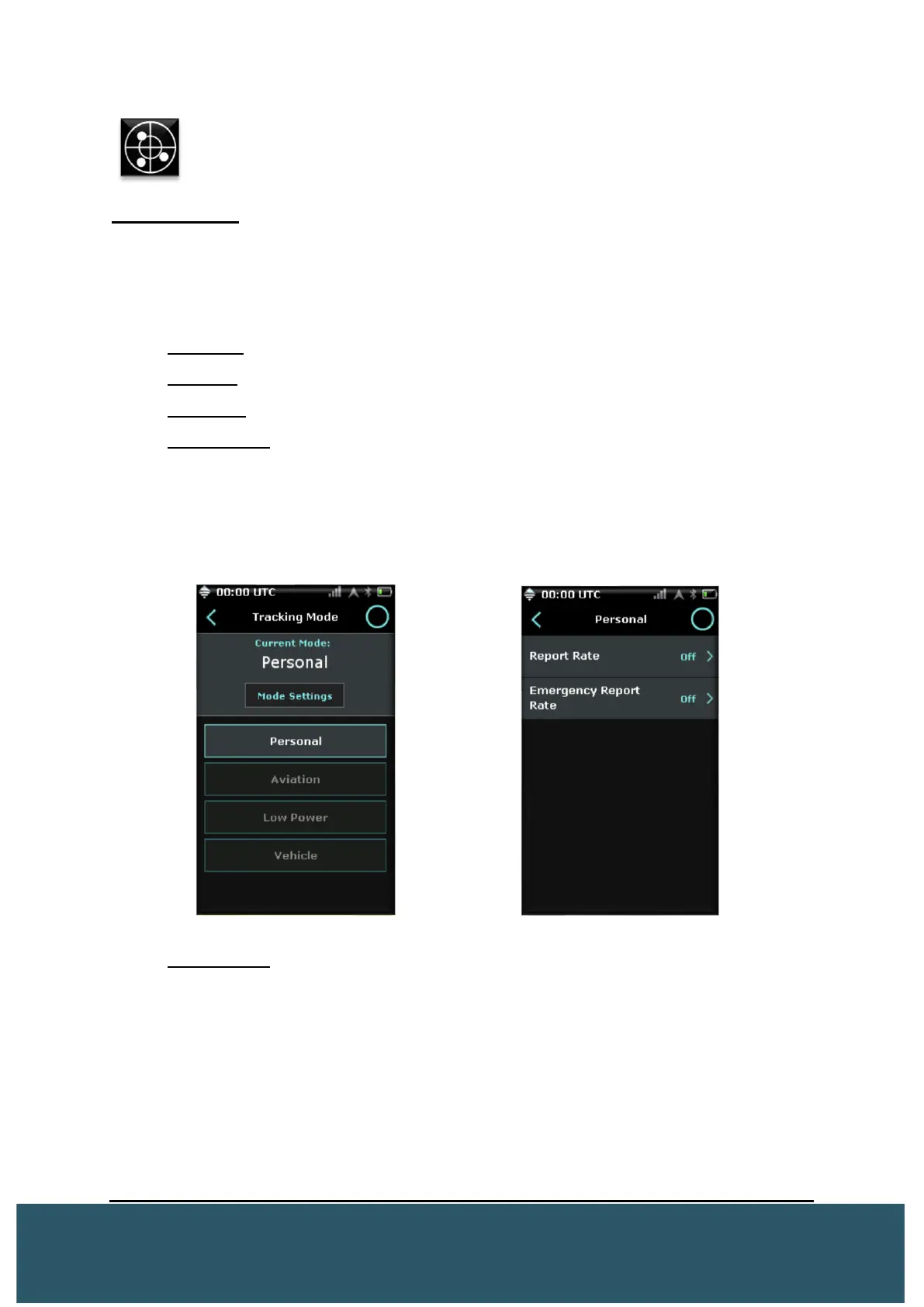
Tracking Mode The Tracking Mode menu allows the user to switch between the
different tracking modes available.
Users must visit this menu to view the current tracking mode. The default report rate for
the Wave is set at 5 minute intervals.
• Personal: Default mode
• Vehicle: Used in conjunction with a moving vehicle
• Aviation: Used in conjunction with aircraft. Will display altitude.
• Low Power: Used for power saving. More info below.
For each tracking mode, users can enter the Mode Settings screen to customize
various reporting intervals based on time.
Low Power:
When in low power, the Wave will wake up when its report time rate is reached.
Upon wake up, the Wave turns on the GPS chip and searches for a signal for 2
minutes. If no GPS signal can be acquired, it will return to its low power state.
If GPS is acquired, the Wave will then turn on the Iridium modem and try to
obtain a satellite fix for 4 minutes.
When the Wave acquires a satellite fix it will send the position report and then
return to its low power state. If after 4 minutes no satellite signal is acquired, the
Wave will also return to its low power state.


 To Next Page