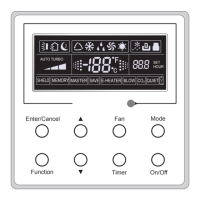
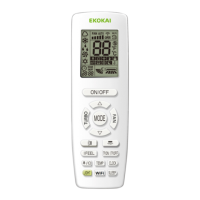
Wireless Remote Controller WLRC2
5
Ɣ About lock
Press + and - buttons simultaneously to lock or unlock the keyboard. If the wireless remote
controller is locked, the icon
ZLOOEHGLVSOD\HGLIDQ\NH\LVSUHVVHGWKHV\PEROZLOOÀDVKWKUHH
times to indicate the controller is locked.
Ɣ About SWING UP/DOWN
ķ
3UHVVWKH6ZLQJ8S'RZQEXWWRQIRUPRUHWKDQVHFRQGVDQGWKHQWKHORXYUHZLOOVZLQJXS
and down. When you release the button, the louvre will stop.
ĸ
3UHVVWKH6:,1*83'2:1EXWWRQWRVWDUWWKHORXYUHVZLQJLQJ3UHVVDJDLQZLWKLQ
VHFRQGVDQGWKHORXYUHZLOOVWRS3UHVVZLWKLQWZRVHFRQGVDJDLQDQGORXYUHZLOOEHJLQVZLQJLQJ
DJDLQ
Ɣ About Change over switch between Fahrenheit and Centigrade
:LWKWKHXQLWLQ2))VWDWXVSUHVV02'(DQGEXWWRQVVLPXOWDQHRXVO\WRVZLWFKEHWZHHQ&
DQG)
4 Replacement of batteries
ƹ
1
6OLJKWO\SUHVVWKHSODFHZLWK DORQJWKHDUURZKHDGGLUHFWLRQDQGSXVKWKHEDFNFRYHU
of the wireless remote controller.
2
Take out the used batteries.
3
Insert two new AAA 1.5V dry cell batteries.
4
Put back the cover of the wireless remote controller.
2
1
3
4
Notes!
ķ
Only use new AAA 1.5V dry cell batteries.
ĸ
,IWKHZLUHOHVVUHPRWHFRQWUROOHUZLOOQRWEHXVHGIRUDORQJWLPH SOHDVHWDNH WKHPRXWWR
DYRLGEDWWHU\OHDNLQJDQGGDPDJLQJWKHFRQWUROOHU
Ĺ
5HPRWHFRQWUROOHUZLOOQRWRSHUDWHRXWVLGHQRUPDOUDQJH
ĺ
Remote should be kept 1m away from the TV, stereo or other electronics.
Ļ
,IWKHZLUHOHVVUHPRWHFRQWUROOHUZLOOQRWRSHUDWHQRUPDOO\SOHDVHWDNHEDWWHULHVRXWIRUV
DQGUHSODFH,IWKHDQRPDO\SHUVLVWVSOHDVHFKDQJHWKHP
ļ
The battery must be removed from the appliance before it is scrapped. The batteries is to
be disposed of safely.



 To Next Page