EasyManua.ls Logo

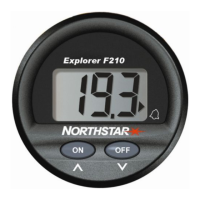
NorthStar EXPLORER F210 - User Manual

NorthStar EXPLORER F210
60 pages
Print Icon
To Next Page IconTo Next Page
Loading...
www.northstarnav.com
Explorer F210
Fuel Instrument
Installation and Operation Manual

Table of Contents

Question and Answer IconNeed help?

Do you have a question about the NorthStar EXPLORER F210 and is the answer not in the manual?

Summary

Important Safety Information

Safety Alert Symbols

Explains DANGER, WARNING, CAUTION symbols and associated hazards for safe use.

Disclaimer and Liability

Owner's responsibility for installation/use and manufacturer's liability disclaimer.

FCC Compliance Statement

Details FCC rules for digital device interference and compliance requirements.

Operation

Fuel Flow Display

How to display the current fuel flow rate using the FLOW key.

Other Fuel Functions

Accessing and viewing trip log, total log, and low fuel alarm settings.

Setting the Low Fuel Alarm

Procedure to set a custom alert value for low fuel levels.

Alarm Activation and Muting

How the alarm sounds and how to mute it while the condition persists.

Resetting Trip and Total Logs

Instructions for resetting the fuel usage logs to zero.

Instrument Setup

Selecting Units of Measure

Guide to changing display units between Litres, Imperial, and US gallons.

Instrument Calibration

Steps to calibrate the fuel flow meter for enhanced accuracy.

Installation

Installation Location

Recommendations for choosing an optimal mounting location for the instrument.

Instrument Mounting Procedure

Detailed steps for physically mounting the instrument on a panel.

Wiring Connections

Instructions for connecting power supply and transducer cables.

Fuel Flow Transducer Installation

Guidance on installing the transducer in the fuel line system.

Specifications

Troubleshooting Chart

Summary

Important Safety Information

Safety Alert Symbols

Explains DANGER, WARNING, CAUTION symbols and associated hazards for safe use.

Disclaimer and Liability

Owner's responsibility for installation/use and manufacturer's liability disclaimer.

FCC Compliance Statement

Details FCC rules for digital device interference and compliance requirements.

Operation

Fuel Flow Display

How to display the current fuel flow rate using the FLOW key.

Other Fuel Functions

Accessing and viewing trip log, total log, and low fuel alarm settings.

Setting the Low Fuel Alarm

Procedure to set a custom alert value for low fuel levels.

Alarm Activation and Muting

How the alarm sounds and how to mute it while the condition persists.

Resetting Trip and Total Logs

Instructions for resetting the fuel usage logs to zero.

Instrument Setup

Selecting Units of Measure

Guide to changing display units between Litres, Imperial, and US gallons.

Instrument Calibration

Steps to calibrate the fuel flow meter for enhanced accuracy.

Installation

Installation Location

Recommendations for choosing an optimal mounting location for the instrument.

Instrument Mounting Procedure

Detailed steps for physically mounting the instrument on a panel.

Wiring Connections

Instructions for connecting power supply and transducer cables.

Fuel Flow Transducer Installation

Guidance on installing the transducer in the fuel line system.

Specifications

Troubleshooting Chart

NorthStar EXPLORER F210 Specifications

General IconGeneral
BrandNorthStar
ModelEXPLORER F210
CategoryMeasuring Instruments
LanguageEnglish

Related product manuals