Need help?
Do you have a question about the NORWii N76 and is the answer not in the manual?
Controls page up/down, slide play, and black screen functions.
Supports PowerPoint, Keynote, and Prezi presentation software.
USB receiver stored in presenter for portability and plug-and-play.
Allows adjustment of music volume.
Uses Tab/Enter keys for hyperlink navigation.
Tab key activates Alt+Tab for window switching.
360mAh battery with USB-C charging port.
Universal USB driver, plug-and-play functionality.
Page up/down keys customizable; updatable firmware.
One wireless presenter with integrated USB receiver.
Includes one user manual and one Micro USB charging cable.
Tech, frequency, distance, laser, battery, dimensions.
Working voltage, dimensions, weight.
Explains functions of LED, page controls, laser, clip, volume buttons.
Advise switching Input Method Editors (IME) to English.
Instructions for turning the presenter ON/OFF.
Single click, long press for page up/play/end show.
Single click, long press for page down/black screen.
Press and hold to activate laser beam.
Adjusts volume up/down, continuous press function.
Tab for switching, Enter for opening/closing hyperlinks.
Plug the USB receiver into the computer's USB port.
How to control the presenter using its keys.
Turn off presenter and store USB receiver.
Blue LED flashes slowly to signal low battery.
Red light indicates charging; green indicates fully charged.
Using PC or mobile chargers; approx. 2 hours charging time.
Download Norwii Presenter software and pair presenter/receiver.
How to check if the battery is low or depleted.
Troubleshooting steps for laser pointer issues.
Addresses dim laser issues due to battery or aging module.
Diagnosing why the computer doesn't detect the USB receiver.
Steps to calibrate the presenter for accurate cursor movement.
Standard 5V charging only; avoid QC quick charging.
Resolving presenter control issues by re-pairing receiver.
Adjusting permissions for Norwii Presenter on macOS.
This document describes the N76 Wireless Presenter, a professional tool designed for presentations. It includes a comprehensive function description, important technical specifications, usage features, and maintenance information.
The N76 Wireless Presenter offers a wide range of functionalities to enhance presentations. It supports navigation through slides with "previous page" and "next page" controls. A single click on the "page up" key moves backward, while a long press initiates a slide show from the current page. Similarly, a single click on the "page down" key moves forward, and a long press activates a black screen, which can be exited with another long press.
The presenter provides full support for popular presentation software such as PowerPoint, Keynote, and Prezi. Its functions can be flexibly switched between various computer keyboard inputs, including up/down arrows, left/right arrows, and Page Down/Up. By default, the page up and page down keys correspond to the up and down arrows on the computer keyboard, supporting PowerPoint and Keynote. Pressing the page up and page down keys simultaneously for the first time switches the function to left and right arrows, supporting Prezi. A second simultaneous press switches to Page Up and Page Down for internet browsers and Microsoft Photo software. A third simultaneous press reverts to the default up and down arrows. The page up/down keys are also customizable using the Norwii Presenter software.
An integrated design allows for easy storage of the USB receiver at the rear of the wireless presenter, making it highly portable and convenient for plug-and-play use.
The N76 also supports volume control for music, with "+" to increase and "-" to decrease volume. A long press on these keys provides continuous volume adjustment.
Hyperlink functionality is included: pressing the "Tab" key switches between hyperlinks on a page, and pressing the "Enter" key opens the selected hyperlink. A long press of the "Enter" key executes Alt-F4 to close the current active window. When switching between open windows, pressing and holding the "Tab" key executes the Alt Tab function. Releasing the button on the desired window switches to it.
The device features a Class 2 safe laser module, compliant with IEC/EN60825-1:2014. The physical laser key activates the laser beam when pressed and held, and turns it off upon release.
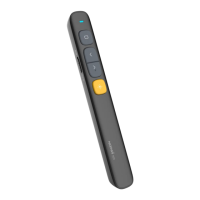
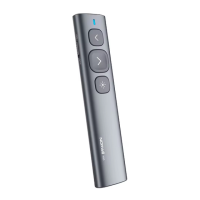
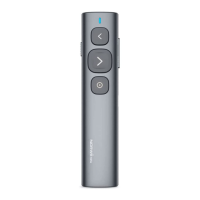
The N76 Wireless Presenter consists of a transmitter and a USB receiver.
The N76 is compatible with Windows 7 / 8 / 10 / 11 or later, macOS, Linux, and Android systems. On Android/Linux systems, it may only support the page turning function.
To install, remove the USB receiver from the lower part of the wireless presenter and plug it into a USB interface on the computer. The system will automatically detect and install the necessary drivers. A "New hardware installed and ready to use" message on Windows indicates successful installation.
The presenter has a power switch: push up to "ON" to turn it on, and push down to "OFF" to turn it off. After use, it is recommended to return the USB receiver to its storage position and turn off the power switch to conserve battery.
The N76 is equipped with a 360mAh lithium battery and a USB-C charging port. It can be charged via a computer's USB port or a mobile phone charger, eliminating the need for battery changes. The blue LED on the presenter will flash slowly to indicate low power, signaling that charging is needed. During charging, a red indicator light will illuminate, turning green when fully charged. Charging typically takes about 2 hours, depending on the power supply of the USB interface. Only standard 5V charging is supported; using a voltage higher than 5V can damage the product or prevent charging.
When using the product, it is important to change the computer's Input Method Editors (IME) to English input mode for optimal functionality.
Calibration is required if the mouse cursor moves on its own or if horizontal/vertical movements of the presenter do not correspond to horizontal/vertical movements of the mouse cursor on the screen. To calibrate, place the product on a horizontal and stable surface, press and hold the "page down" key, and turn on the power. The blue LED will flash, indicating entry into calibration mode. Release both hands and keep the product as level as possible. The blue LED will flash for 3 seconds, then remain on for 5 seconds before turning off, signaling that calibration is complete.
If the computer does not detect the USB receiver, first test the USB port with a USB mouse or keyboard. If other USB devices work, but the presenter's USB receiver does not, the receiver may be broken, or the USB drivers are incompatible. Try another USB port on the same computer or on a different computer. If it works on another computer, the issue lies with the USB drivers on the original computer, and backing up data and reinstalling the OS may be necessary.
For products supporting key function customization or advanced features like digital laser, highlight, or magnifier, the Norwii Presenter software is required. It can be downloaded from the "Downloads" section under the "Support" menu on the official Norwii website (www.norwii.com, English version). This software also allows pairing the presenter and the USB receiver if the receiver fails to save the presenter's address properly. The firmware of the USB receiver is updatable.
On macOS, users need to grant operation permissions for [Input Monitoring], [Screen Recording], and [Accessibility] to the Norwii Presenter software under [System Preferences] - [Security & Privacy] - [Privacy].
The N76 Wireless Presenter holds CE, ROHS, and FDA certifications. Its FCCID is 2AXGRN95. It complies with IEC/EN60825-1:2014 and 21 CFR 1040.10 and 1040.11, with exceptions pursuant to Laser Notice No.50, dated June 24, 2007.
For support, contact Shanghai Norwii Technology Co., Ltd. Address: 2F, Building 3, No 277, Jinfeng Road, Pudong New Area, Shanghai 201201, P. R. China Tel: 86-21-51872080 Email: support@norwii.com
 General
| Brand | NORWii |
|---|---|
| Model | N76 |
| Category | Digital Presenters |
| Language | English |

 To Next Page