– 76 –
L
The uppermost extraction tower glass must NOT be
placed in the dishwasher. This may cause scratches
in the glass; it may also damage the coating on the
base.
After cleaning:
– Return the filters and the glass into the extraction tower.
– Press the
button after all parts are reinstalled.
– Press the
control key for 3 seconds when the extraction
tower is completly downwards.
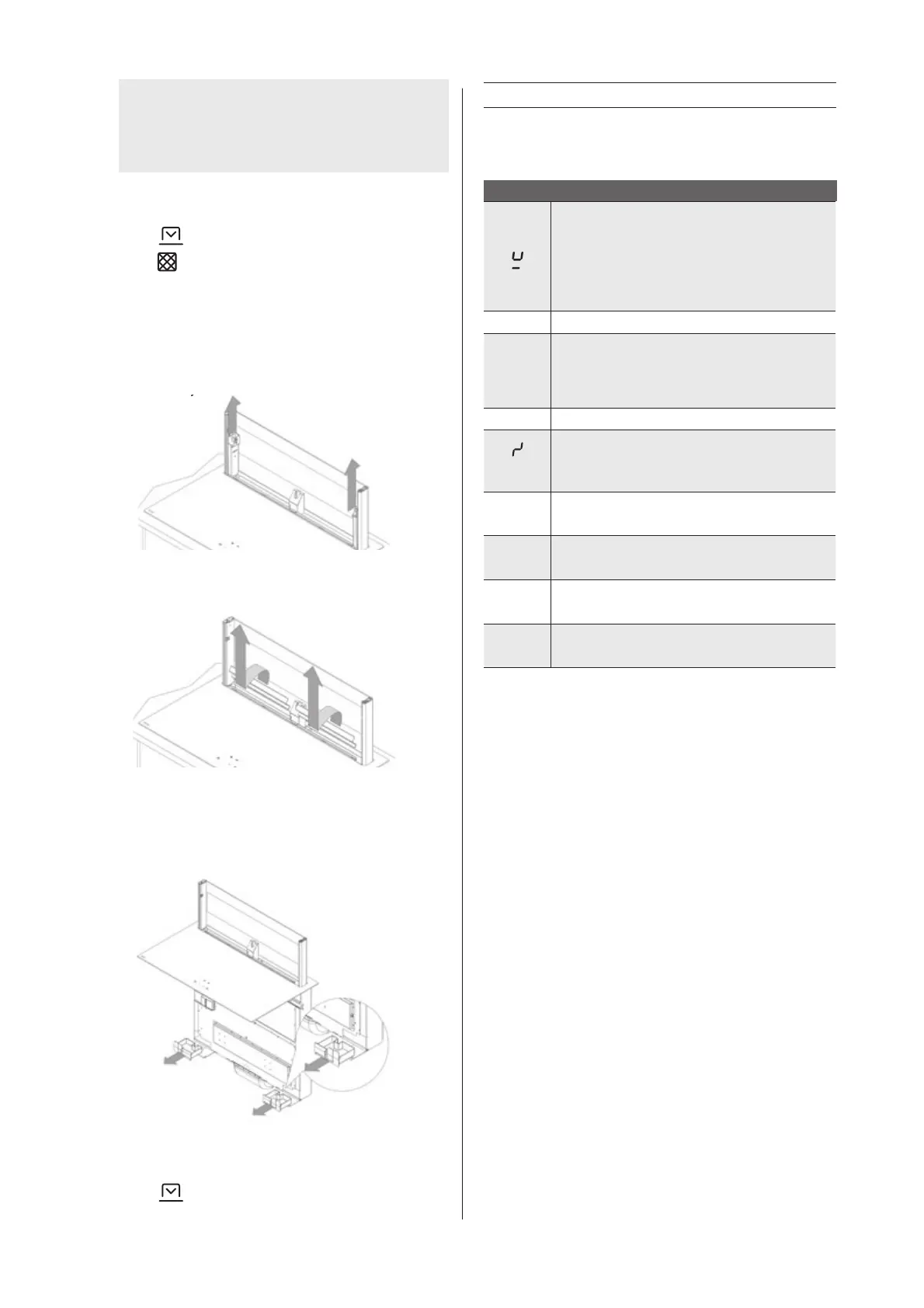
9.2.3 Cleaning in the event of spillage into the device
- Follow the steps described in 9.2.1 and 9.2.2.
- Remove the upper collection containers from the tower and
clean if necessary.
- Remove the collection safety and clean if necessary.
- In the case of spillage of large quantities of fluid, slide the
lower collection containers from the underside of the extraction
hood and clean if necessary.
Follow the steps in the reverse order to make the device ready
for cooking again.
– Press the
button after all parts are reinstalled.
10 Troubleshooting minor faults
10.1 Messages on the hob
Code
– there is no cooking pan on the cooking zone
– the cooking pan is not suitable for induction
– the diameter of the bottom of the cooking pan
is too small when compared to the cooking
zone
U
See Chapter 5.3.9 Keep warm (1821)
E
– The electronic system is disrupted.
– Disconnect and reconnect the hob.
– Call the after-sales service
I I
See Chapter 5.3.7 Stop & Go (1821)
(Er03)
The controller keys are covered by liquid or an
item. The symbol will disappear as soon as the
keys are released or cleaned.
E2
The hob has overheated, leave to cool, then
switch back on.
E8
The fan air supply is blocked.
Unblock it.
4
The hob has not been properly connected to the
network. Check the connection. (1821)
(Er47) Problem in the device's internal bus system.
If one of these error messages remains visible, you can contact
the after-sales service.
The hob or the cooking zone does not work:
– the hob has been poorly connected to the electrical power
supply
– the safety fuse has blown
– check the locking key has been enabled
– the touch control keys have been splashed with water or fat
– there is an object on the touch control keys
A single zone or all zones are not working:
– the safety device has been operated
– this shall engage when a cooking zone has been left on
unintentionally
– the safety shall also engage when one or more touch control
keys are covered
– a pan is empty and the base has overheated
– the hob also has an automatic power reducer and automatic
shut-down in the event of overheating
The fan continues to operate after the hob has switched
off:
– this is not a defect, the fan is protecting the electronic
equipment
– the fan will stop automatically.


 To Next Page