29
Measuring Optical Power
!
It is important to keep all optical connections and surfaces free from dirt, oils, or other
contaminants to ensure proper operation. Always clean all test jumpers before conducting the
test procedures outlined in this Guide (see Section 5: “Maintenance” for details).
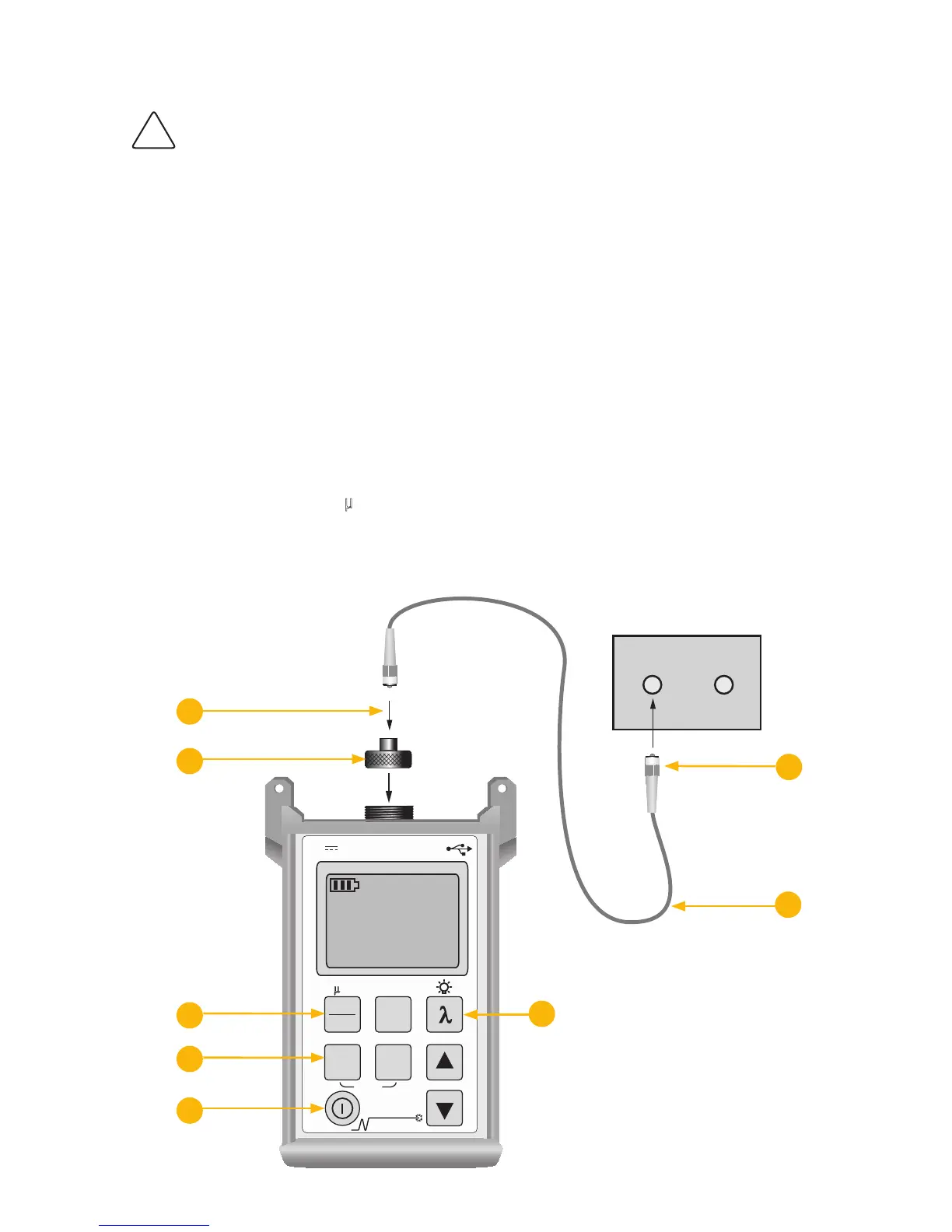
To Measure Optical Power
Turn on the OPM optical power meter.1.
Select the appropriate fiber optic test jumper. The fiber type of this jumper must be the same as the 2.
fiber type normally connected to the output being measured.
Mount the appropriate adapter cap on the OPM optical input. This adapter cap must match the 3.
connector on the end of the test jumper you will connect to the OPM.
Connect one end of the test jumper to the OPM adapter cap and the other end to the optical output to 4.
be measured.
Press the 5.
l key to select the calibrated wavelength that matches the nominal wavelength of the
source being measured.
If the OPM is presently measuring loss dB, press 6. the dB/dBm key to display power in dBm, or press
and hold to display power in
µW.
OPM5 power meters only:7. You may press the Store key to save the displayed measurement in the
next available memory location.



 To Next Page