6 7
in CARTRIDGE SETUP
Remove plastic wrap from the 3in1 cartridge.
Insert the 3in1 cartridge gently into the water purifi er, as shown
in fi gure 1.
Gently press and turn 3in1 cartridge 90˚ clockwise.
Align dot with lock icon (fi gure 2).
Make sure cartridge top is fl ush with the surface of the water
purifi er (fi gure 3).
After the new 3in1 cartridge is securely in place, let water run
through the water purifi er until the water comes out clear to prepare
the 3in1 cartridge for normal use (fi gure 4).
Letting the water run until clear cleans the 3in1 cartridge and
its tubing. Water will initially come out greyish-black or soapy.
This is normal.
HOW TO SET UP YOUR PURIFIER
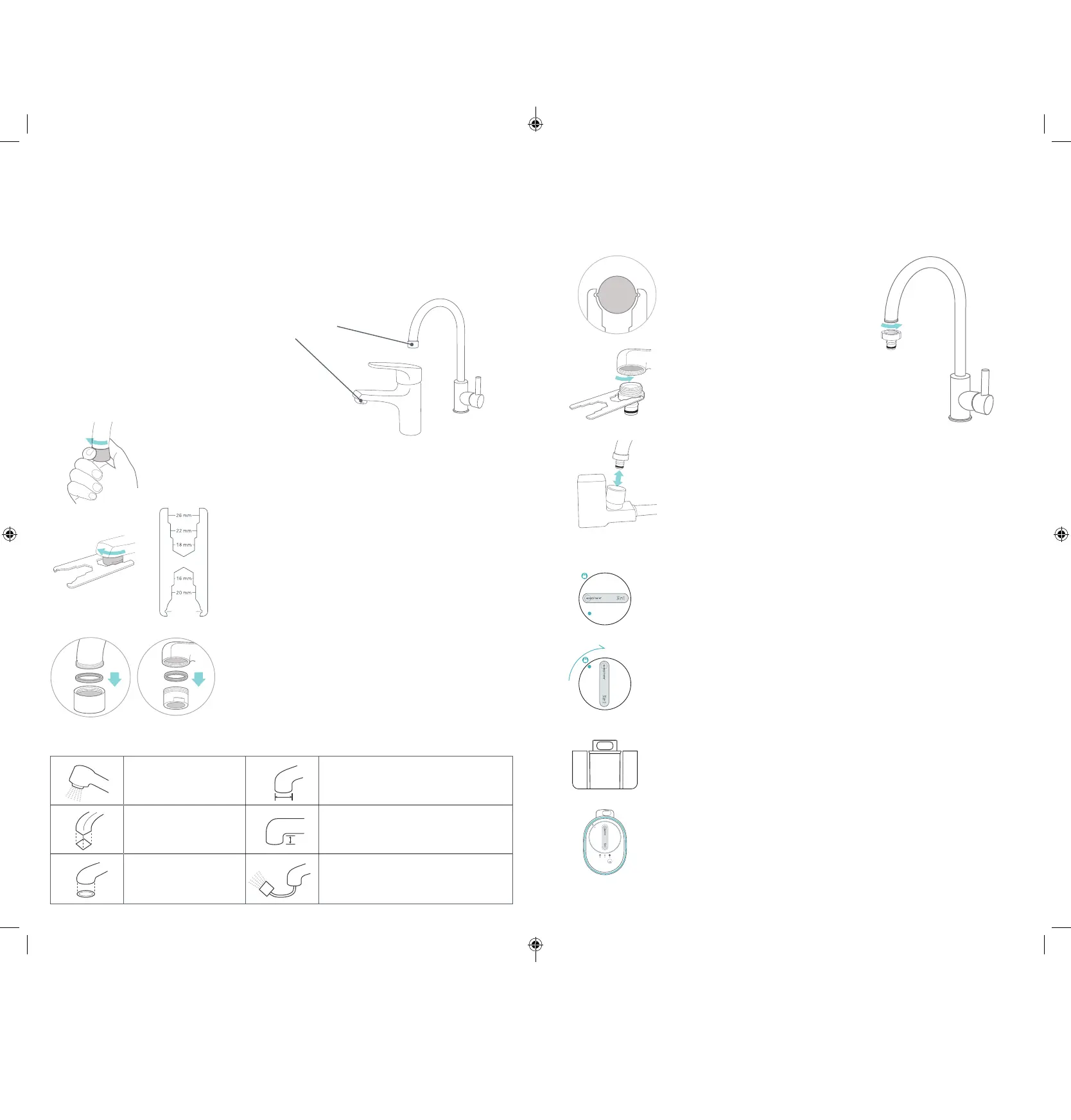
If the aerator has a glossy exterior, simply unscrew it by hand.
Use a towel to increase friction.
If the aerator is fi rmly attached, use the small
wrench provided.
The small wrench is specifi cally designed
to remove aerators and install the EcoSphere
®
Water
Purifi er faucet adapters.
Make sure to also remove the washer above the aerator.
These faucets are not recommended for use with the EcoSphere
®
Water Purifi er.
Shower heads Spout outlets wider than 24 mm
Square spout outlets Spout outlets shorter than 15 mm
Oval spout outlets Retractable faucets
Select the appropriate adapter from the
Faucet Adapter Kit.
Use the small wrench to securely
attach the adapter to the faucet.
Make sure to match the appropriate
faucet thread to avoid water leaks.
Use connector to connect the faucet and faucet
adapter if required.
REMOVING THE FAUCET AERATOR
?
Most faucets contain a removable aerator that helps mix water and air so that the fl ow of water is
consistent.
Some old faucets do not have aerators.
Faucet Aerator
ATTACHING THE FAUCET ADAPTER
Using the small wrench, attach the appropriate adapter so that it fi ts tightly.
Hold the faucet attachment with one hand, and then gently
push the faucet attachment onto the adapter while holding
the faucet with your other hand. Stop when you hear the
faucet attachment click into place.
To detach the faucet attachment from the faucet, hold the
faucet fi rmly with one hand and the faucet attachment with the
other hand, then pull down to remove the faucet attachment.
1
9
:
00
12
:
00
2
3
4
CARTRIDGE FLUSH WITH SURFACE
9
:
00
Remove/Install
Faucet Adapter
94507300-3_ecosphere_water_purifier_user_manual_without_WiFi_smaller_version.indd 6-7 3/7/19 3:30 PM


 To Next Page