10 11
in CARTRIDGE REPLACEMENT CYCLE
3in1 Cartridge
12 months
The replacement cycle is a recommended cycle. The replacement cycle will vary depending
on your country and region, water quality, season, and frequency of usage.
in CARTRIDGE REPLACEMENT
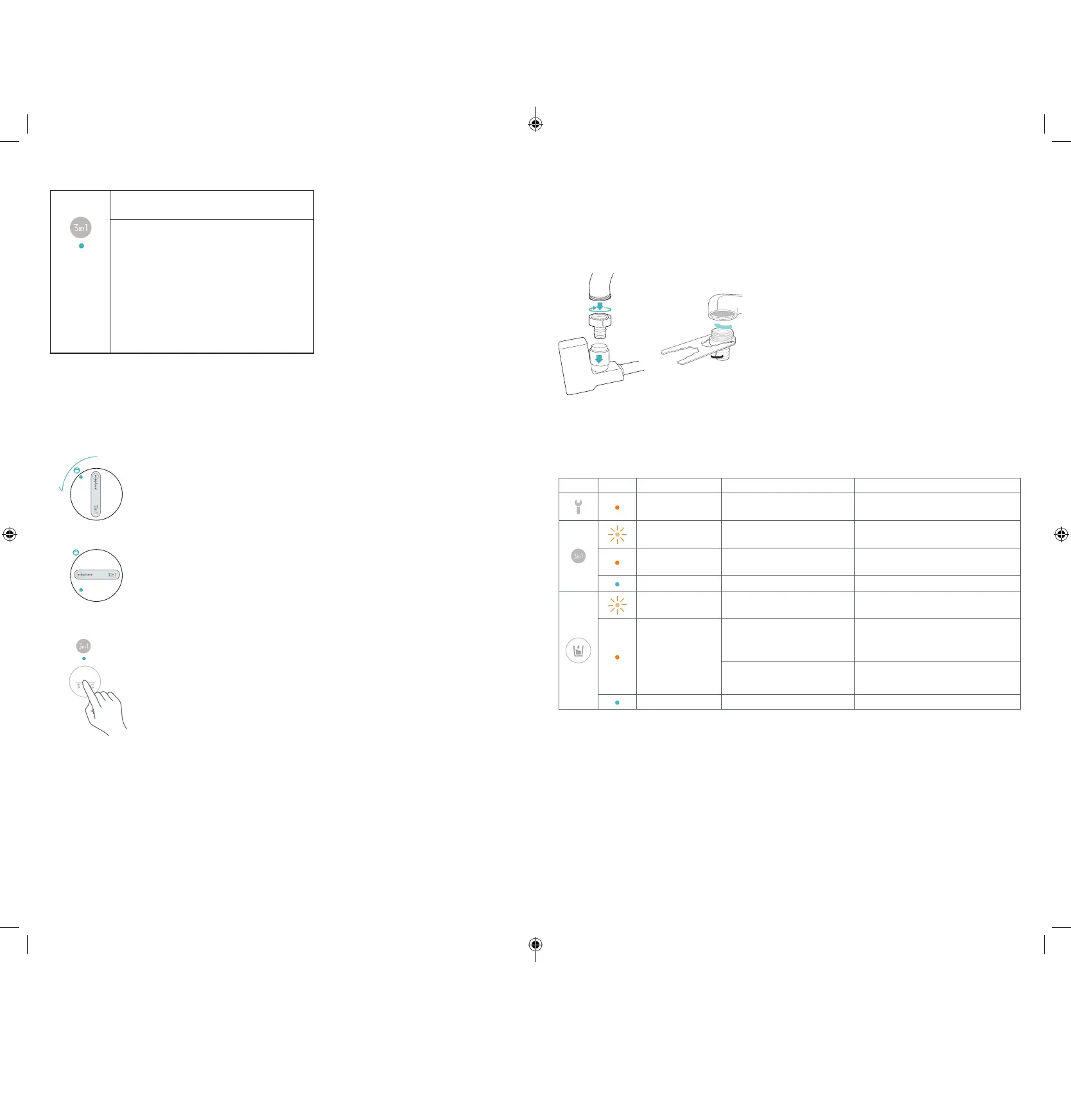
After turning o the faucet, wait two minutes before removing the
3in1 cartridge.
Gently press and turn the old 3in1 cartridge 90˚ counter-clockwise
(
fi gure 1).
With the water o and the cartridge in the unlocked position, carefully lift
the cartridge out of the purifi er
(
fi gure 2).
Follow the directions for cartridge setup on page 7.
Reset the water purifi er by holding the “3in1 Reset” button for three
seconds
(
fi gure 3).
After the new 3in1 cartridge is securely in place, let water run through the
water purifi er until the water comes out clear to prepare the 3in1
cartridge for normal use.
Letting the water run until clear cleans the 3in1 cartridge and its tubing.
Water will initially come out greyish-black or soapy. This is normal.
MAINTENANCE
2
9
:
00
12
:
00
1
Hold the faucet attachment with one hand and the
faucet with the other hand, then pull down faucet
attachment until it comes o .
If necessary, use the small wrench to unscrew the
faucet adapter.
Clean the faucet adapter to remove any hard water
deposits or impurities that may clog the purifi er.
CLEANING THE FAUCET ADAPTER
Periodically clean the faucet adapter to remove any hard water deposits or impurities that
might clog the purifi er.
TROUBLESHOOTING
LED INDICATORS
ICON LED STATUS CAUSE SOLUTION
Solid Orange LED
The purifi er is in an abnormal
state.
Contact your local Nu Skin Distributor
Center.
Flashing
Orange LED
3in1 cartridge is nearing the end
of its life cycle.
Purchase a new 3in1 cartridge soon.
Solid Orange LED
3in1 cartridge’s life cycle has
expired.
Replace the 3in1 cartridge.
Solid Blue LED 3in1 cartridge is working properly.
Flashing
Orange LED
Water might be over 38˚C. Lower the temperature of the water.
Solid Orange LED
Purifi er is powering on.
Purifi er has not been used for
72 hours.
Touch the “Purifi ed Water” button and
run water until the LED light changes
to blue.
3in1 cartridge’s life cycle has
expired.
Replace the 3in1 cartridge.
Solid Blue LED Purifi er is working properly.
3
RESET
94507300-3_ecosphere_water_purifier_user_manual_without_WiFi_smaller_version.indd 10-11 3/7/19 3:30 PM


 To Next Page