2
CHAPTER - II
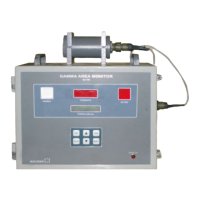
FRONT PANEL & SIDE PANEL CONTROLS
2.1 FRONT PANEL CONTROLS
2.1.1. NORMAL & ACTIVE LAMPS
The NORMAL lamp (GREEN) glows during acquisition mode until the dose rate exceeds alarm preset
value. Once dose rate exceeds alarm preset value then the NORMAL lamp turns OFF and the ACTIVE
lamp (RED) blinks. Once the dose rate falls below the preset level, then (i) if
Reset mode is
AUT
O then
it comes back to normal mode. (ii) if RESET mode is manual, then it comes back to normal mode only
after RESET key is pressed.
2.1.2.
DOSERATE (mR/hr) [
6x7 segment display]
This gives the visual display of the current dose rate in acquisition mode. On pressing EHT key it displays
the current EHT value. It also displays fault conditions like EHT fail, Supply fail. It also displays the
overrange indication by blinking the maximum dose rate.
2.1.3. STATUS DISPLAY : [16x2 LCD dot-matrix display]
This is a 16 X 2 alpha numeric LCD dotmatrix and responds to all the commands from the keypad and
displays dose rate in acquisition mode with “A” blinking. It also displays the different parameters like
Preset alarm level, Reset mode, Audio status, Baud rate, Calibration adjustment, Audio frequency
adjustment.
2.2. SIDE PANEL CONTROLS
2.2.1. MAINS
This is a 3 pin MS connector for connecting the power cable.
2.2.2. ON
This is a toggle switch (inside the unit) which is used to power the unit. When the switch is put 'ON' the
mains AC power is available to the unit.
2.2.3. AUDIO ALARM
There is an audio alarm also which produces loud beeps alternately with the ACTIVE lamp. The audio
alarm can be turned off by pressing ACK key. It can be made OFF permanently through the AUDIO
ALARM - ON/OFF option in PROG menu.


 To Next Page