How to Use Product
E5
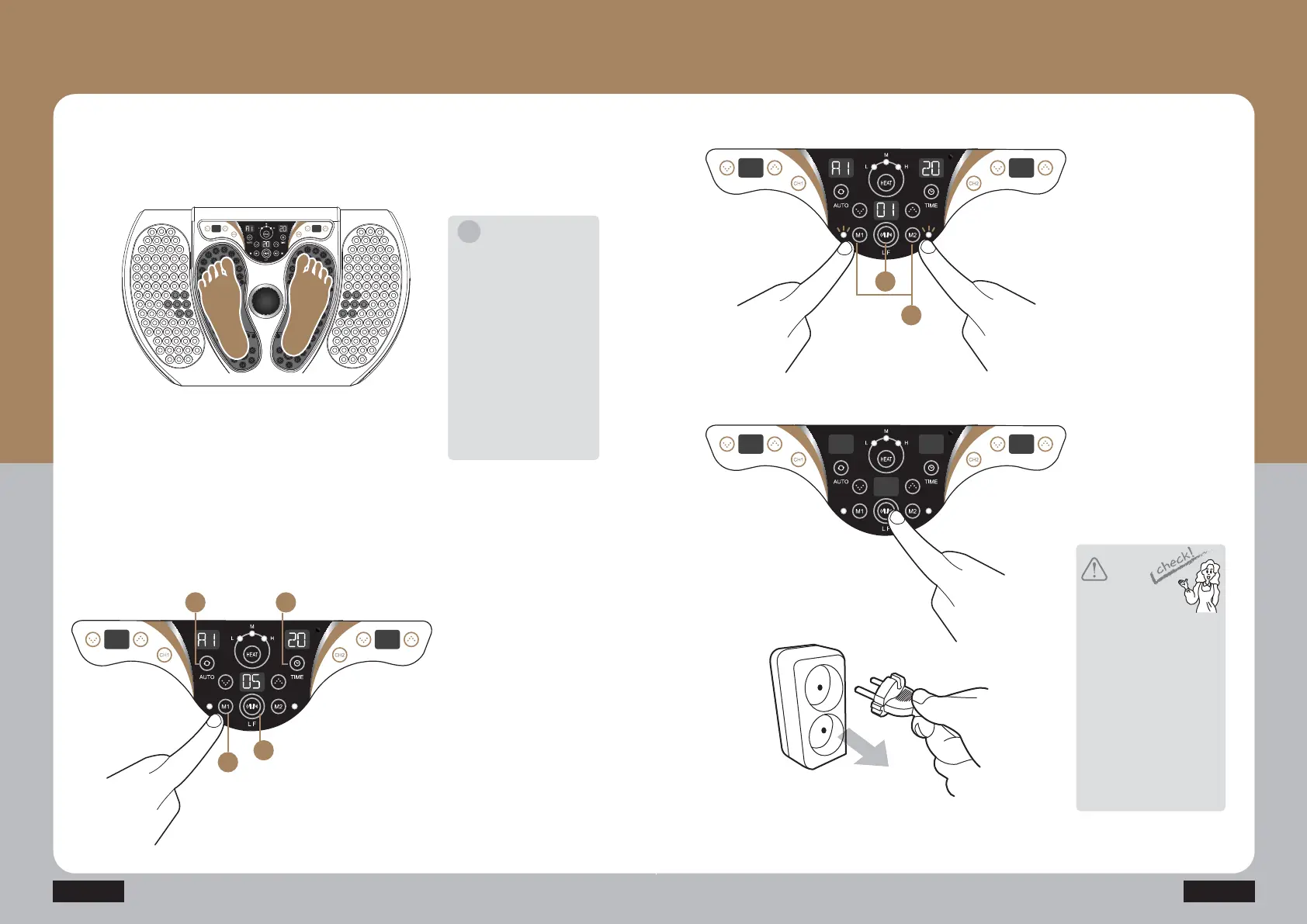
Separate the power cord
from the power outlet after
use.
Press the low frequency
button(LF) to finish the operation.
[Memory function setting-Low
frequency set memory]
The frequently used operation
(Auto mode, time, and strength)
can be stored in the M1 and M2
buttons.
ⴘ Press the auto button to set the
desired mode.
ⴙ Set the time.
ⴚ Press the button (LF) of the low
frequency of the controlling unit
to start the operation.
ⴛ When you hold the M1 (or M2)
button after setting the low
frequency, there is the first
sound, and the setting
information is stored with the
second sound.
(You may change the setting
information in the same method
as above.)
TUFQ
Put your both feet on the product
while using.
TUFQ
[Memory function operation –
Import stored low frequency
setting]
When you hold the M1 (or M2)
button while the low frequency
is operating after pressing
the low frequency button(LF).
(When the M1 and M2 functions
are operated, the display LED
is turned on)
TUFQ
TUFQ
Caution
Notice
If you do not put your both feet
together on the product, you
may not feel the low frequency
stimulation. Therefore, put
your both feet on the product.
When one foot is separated
from the product at a level that
is greater than a predetermined
level (fourth level), the output
is stopped with a sound. If the
both feet are put on the
product again, the product
automatically operates with
a set output intensity.
Press the start/stop button to
finish the operation, turn off the
power switch, and separate the
power cord from the power
outlet.
All the cords should be
separated while moving the
product. Otherwise, it may cause
the damage of the product.
It may cause an error if the
product is turned on when the
product is not used.
i
1 2
3
4
1
2


 To Next Page
 Loading...