- 5 -
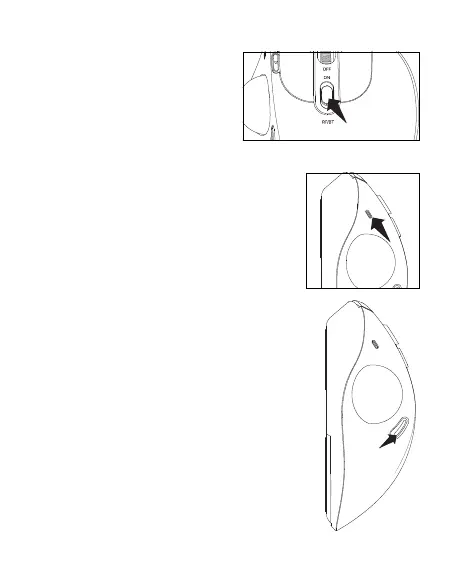
When 2.4G or Bluetooth connects
successfully, slide down the mode
switch in the middle of the mouse, and
you can switch the modes easily. The
indicator light (BT: Blue, RF: Red) goes
out after pairing successfully.
Battery Low: Red lighting is ashing while using.
Bluetooth Connection Mode: Slide down the mode
switch, and blue light is ashing.
2.4GHz Receiver Connection Mode: Slide down the mode
switch, and red light is ashing.
DPI Mode Switching: The number of times the red light
ashes corresponds to the DPI level.
Accurate Action Mode: Purple light is on.
There are 4 DPl levels; please press the DPl button to adjust
for your preference.
When you press the DPl button, the red light ashes once
/ twice / three times / four times, corresponding to DPl
400/800/1200/1600.
If the maximum DPl still fails to meet the usage
requirements, You can also adjust the DPl on your
computer.
For Windows: Start Microsoft Mouse and Keyboard Center,
select the mouse you are using, click basic settings, locate
Sensitivity, and make your changes.
For Mac: Open the System Preferences menu, click "Mouse",
and move the slider under "Tracking Speed" to adjust DPl.
Mode Switch
Light Indication
DPI Mode



 To Next Page