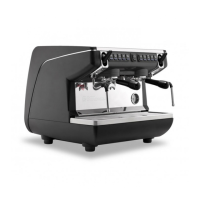
The Nuova Simonelli Appia Life Compact is a professional espresso coffee machine designed for commercial use, offering a range of features for coffee preparation, hot water dispensing, and steam functions. This user handbook provides essential information for installation, operation, and maintenance to ensure safe and efficient use.
Function Description
The Appia Life Compact is primarily designed for brewing espresso coffee using coffee beans. It features multiple dispensing groups, a steam wand for frothing milk, and a hot water nozzle for other beverages. The machine also includes a cup warmer to keep cups at an optimal temperature.
Key functions include:
- Coffee Dispensing: The machine allows for the preparation of short and long coffees, with options for single or double servings. It also supports continuous coffee dispensing.
- Steam Dispensing: A dedicated steam wand is used for frothing milk, essential for cappuccinos and lattes. An optional Easycream system is available for automated milk frothing.
- Hot Water Dispensing: A hot water nozzle provides hot water for tea or other hot beverages.
- Programming: The machine offers dose programming for coffee and hot water, allowing users to set specific volumes for different beverages. Standard doses can also be pre-set.
- Automatic Cleaning Cycle: An automatic cleaning cycle for the groups ensures hygiene and proper maintenance.
Important Technical Specifications
The Appia Life Compact is available in different configurations, typically with 2 groups.
General Dimensions (example for a 2-group machine):
- Width (X): 554 mm (21.81 inches)
- Depth (Y): 498 mm (19.61 inches)
- Height (Z): 545 mm (21.46 inches)
- Height (A): 362 mm (14.25 inches)
- Distance from counter to spout (J): 450 mm (17.72 inches)
- Distance from counter to cup warmer (K): 160 mm (6.3 inches)
- Distance from counter to drip tray (Q): 95 mm (3.74 inches)
- Worktop grid cover (W): 447 mm (17.6 inches)
Electrical Specifications (example):
- Voltage: 220-240 V (also available in 110-120 V for some markets)
- Frequency: 50-60 Hz
- Power: 2900 W (for 220-240 V)
Boiler Specifications (example):
- Boiler Capacity: 7 Liters
- Maximum Pressure (MPa): 0.18
- Maximum Temperature (C°): 130.5
- Steam Production (Kg/h): 2.3 (for 2600W/2700W models)
- Heating Element Power (P): 2900 W (for 2-group models)
Water Specifications:
- Total Hardness: 50-60 ppm (parts per million)
- Water Line Pressure: 2-6 bar (cold water)
- Minimum Flow Rate: 200 l/hr
- Filtration Level: below 1.0 micron
- TDS (Total Dissolved Solids) Level: 50-250 ppm
- Alkalinity Level: 10-150 ppm
- Chlorine Level: less than 0.50 mg/l
- pH Level: 6.5-8.5
Safety Indications:
- The machine must be installed by qualified technicians in accordance with federal, state, and local plumbing and electrical codes.
- A disconnection device with contact separation in all poles (overvoltage category III) is incorporated in the fixed wiring.
- The maximum inlet pressure is 0.65 MPa.
- The A-weighted sound pressure level is below 70 dB.
- The operating temperature must be within [+5, +30]°C.
- For proper aeration, position the machine 10 cm away from walls or other machinery.
- The machine is designed for use with coffee beans only.
- Packaging materials must be kept away from children.
- The machine is suitable for installation in staff kitchen areas, offices, hotels, motels, bed and breakfast establishments, and other residential environments.
- Access to service areas is restricted to personnel with practical knowledge of the appliance, especially regarding safety and hygiene.
- The machine must be installed on a horizontal surface at a height such that the top of the machine is above 1.2 m.
- Not suitable for installation in areas where a water jet might be used or cleaned with a water jet.
- The power supply cord must not be replaced by the user; only qualified technicians or authorized service centers can perform this operation.
- New hose sets supplied with the appliance must be used, and old sets should not be reused.
Usage Features
Preliminary Operations:
- After installation, the machine is switched on and brought to rated operating conditions until it is "ready for operation."
- Once ready, perform the following dispensing operations: 100% of the coffee circuit (divided equally for multiple dispensers), 100% of the hot water circuit (divided equally for multiple dispensers), and open the steam outlet for 1 minute.
- Completely empty the steam boiler at least 3 times.
Coffee Dispensing:
- Insert the desired filter (single or double) into the filter holder.
- Fill the filter with appropriately ground coffee.
- Press the coffee in the filter uniformly using the appropriate presser.
- Clean the edge of the filter holder and insert it into the dispensing unit.
- Before inserting the filter holder, the group must be purged for at least 2 seconds to refresh the water.
- Position the cup/s under the spout/s and press the desired coffee button.
Steam Dispensing:
- Pay attention not to place hands beneath the steam nozzle or touch it immediately after use.
- Before use, purge the steam wand for at least 2 seconds.
- To use steam, pull or push the provided lever.
- The two steam nozzles are articulated for easy use.
Cappuccino Preparation:
- Immerse the steam nozzle 1/3 into a container of milk.
- Turn on the steam.
- Before the milk reaches the desired temperature, pull the nozzle slightly up and lightly move it vertically across the surface of the milk.
- After use, clean the nozzle carefully with a soft cloth.
Hot Water Dispensing:
- Pay attention not to place hands beneath the hot water nozzle or touch it immediately after use.
- Before use, purge the hot water wand for at least 2 seconds.
- Place a suitable container under the hot water nozzle.
- Press button (P6); the indicator light will illuminate.
- Hot water can be delivered continuously or for a set time.
Programming Doses:
- To enter programming mode, hold down the continuous delivery key (P3) for 5 seconds until the delivery keys start flashing.
- To program a specific dose, press the desired coffee button, and then press it again to stop dispensing when the desired volume is reached.
- To exit programming, press the continuous delivery key (P3) again.
Programming Standard Doses:
- To set pre-set values for the 4 group doses and water (steam), press and hold key (P3) for at least 10 seconds until the flashing keys remain fixed.
- Standard doses are 40cc, 60cc, 50cc, 85cc for coffee, and 9 seconds for water. A 0-second setting for water or steam indicates continuous operation.
Copying Dose Settings:
- To copy dose settings from group 1 to group 2, hold down the continuous key (P3) of group 2 for at least 8 seconds until the keys remain fixed.
Easycream Programming (Optional):
- Enter programming mode by pressing and holding down the continuous dispensing key (P7) of the first group for 5 seconds.
- Press the steam selection button (optional).
- Steam delivery starts. Determine the desired duration and press the steam key again.
- To exit, press key (P3) or proceed with programming other selection buttons.
Maintenance Features
Safety Precautions for Maintenance:
- Before any cleaning or maintenance, turn off the machine by pressing the main switch to "O" and unplug it from the mains.
- Wear work gloves and safety shoes for any installation, maintenance, discharge, or adjustment operations.
- Do not use water jets or immerse the machine in water for cleaning.
- Do not use solvents, chlorine-based products, or abrasives.
Body Machine Cleaning:
- Work Area: Remove the worktop grid cover by lifting it from the front and sliding it out. Remove the water collection dish underneath. Clean all parts with hot water and cleansers.
- External Plates: Clean all chromium-plated areas with a soft, damp cloth.
Cleaning Coffee-Holders (Showers):
- Perform weekly.
- Unscrew the screw in the center of the coffee-holder.
- Slide out the coffee-holder and check that the holes are not obstructed. Clean if necessary.
Cleaning with the Blind Filter (Group Cleaning):
- The machine is pre-set for cleaning the delivery unit with specific washing powder.
- Perform a washing cycle at least once a day.
- Substitute the filter with the blind filter.
- Fill the blind filter with two spoonfuls of special cleanser powder and insert it into the filter-holder.
- Press one of the coffee keys and halt it after 10 seconds.
- Repeat the procedure several times.
- Remove the filter-holder and perform a few deliveries to eliminate cleanser residues.
Cleaning Filters and Filter-Holders:
- Place two spoonfuls of special cleanser in half a liter of hot water.
- Immerse the filter and filter-holder (without the handle) for at least half an hour.
- Rinse thoroughly with running water.
Resin and Softener Regeneration:
- To prevent scale deposits in the boiler and heating exchangers, the softener must always be efficient.
- Regularly regenerate the ionic resins.
- Regeneration times depend on daily coffee quantity and water hardness.
- Regeneration procedures involve turning off the machine, placing a container under tube E, turning levers C and D from left to right, removing knob G, filling with 1 kg of kitchen salt, replacing knob G, repositioning lever C to the left, and allowing salty water to discharge from tube F until it becomes fresh (about half an hour). Finally, reposition lever D to the left.
Automatic Group Cleaning Cycle:
- Press and hold the hot water key (P6) for 3 seconds to access the automatic cleaning function (continuous keys P3 will flash).
- Press the continuous key (P3) of a group to start its cleaning cycle.
- After the cycle, all continuous keys (P3) flash for the rinsing cycle.
- If no key is pressed for 20 seconds, the machine returns to normal operation.
- To exit manually, press and hold the hot water key (P6) for 3 seconds while continuous keys (P3) are flashing.
- The automatic cleaning cycle cannot be stopped once started. If the machine is turned off during the cycle, it will restart the rinsing cycle automatically upon next power-on.
Troubleshooting (Error Messages):
- Dosage Error: Continuous key (P3) flashing, delivery key (P1) lit. Occurs if the doser doesn't send commands within the first three seconds of delivery. Solution: Interrupt delivery.
- Level Error: Continuous key (P3) flashing. Occurs if the water level is not re-established within 90 seconds (with pump inserted during leveling) or 180 seconds (if pump is disabled). Solution: Turn the machine off for at least 5 seconds and then switch it on again.

 Need help?
 General






 To Next Page