-21-
BOLUS FEEDING
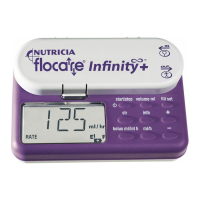
• In the hold mode press the “bolus ml/int h” key.
• The pump now displays either “BOLUS VOLUME” or “INTERVAL BOLUS”.
• If the pump displays “INTERVAL BOLUS” press “bolus ml/int h” key again to go to “BOLUS VOLUME” settings.
• Adjust the bolus volume settings using the “+” or “-” key.
• The bolus volume settings can be set from 1 to 500 ml, with increments of 1 ml.
• Press the “bolus ml/int h” key again to go to the “INTERVAL BOLUS” settings.
• Adjust the bolus interval settings using the “+” or “-” key.
• The bolus interval can be set from 0.30 h to 12.00 h in 0.30 h steps.
• Press the “ml/h” key and select the flow rate to be used with the “+” or “-” key.
• The flow rate settings can be set in two rates, high (600 ml/h) and low (400 ml/h).
• If a total dose needs to be set, use the “volume ml” key and adjust the dose with the “+” or “-” keys.
• If no total dose is desired, press the “volume ml” key and clear the dose by pressing the “clr” key. “CONT”
will be displayed.
• Start the pump by pressing “start/stop”.
Notes:
When a bolus has finished, the pump will inform you of the time to the next bolus, by displaing “NEXT BOLU”
as well as the time remaining until the start of the next bolus. Setting the bolus volume to “NO” will disable the
bolus feeding mode. For more information on how to set a total dose, please check the paragraph “to set a dose”.
TO CHANGE THE FEEDING PROGRAM DURING FUNCTIONING
• Press the “start/stop” key to pause the pump.
• Change the program by pressing the required key (ml/h, volume ml or bolus ml/int h) and adjust using
the “+” or “-” keys.
• Check all installed parameters to assure correct programming of the pump.
• Restart the pump by pressing the “start/stop” key again.
CLEARING THE MEMORY
All parameters and values can be cleared one after the other in the following way:
• Press “start/stop” to pause the pump.
• Select the parameter that needs to be cleared.
• Press the “clr” key to clear the memory. The parameter or value returns to its default value:
ml/h = 0 ml/h
volume ml = CONT = No dose set. Pump will feed continuously until feed container is
empty or pump is stopped.
bolus ml = NO = No bolus volume set. The pump will run in continuous feeding mode.
int h = NO = No bolus interval set.
info = 0 ml = Volume delivered is cleared.
In order to keep a clear overview of the daily amount of feed delivered, clear the total volume delivered as
each daily feeding schedule is started, as follows:
500 ml
+
1 ml
–
12 h
+
0,3 h
–
bolus ml/int h bolus ml/int h ml/h
HIGH
+
LOW
–
4000
+
CONT
–
volume ml start/stop
UK
ZMNL900097_AW.indd 23 24/01/12 7:29 PM


 To Next Page