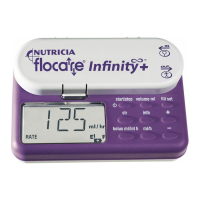
PROGRAMMING THE PUMP
• The Flocare
®
Infinity
™
+ pump can be used for continuous or dose feeding.
• Insert the pump set in the pump, switch the pump on and fill the pump set when necessary (see para-
graph: filling the pump set).
• The display shows the total volume delivered since the pump was last cleared.
• If necessary clear the volume delivered by pressing the “clr” key.
• The last installed flow rate (ml/h) is now displayed.
• The pump is now in the “hold” mode and is ready for programming.
CONTINUOUS FEEDING
• Adjust the flow rate (ml/h) if required by using the “+” or “-” key. Hold either key down to change rapidly.
• If another parameter is indicated in the LCD, it will be necessary to first press the “ml/h” key followed by the
“+” or “-” key to set the flow rate.
• The flow rate ranges from 1 - 400 ml/h in 1ml increments.
• The flow rate slows down and stops shortly at 50 - 125 - 250 ml/h.
• Press the “volume ml” key and make sure the value is disabled by pressing the “clr” key. The display will
indicate the word “CONT”.
• Press the “bolus ml/int h” key and make sure the volume bolus value is disabled by pressing the “clr” key.
The display will indicate the word “NO”. This means the pump will run in a continuous mode.
• Start the pump by pressing “start/stop”.
• The arcs around the word “run” start rotating.
• The flow rate (ml/h) is displayed whilst functioning.
TO SET A DOSE
In the “hold” mode with the last flow rate (ml/h) displayed in the LCD:
• Set the flow rate by pressing the “+” or “-” key.
If another parameter is displayed:
• Press first the “ml/h” key followed by “+” or “-” key to adjust the flow rate. The flow rate
can be set between 1 and 400 ml/h, with steps of 1 ml/h. If the display shows “HIGH” or
“LOW” then disable the volume bolus value as indicated in the paragraph “continuous feeding”.
• Press the “volume ml” key and install the volume to be administered with the “+” and “-” key. The range
goes from 1 - 4000 ml, with steps of 1ml.
• Start the pump by pressing “start/stop”.
During functioning the following parameters can be found in the display:
• By pressing the “ml/h” key the “flow rate” is displayed.
• By pressing the “info” key the total volume since the memory was cleared will be
visualized.
When the required volume or dose has been delivered, “END OF DOSE” will appear and the pump will beep
(or mute, depending upon the pumps’ configuration (see paragraph: set up mode).
info
ml/h
+
1 ml/h
–
start/stop
ml/h
400 ml/h
+
1 ml/h
–
4000 ml
+
1 ml
–
volume ml start/stop
UK
ZMNL900097_AW.indd 22 24/01/12 7:29 PM


 To Next Page