10
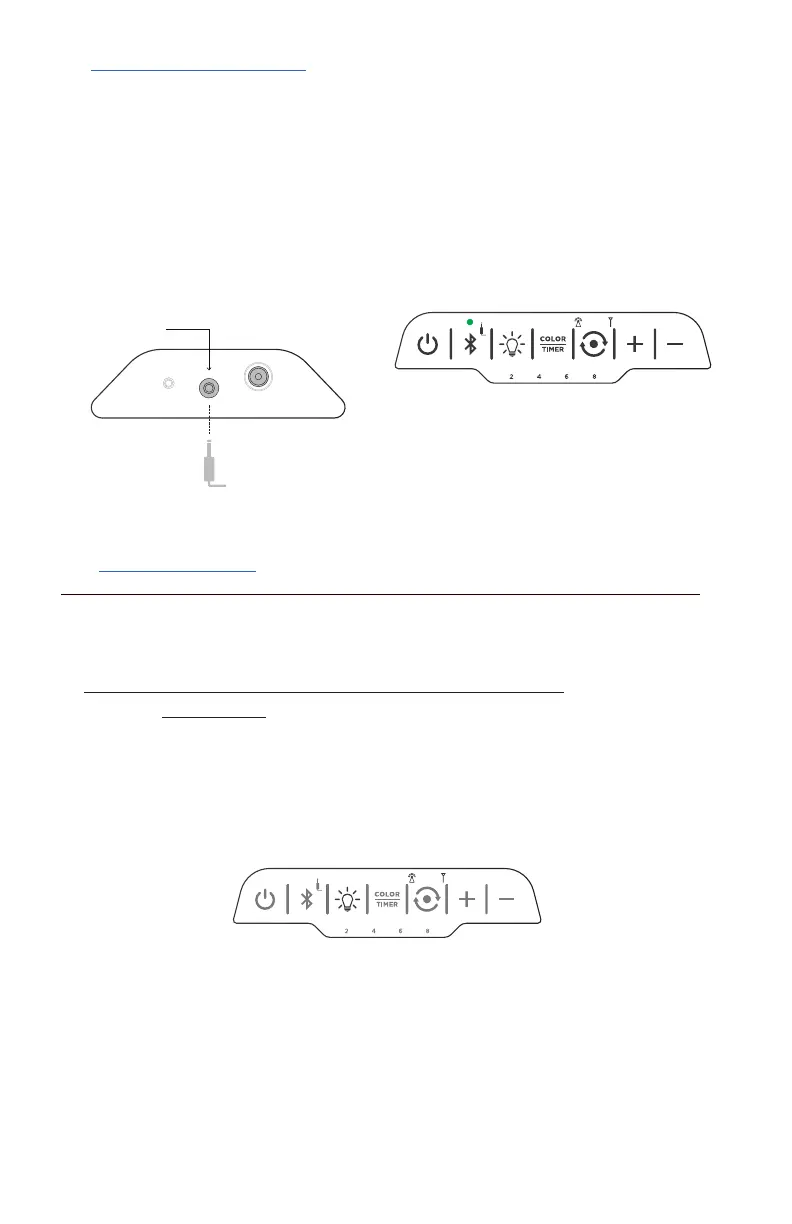
AUX IN
RELEASE COVER TO ACCESS PORTS
AUXILIARY CABLE
Solid green light indicates auxiliary input
V. AUXILIARY INPUT
If your device has a 3.5mm audio jack, or is not Bluetooth enabled, you may use the
included auxiliary cable to use the speaker without Bluetooth. When used this way,
Bluetooth will be disabled, but speaker sync features remain fully functional.
1. Plug one end of the auxiliary cable into the speaker auxiliary port
2. Plug the other end of the auxiliary cable into your device audio jack
(ensure audio jack is not obstructed by any protective case or accessories)
3. When auxiliary cable is plugged into speaker you will hear an audible chime
and the auxiliary indicator will illuminate.
LIGHT SHOW ON & BRIGHTNESS BUTTON
press to cycle through brightness settings
VI. LIGHT SHOW
NOTE: Color-changing Pulse feature DOES NOT WORK without playing music!
By default, the lantern will turn off after 2 hours to extend run time. If you wish the
lantern to illuminate for longer, please set the timer (see Section D. on page 11)
A. LANTERN ON/OFF AND BRIGHTNESS CONTROL
1. Press the LIGHT SHOW button to turn the lantern feature ON
2. Press again to turn lantern feature OFF
3. Each time you press the button again, the brightness of the light increases
4. Press button a total of 5 times to reach maximum brightness, then press
again to turn lantern feature OFF
(Brightness level settings correspond to 20%, 40%, 60%, 80% and 100%)


 To Next Page