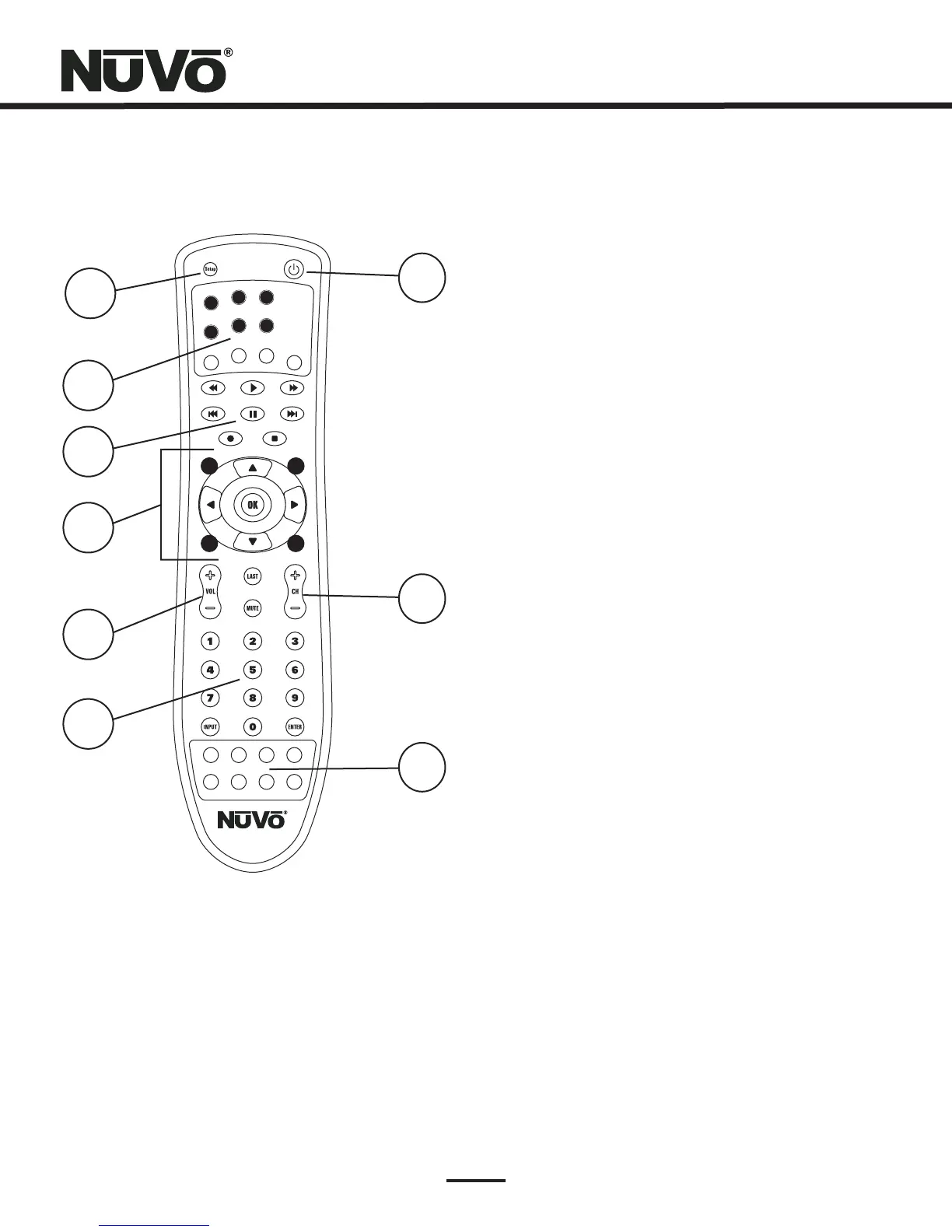
1. Setup:
2. Whole-Home Control:
3. Transport Buttons:
4. Video Source Control:
5. Source Volume:
6. Numeric Buttons:
7. Power Button:
8. Channel up and down:
9. Macro Buttons:
The setup button is used to place the
remote control in program/learn mode.
This section automatically performs the
basic Essentia keypad functions.
The transport buttons perform basic
source specific functions, such as play,
stop, pause, forward and reverse.
These buttons are typically used by
video equipment for menu navigation
and selection.
This is source specific volume control,
such as a TV or stereo receiver. This is not
used for NuVo zone volume.
These buttons provide source specific
direct numeric access.
This power button is for source specific
power on and off. It is not for NuVo zone
on and off.
This button provides source specific
channel scrolling.
These buttons do not perform a given
source function. They can be used for
programming multiple function macro
commands.
1
2
3
4
5
6
MUTE
VOL-
VOL+
ON/OFF
W
H
O
L
E
-
O
H
M
E
C
O
N
T
R
L
O
W
H
O
L
E
-
O
H
M
E
C
O
N
T
R
L
O
S
O
UR
C
E
NV-LRC1
M1
M2
M3
M4
M6
M5
M7
M8
1
3
4
2
5
6
7
8
9
LRC1 Learning Remote Control
6



 To Next Page