VOL
VOL
TUN3
TUN2
TUN1
SAT
CD2
CD1
MUTE
ONOFF
ALL OFF
Page 4
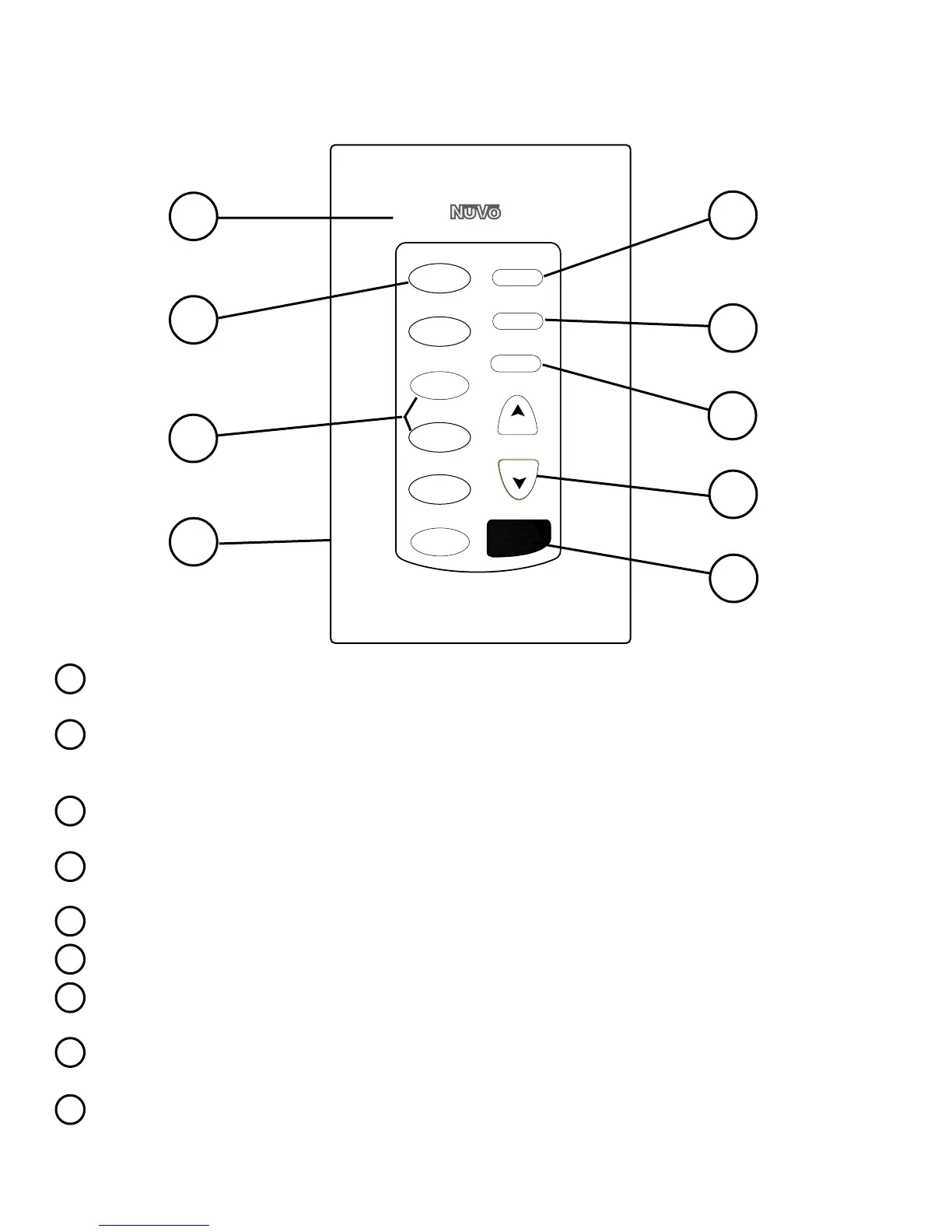
The E Series keypad comes with four molded, replaceable covers in
white, ivory, almond, and black.
The selected source button remains a backlit green until a new source
is selected or the zone is turned off. A flashing source button indicates
that the zone is muted.
Each keypad comes with 30 preprinted replaceable buttons, so the
system can be customized for the homeowner.
Each keypad plugs into a dedicated Cat-5 wire using an RJ45 phone
jack. The system operates on standard EIA/TIA 568A wiring.
This turns the entire system off from any of the zone keypads.
Each zone can be individually turned on or off.
Each zone can be individually muted. The source selection button
will flash indicating a muted zone.
The musics volume may be increased or decreased individually in
each zone.
Infrared commands can be used to control the E Series system as
well as individual source functions.
E Series Keypad
1
2
3
4
8
9
7
6
5
Cover Plate:
Source Selection:
Source Buttons:
RJ45 Connection:
ALL OFF Button:
Zone ON/OFF Button:
Mute Button:
Volume Button:
IR Receiver:
1
2
3
4
5
6
7
8
9



 To Next Page