nuwavenow.com | 15
CLEANING & MAINTENANCE
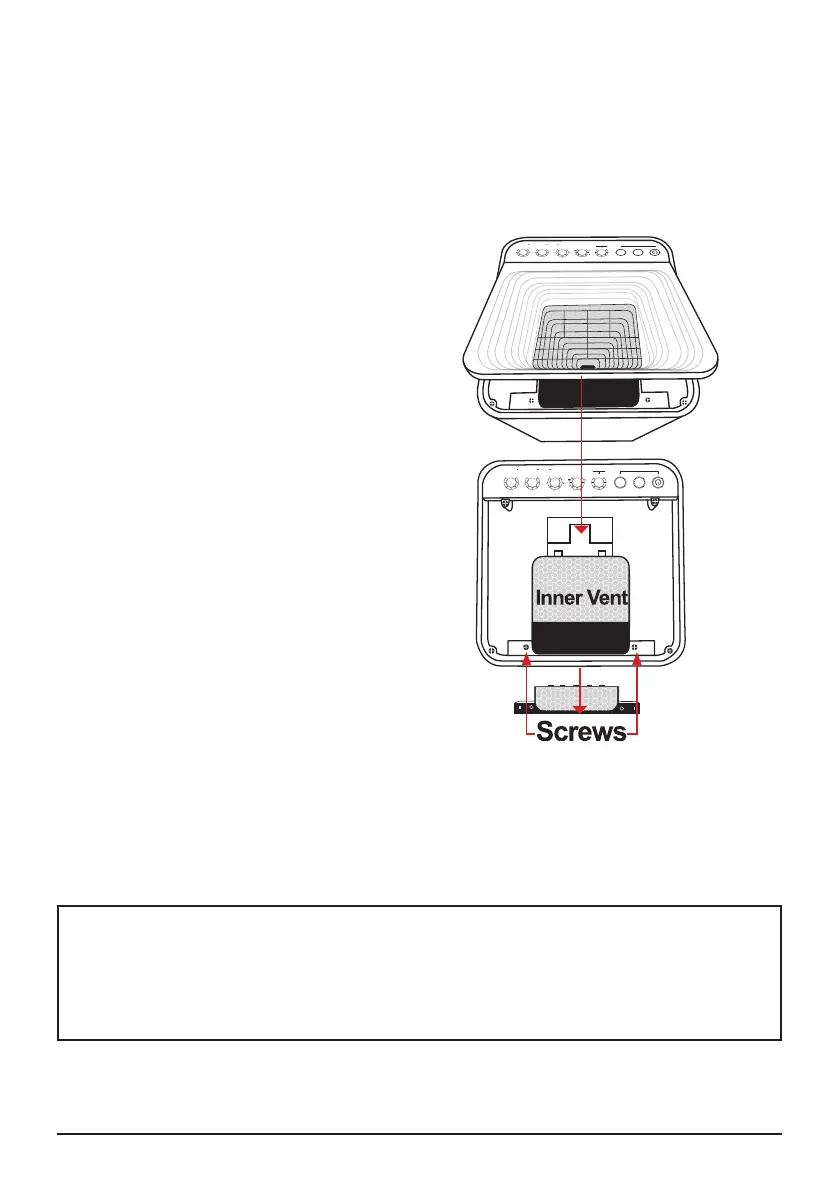
To clean the surface underneath and
Inner Vent Screen.
1. Turn the OxyPure off and unplug it from
the wall outlet.
2. Lift the Top Vent using the built-in tab.
3. Using a Using a vacuum with brush
attachment or duster, clean any dust or
accumulated particles from the surface
an Inner Vent Screen.
To clean the inner wall opposite of the
fan or to remove an object that has fallen
through the Inner Vent Screen.
1. After removing the Top Vent, locate the
two screws
2. Use a Phillips screwdriver to loosen the
two screws (only).
3. Lift up the Inner Vent Screen.
4. After cleaning the inner wall with
a soft cloth or paper towel, or
duster. Reassemble the Inner Vent,
retightening the two screws, and
replace the Top Vent.
• Make sure all parts are secure
before plugging in the OxyPure and
turning it on again.
Note: DO NOT unscrew the four outer screws located toward the corners. Doing so will
void your warranty.
Do not immerse the OxyPure in water. Clean with a damp sponge or cloth and wipe
dry.
Make sure all parts and covers are securely attached.
Cleaning the Top Vent
The Top Vent of your OxyPure can be removed to clean with mild soapy water and dried
thoroughly.
ODOR
NO
ODOR
STRONG
ODOR
REPLACE
FILTER 4
CLEAN
FILTER 2
WIFI
SLEEP MODE
AUTO
ULTIMATE
CLEAN
FAN
SPEED
TIMER TURBO
HR CLEAN DIRTY
POWER
HRHIGHLOW
ECO-FRIENDLY MODE
RESET FILTER 2
HOLD FOR 2 SECONDS
RESET FILTER 4
HOLD FOR 2 SECONDS
AIR
ODOR
NO
ODOR
STRONG
ODOR
REPLACE
FILTER 4
CLEAN
FILTER 2
WIFI
SLEEP MODE
AUTO
ULTIMATE
CLEAN
FAN
SPEED
TIMER TURBO
HR CLEAN DIRTY
POWER
HRHIGHLOW
ECO-FRIENDLY MODE
RESET FILTER 2
HOLD FOR 2 SECONDS
RESET FILTER 4
HOLD FOR 2 SECONDS
AIR










 To Next Page