nuwavenow.com | 13
CLEANING & MAINTENANCE
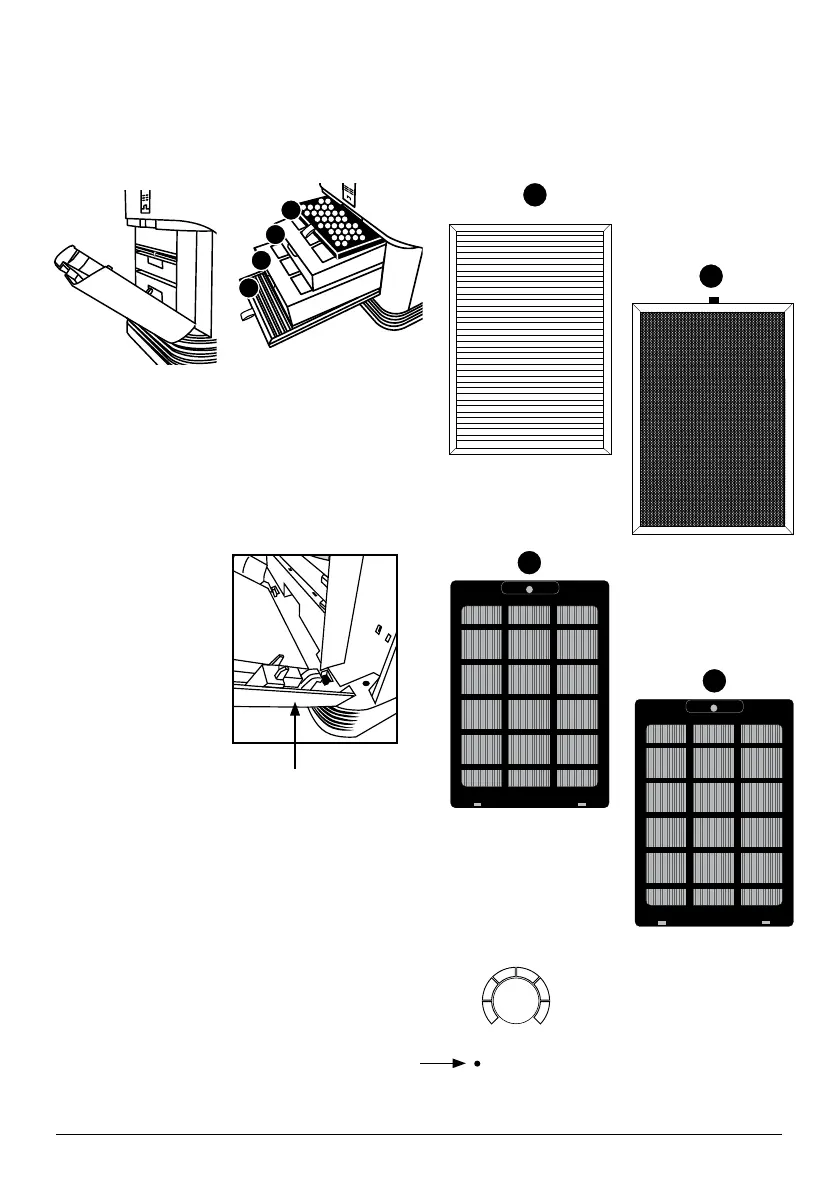
1. Remove the Filter Slot Cover in the rear
of the OxyPure using its built-in handle.
2. Slide out the filters for cleaning.
3. After washing allow the Filters to
completely dry before you reinserting
them.
• Never place
a wet filter
into the
OxyPure.
• Ensure the
Filter Slot
Cover is
properly
aligned and
secure
4
3
2
1
Cleaning the Filters
The filters inside the Filter Slot need to be cleaned on schedule to help your OxyPure
maintain optimum performance.
Stainless Steel
Pre-Filter
1
Ozone Emission
Removal Filter
4
Bio-Guard
®
Filter 1
2
3
Bio-Guard
®
Filter 2
CONTROL PANEL
CLEAN FILTER 2/3
AIR
SLEEP MODE
AUTO
ULTIMATE
CLEAN
FAN
SPEED
TIMER TURBO
HR
CLEAN DIRTY
HRHIGHLOW
WIFI
ECO MODE
WIFI
RESET FILTER
OXY 350 BIO
date name rev #
09/27/23
350BIO
control panel
2
JO
CONTROL PANEL
COLORS OF CLEAN FILTER 2/3 light:
• After about 3 months the green CLEAN
FILTER 2/3 light will turn Yellow
alerting you that the Bio-Guard
®
Filters
1 and 2 SHOULD BE CLEANED to
maintain optimal performance.
• After about 6 months the CLEAN
FILTER 2/3 light will turn Orange
indicating that the Bio-Guard
®
Filters 1
and 2 SHOULD BE CLEANED.
• After 12 months the CLEAN FILTER
2/3 light will turn Red indicating that
the Bio-Guard
®
Filters 1 and 2 MUST
BE CLEANED.










 To Next Page