EasyManua.ls Logo

NVX MVPA1 - User Manual

NVX MVPA1
12 pages
Print Icon
To Next Page IconTo Next Page
Loading...
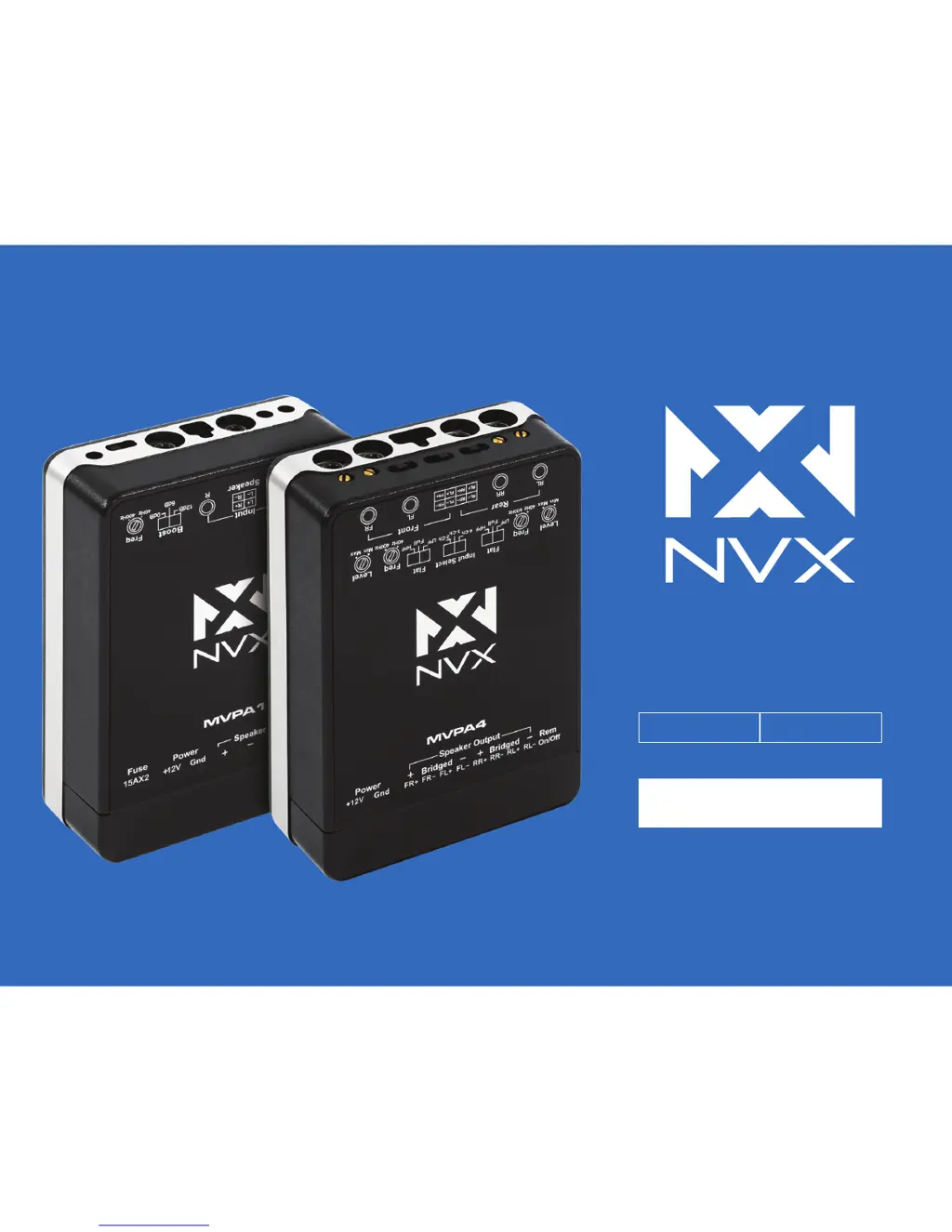
MVP
AMPLIFIERS
USER MANUAL
MVPA1 MVPA4

Questions and Answers

  • B
    Barbara BrownJul 31, 2025
    What to do if NVX Amplifier power LED is on, but there is no output from speakers?
    • T
      Tiffany CampbellJul 31, 2025
      If the power LED is illuminated, but you aren't getting any sound from your speakers, verify that the RCA or High-Level Speaker connections are properly connected, ensuring the amplifier is receiving a signal. Also, check the gain setting on the amplifier and the volume level on your source unit.
  • R
    Ruben MillerAug 16, 2025
    How to fix NVX Amplifier if power LED is not lit when source is turned on?
    • O
      omorganAug 16, 2025
      If the power LED on your NVX amplifier isn't lighting up when the source is turned on: * Verify the remote turn-on wire has sufficient voltage. * Ensure the power (+12V), ground (Gnd), and remote (Rem) connections are secure. * Check both the amplifier fuse and the in-line fuse. * Confirm the power wire has sufficient voltage.

Summary

Specifications

MVPA1 Specifications

Detailed technical specifications for the NVX MVPA1 amplifier, including power output and frequency response.

MVPA4 Specifications

Detailed technical specifications for the NVX MVPA4 amplifier, including power output and frequency response.

Features

MVPA1 Features

Key features and capabilities of the NVX MVPA1 amplifier, such as circuitry and protection indicators.

MVPA4 Features

Key features and capabilities of the NVX MVPA4 amplifier, such as circuitry and protection indicators.

Safety Information

Installation

Step 1: Mounting the Amplifier

Instructions for securely mounting the amplifier to ensure proper ventilation and longevity.

Step 2: Power & Ground Connection

Guidance on making secure power and ground connections using proper gauge wire.

Step 3: Signal Connections

How to connect audio signals via RCA or speaker-level inputs for optimal performance.

Step 4: Subwoofer & Speaker Connections

Instructions for connecting speakers and subwoofers to the amplifier terminals.

Tuning the Amplifier

Setting the Gain (Level)

Adjusts input sensitivity to match source unit output voltage for optimal performance.

Setting the Boost Select

Controls bass output at 45Hz with 0dB, +6dB, and +12dB settings for pronounced bass.

Setting the Input Select

Configures signal input for 2, 3, or 4-channel operation based on source unit outputs.

Setting the Low-Pass Filter (LPF)

Blocks frequencies above the set crossover point, ideal for subwoofers.

Setting the Phase Control

Adjusts phase to synchronize sound arrival from subwoofer and main speakers.

Setting the High-Pass Filter (HPF)

Blocks frequencies below the set crossover point, suitable for main speakers.

Troubleshooting

Warranty

Warranty or Service

NVX MVPA1 Specifications

General IconGeneral
Channels1
Power Output @ 4Ω1000 W
RMS Power @ 4 Ohms500 W
Signal to Noise Ratio>100 dB
Damping Factor>200
Bass Boost Frequency45 Hz
Frequency Response10 Hz - 200 Hz
THD at Rated RMS Power<1%
Input Sensitivity6V - 0.2V
Subsonic Filter10-50 Hz
Low Pass Filter50 Hz - 200 Hz
Bass Boost0-12dB
THD<1%
RMS Power @ 2 Ohms1000 Watts x 1 Channel @ 2 Ohms

Related product manuals