The O'2NAILS Mobile Nail Printer | V11 is a smart device designed for commercial nail art services, allowing users to print various patterns directly onto nails. It is wirelessly controlled via the O'2NAILS application on a smartphone or tablet.
Technical Specifications
- Model: SM-NP1601V
- Power Input: 24V-1A
- Power Rating: 24W
- Machine Dimension: 175x168x175 mm
- Net Weight: 1.6KG
- Operating Temperature: 0-40°C
- Input (Power Adaptor): 100-240 V~, 50/60Hz, 0.6A max
- Output (Power Adaptor): 24V 1.0A
Usage Features
Application Download and Introduction
The O'2NAILS application, compatible with both iOS and Android systems, can be downloaded via three methods:
- Method One: Scan the provided QR code.
- Method Two: Search "O2Nails" in the App Store (iOS) or Application Market (Android) and download.
- Method Three: Download from the official website: WWW.O2NAILS.COM.
The application features a comprehensive interface:
- Homepage: Displays a cover image and provides access to key sections.
- Navigation: Includes "Nail Printing," "Nail Style Store," "Tutorial," "Beginner's Guide," "Pattern Download," and "Settings."
- Personal Center: Allows users to manage "User Information," "User Collection," "Download," "Account Security," and "Pattern Download Code," with an option to log out.
- Nail Printing - All Galleries: Users can select patterns from "New Pattern," "Preselected Pattern," and "Hot Pattern" categories. It also includes "Custom Classification Patterns" and options to navigate "Back," view the "Screen," go "Next," and switch "Preview Mode."
- Nail Printing - Operation Window: Features include "Search Pattern by Number," "Connect Nail Printer's WiFi," "Nail Position Observation Window," "Automatic Position," "DIY Printing Function" (to get pictures from mobile phone/tablet album), "Rotation," "Reset Pattern," "Hide Pattern," and "Start Printing."
Device Operation
- Power Switch: Press once to turn on the machine. Press and hold for more than 2 seconds to turn off. After the machine starts, press twice in a row to control the cartridge holder (to come out/in).
- Power Connection: Connect the DC Power Port on the back of the machine to the Power Adaptor, and then plug the Power Adaptor into an AC Power Port. The socket-outlet should be easily accessible.
- Cartridge Installation:
- Remove the detachable front panel.
- Press the power switch twice to make the cartridge holder come out.
- Unpack the cartridge and tear off the seal. Important: Do not re-affix the seal, touch metal contacts or nozzles, or place the cartridge traversely/reversely to prevent damage or color mixing.
- Hold both sides of the cartridge, tilt it, and insert it into the cartridge holder at a 45-degree angle. Push until a "click" sound confirms successful installation.
Connecting to WiFi
- Go to the wireless network settings on your mobile phone or tablet.
- Find and select the nail printer's WiFi network, named "O2Nails-XXXXX."
- Enter the password: "88888888."
Printing a Test Pattern
- Prepare Test Paper: Paste the test paper medially on the nail holder, leaving a distance of 1cm from the handle part.
- Insert Finger Holder: Press down the finger holder, put it horizontally into the finger holder, and then bounce up the finger holder to fix it.
- Select Pattern in App:
- From the homepage, tap "Nail Printing."
- Select a pattern (e.g., from "All Galleries" or by searching pattern number "080000").
- Click "Next" and then "Search."
- Confirm the pattern and click "OK" to start printing. Wait 25-30 seconds.
- Contrast Printing Effect: After printing, press down the finger holder and take out the test paper. Compare the printed pattern with the "QC Standard Test Pattern Compared Card."
- Slight color changes are normal if there's no significant difference.
- Visual comparison is used to judge contrast color and clarity.
- Significant differences in color/clarity require further cartridge testing.
Maintenance Features
Ink Cartridge Test
This feature helps analyze the cartridge status if printing quality is poor.
- Prepare Test Paper: Follow the same steps as for printing a test pattern (paste paper, insert finger holder).
- Initiate Test in App:
- From the homepage, go to "Settings."
- Select "Ink Cartridge Test."
- Click to open the camera, check the test paper position, and then click to test the ink cartridge.
- Take Out Test Paper: After printing, press down the finger holder and take out the test paper.
- Analysis of Cartridge Status:
- Normal: No incomplete lines.
- Slightly Incomplete Lines: Clean the cartridge nozzles. If the actual printing result is not affected, it's acceptable (less than 10% of 192 nozzles clogged).
- Significantly Incomplete Lines: Clean the cartridge nozzles, test again. If the issue persists, replace the ink cartridge or consult customer service.
- Refer to the "Cleaning Ink Cartridge" section in the "Nail Printer Consumables Training Material" tutorial within the application for guidance.
Warranty Policy
The product comes with a one-year warranty from the date of purchase. Users must present a valid warranty card and purchase invoice for service. Repaired products or replacement parts will enjoy a 90-day warranty from the date of replacement if the original warranty period is less than 90 days.
Conditions for charged repair (even within warranty):
- Beyond one year from purchase date.
- Inability to present a valid warranty card or purchase invoice (unless product warranty can be proven otherwise).
- Damages due to improper use, repair, or maintenance not in accordance with instructions (e.g., external voltage, current, electromagnetic issues, abnormal public circuits, use outside specified environment).
- Damages caused by cleaning, repair, disassembly, mishandling, or maintenance not performed by O'2NAILS or authorized dealers.
- Damages from using non-original ink cartridges or spare parts.
- Damages due to improper movement or transportation by the user.
- Appearance damages (abrasion, stains).
- Damages from external causes such as natural disasters or abnormal voltages.
- Purchase date, product model, buyer name, and dealer name not recorded or altered on the warranty card.
- Product model listed on the warranty card does not match the actual product.
Accessories' Quality Assurance Policy:
O'2NAILS provides replacement service for any quality problem of original accessories within seven days after receipt, verified by a designated professional technician. The following conditions are not included:
- Quality problems caused by transportation or improper use by users.
- Ink cartridge is unsealed, or the ink cartridge color is mixed by returning the seal to the nozzle.
- Ink cartridge is clogged due to improper operation, which affects print quality.
- Note: To maximize the seven-day replacement period, check the quality of the starter kit as soon as possible after receiving the O'2NAILS nail printer.
- Spare parts replaced in the warranty are owned by O'2NAILS.
For warranty service, contact O'2NAILS or its authorized dealer. For any problem during use, contact the distributor or manufacturer for help.
O'2NAILS Service Contacts:
- Hotline: +86(020)38732006 (Call Center)
- E-mail: sales@cybernail.com
- Website: WWW.O2NAILS.COM
Manufacturer: GUANGZHOU TAIJI ELECTRONIC CO., LTD.
Address: E1, 25/F, Everbright Bank Building, No.685-691 Tianhe North Road, Tianhe District, Guangzhou, Guangdong Province, China.

 Need help?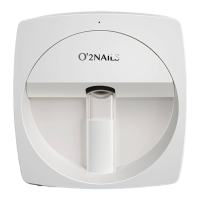

 To Next Page
 General