8
oasiscoolers.com
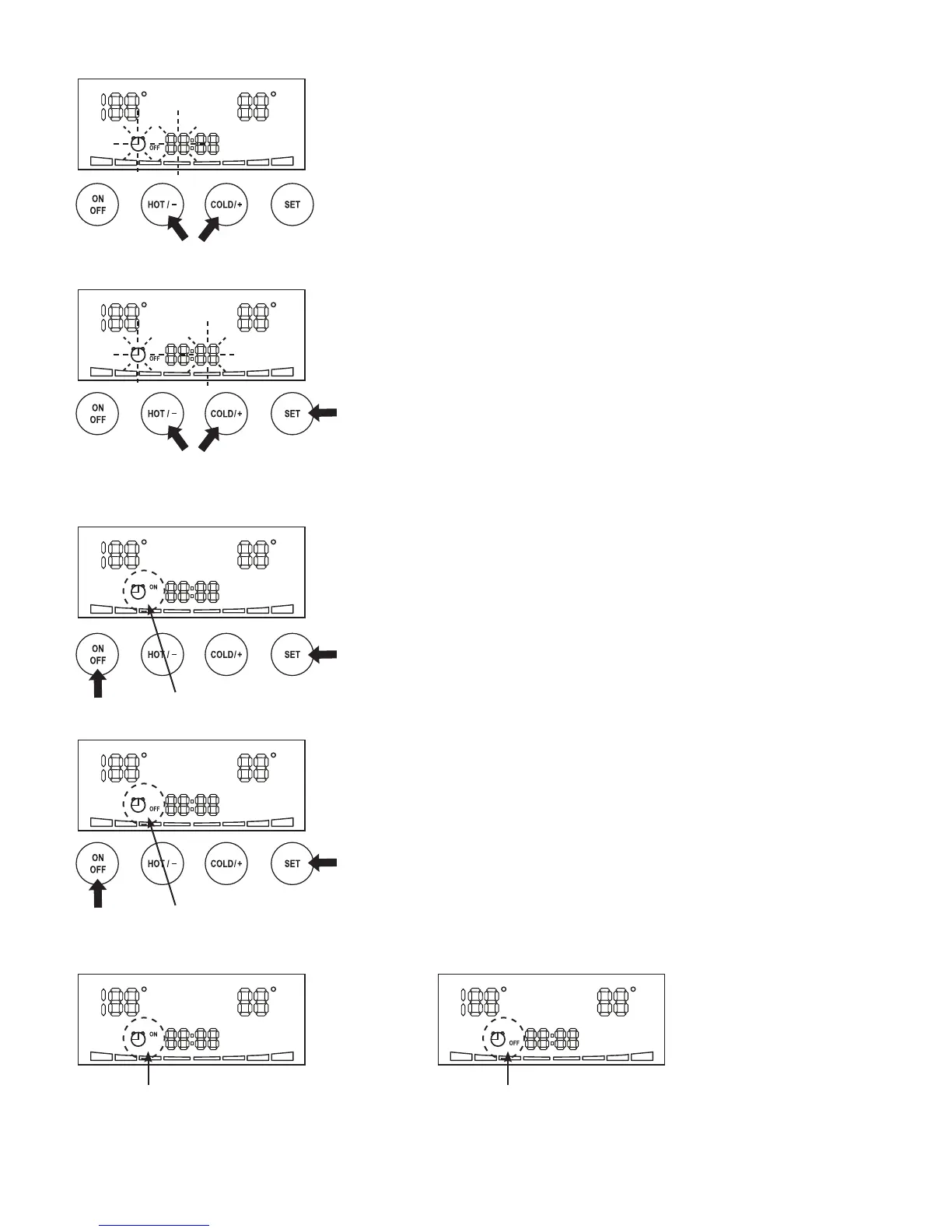
This sets the time that the water cooler will be “OFF”.
G. Press the ON/OFF button. The CLOCK ICON and the HOUR will
blink. The “OFF” next to the clock will be on.
H. Use the HOT/- and COLD/+ buttons to adjust the hour.
I. Press the SET button. The minutes will blink.
J. Use the HOT/- and COLD/+ buttons to adjust the minutes.
K. Press the SET button. The Energy Saver Mode time is now set.
H. Use to set hour.
J. Use to set minutes.
Activating the Energy Saver Mode
A. Press the SET button.
B. Press the ON/OFF button to toggle between Energy Saver
Mode ON and OFF.
Turning ON (Activating)the Energy Saver Mode:
When the “ON” shows next to the “Clock” icon, Press the SET
button. The “Clock” icon will stay on. The Energy Saver Mode is
now active and the water cooler will turn OFF/ON during the
programmed Energy Saver Mode times.
Turning OFF the Energy Saver Mode:
When the “OFF” shows next to the “Clock” icon, Press the SET
button. The “Clock” icon will turn o. The water cooler will not go
into Energy Saver Mode.
1.
2.
1.
2.
When the ENERGY SAVER MODE is active, the display will look like this:
Energy Saver Mode ON
Energy Saver Mode OFF
ON = cooler is actively heating
and cooling the water to maintain
the temperature set points.
OFF = cooler is not heating
or cooling the water because
ENERGY SAVER is active.
F
F
F
F
F
F
F
F
F
F
F
F


 To Next Page