7
The timed operation feature can be set to turn the cooler’s heating and cooling system o for a single
period of time repeated daily.
This is set much like setting the correct time in Step 2, except that the OFF and ON times will
each be programmed.
Setting the ON time
The “ON” time is the time at which the water cooler will “wake up” from Energy Saver Mode and heat/cool
the water to maintain the temperatures set previously.
6. Setting the Energy Saver Mode
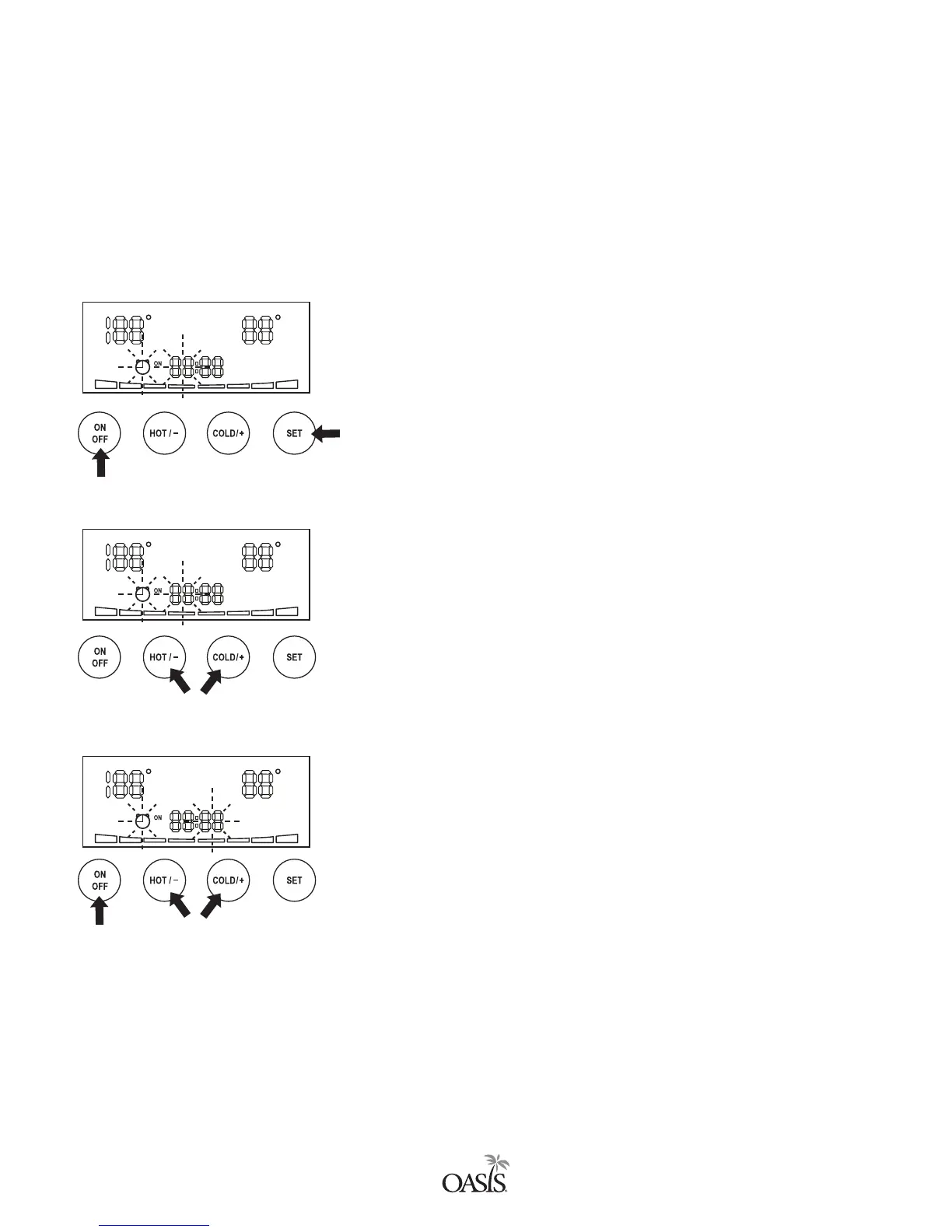
A. Press the SET button.
B. Then press the ON/OFF button.
C. The CLOCK ICON and the HOUR will blink. The “ON” next to
the clock will be on.
D. Use the HOT/- and COLD/+ buttons to adjust the hour.
E. Press the SET button. The minutes will blink.
F. Use the HOT/- and COLD/+ buttons to adjust the minutes.
D. Use to set hour.
G. F. Use to set minutes.
B.
A.
F
F
F
F
F
F


 To Next Page