00 - 10EN - 10
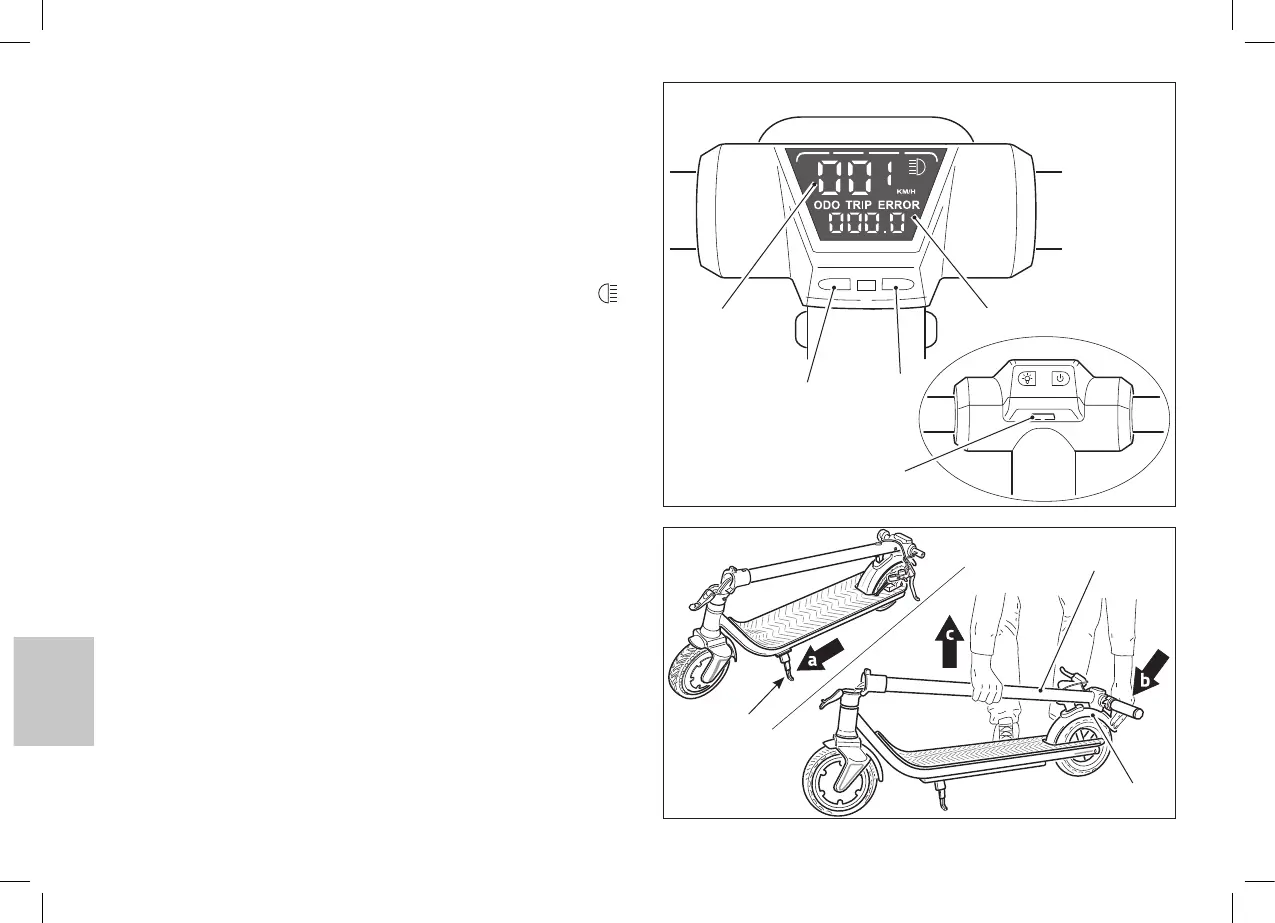
10. DISPLAY AND FUNCTION KEYS
23• ON/OFF key - Function selection
- Long pressing: display ON/OFF
- Short pressing: function selection
• ODO: Total odometer
• TRIP: Partial odometer
24• Speed selection key
- Long pressing: front and rear lights ON/OFF (the blue icon
on the display turns on too)
- Short pressing: speed selection
• 1: minimum speed
• 2: medium speed
• 3: maximum speed
25• USB port
26• Odometer (KM/H)
27• ERROR: in the presence of this message, switch off the
e-scooter and have it checked by an authorized repairer.
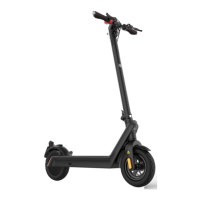
11. ASSEMBLING THE E-SCOOTER
- After removing the e-scooter from the packaging and checking that
everything is compliant with what is indicated in paragraph “8”, it is
necessary to assemble the dismounted components.
a• Open the kickstand (2) and position the e-scooter on a flat sur-
face.
b• Press the rear mudguard (15) to release the handlebars stem
(7).
7
15
23
2
24
25
26 27


 To Next Page