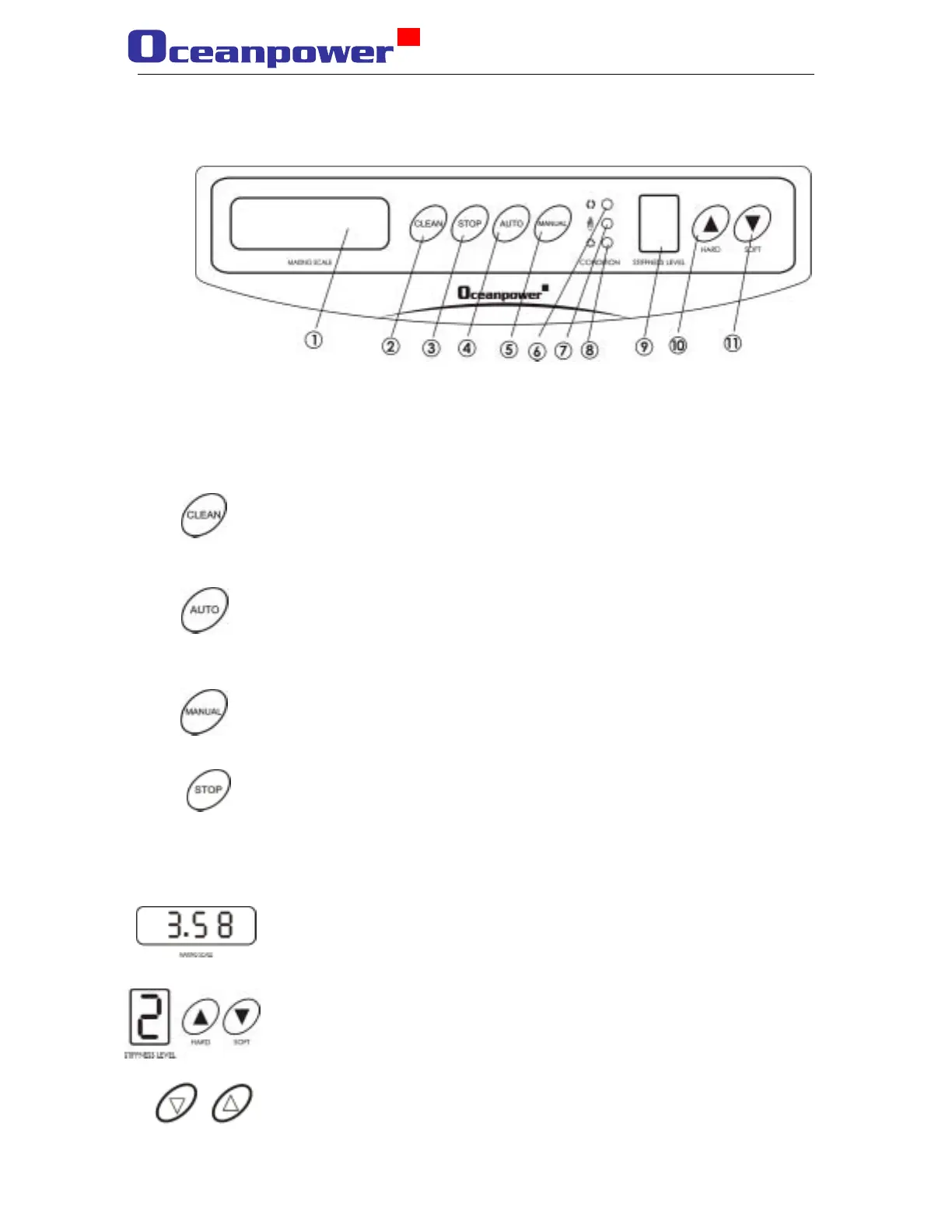
3.1 the machine controls
1. Display of the motors current 2.clean button 3.stop button 4. Button for automatic
operation 5. Button for manual operation 6. Indicator for cleaning condition (green)
7. Indicator for refrigeration condition (blue) 8. Indicator for STOP condition (red)
9. Indicator of the hardness level 10. Button to increase the hardness 11 Button to
decrease the hardness
Cleaning—means auto-cleaning, the cylinder and the hoppers
need to be filled with water, the green light indicates the motor is
working.
Auto-operation—The machine will stop automatic, when
temperature and hardness meets the configured condition. If the
temperature rise, the cooling cycle will start automatically and the
blue light will indicate that normal operation occurs.
Manual-operation—Will start the cooling cycle manually, which
is suitable during high workloads, and the blue light will indicate
that normal operation occurs.
Stop— Will stop the machine. Remember that during cleaning or
repair of the machine the machine should be in STOP condition,
the red light indicates this.
Motors current— the screen indicates that the machine is working
and the number indicates the current in the motor. When the
configured number for the certain hardness level is reached, then
the machine will stop automatically; this number represent the
resistance in the cooling cylinder.
Hardness indication—it represents the set hardness value from 0-
7,the bigger the number, the harder products.
Hardness adjusting— adjust the hardness of the product.
16


 To Next Page