5.5.1.2 Advanced WiFi setup
Not all of the methods described here may be compatible with your router.
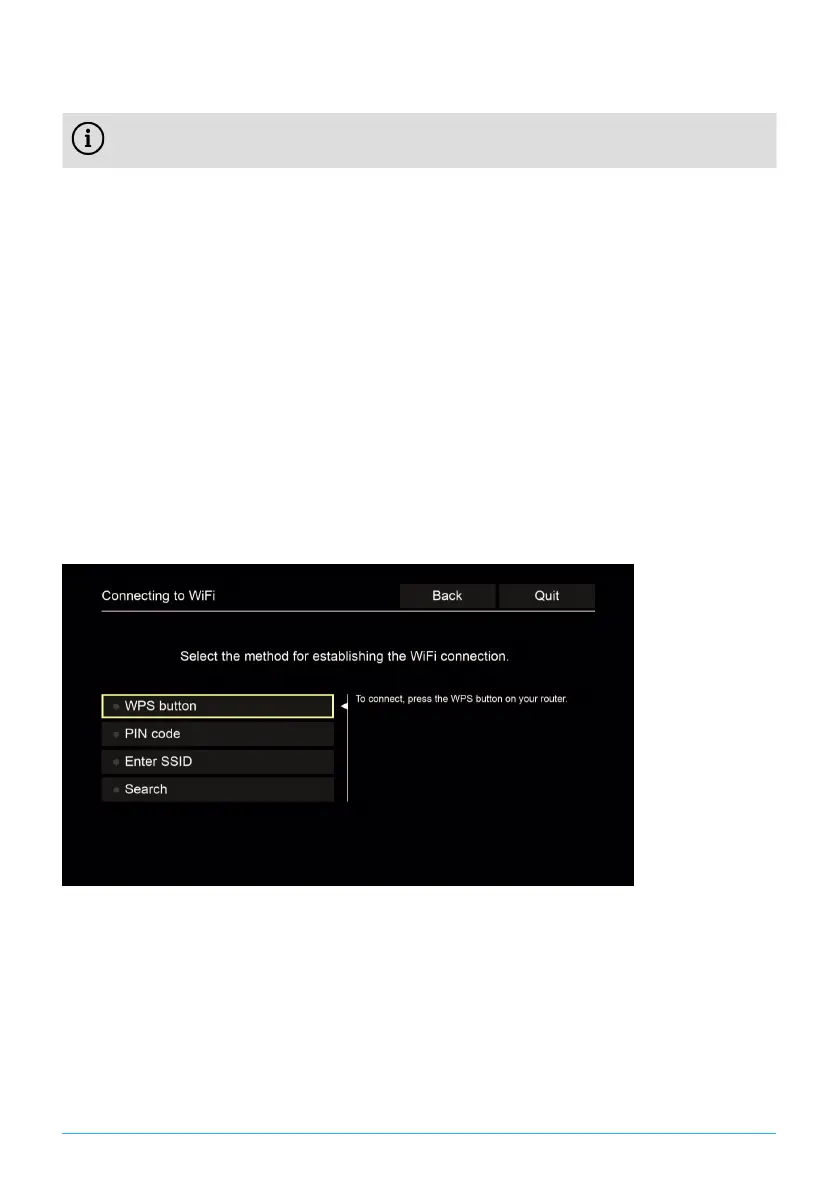
You can select from various methods in the advanced WiFi setup.
■
WPS button: The connection is established automatically after you press the
WPS button on your router.
■
WPS PIN: The connection has to be enabled by entering the PIN on the router
web page.
■
SSID: Manually enter the network name.
■
Search: Search for available networks (see Section "WiFi search" on page
9).
To establish a WiFi connection using the advanced WiFi setup, proceed as
follows:
1. In the setup menu, activate the button Advanced.
2. Navigate to the setup method of your choice.
3. Then follow the instructions on the TV set.
Figure 7: Advanced WiFi setup
5.5.2 Checking the WiFi status
In the WiFi status: menu, you can access the current data for your WiFi
connection such as the signal strength or the MAC address of your WiFi adapter.
10 | P520 IP


 To Next Page