4
Operating Instructions and Parts Manual 24495
OSCILLATING TOOL
1/17
2017 OEMTOOLS
®
INSTALLING SANDPAPER
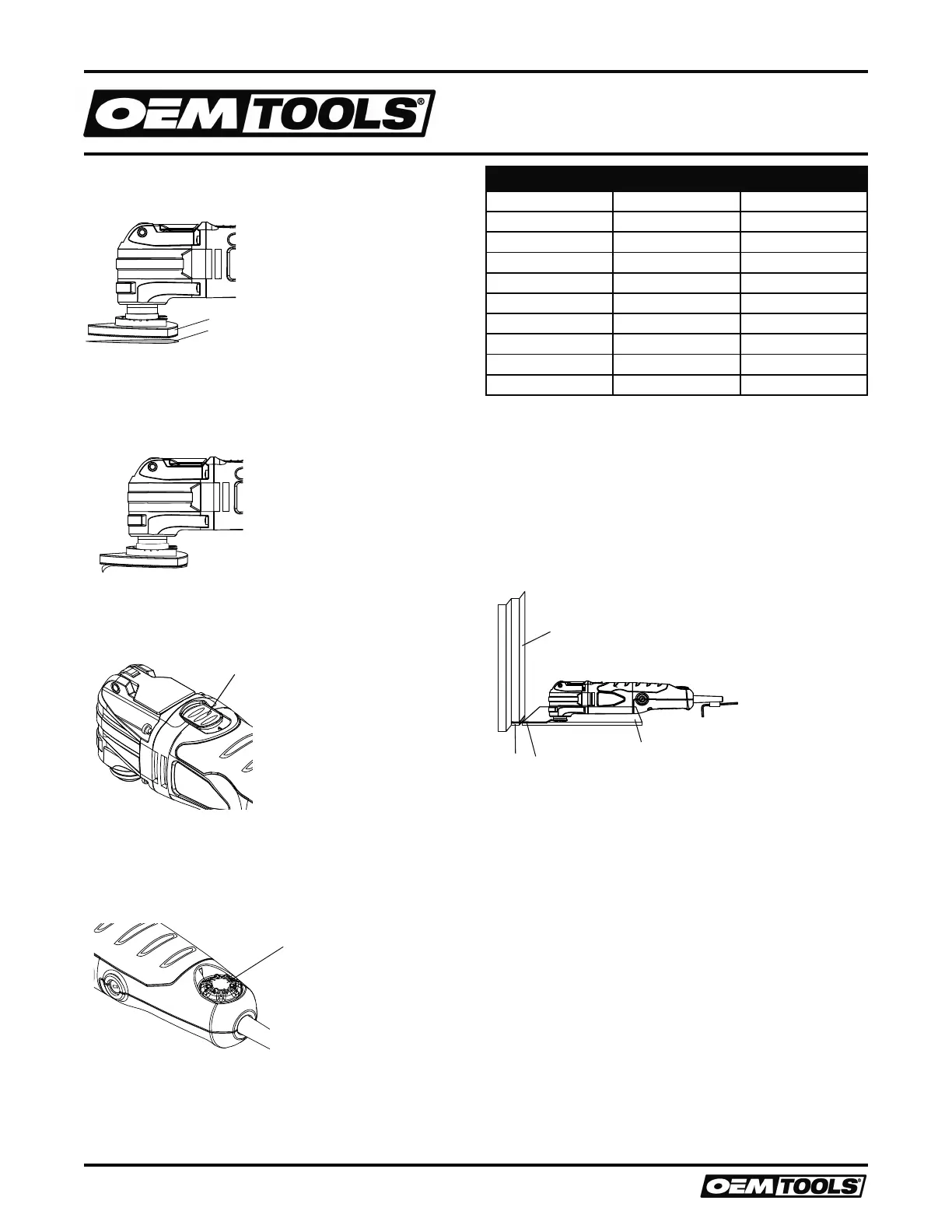
1. Install the hook and loop sanding pad (1) onto the tool. (Figure 2)
Fig. 1
6
7
8
Fig. 2
4
5
Fig. 4
1
2
Fig. 5
Fig. 3
1
2
3
4
5
6
7
8
9
10
Fig. 6
1
Fig. 7
1
Fig. 8
1
2
3
4
Fig. 9
1
2
Fig. 10
1
2
1
2
3
Fig. 11
Fig. 12
4
5
6
7
8
9
10
Figure 2
2. Firmly press the sandpaper (2) onto the hook and loop pad.
NOTES: Place the sandpaper so the holes in the sandpaper line up with
the matching holes in the hook and loop pad. Press the sandpaper firmly
onto the hook and loop pad.
3. To remove the sandpaper, simply peel the sandpaper away from the
hook and loop pad. (Figure 3)
Fig. 1
6
7
8
Fig. 2
4
5
Fig. 4
1
2
Fig. 5
Fig. 3
1
2
3
4
5
6
7
8
9
10
Fig. 6
1
Fig. 7
1
Fig. 8
1
2
3
4
Fig. 9
1
2
Fig. 10
1
2
1
2
3
Fig. 11
Fig. 12
4
5
6
7
8
9
10
Figure 3
ON/OFF SWITCH
1. To turn the tool ON, slide the ON/OFF switch (1) toward the front of the
tool. (Figure 4)
Fig. 1
6
7
8
Fig. 2
4
5
Fig. 4
1
2
Fig. 5
Fig. 3
1
2
3
4
5
6
7
8
9
10
Fig. 6
1
Fig. 7
1
Fig. 8
1
2
3
4
Fig. 9
1
2
Fig. 10
1
2
1
2
3
Fig. 11
Fig. 12
4
5
6
7
8
9
10
Figure 4
2. To turn the tool OFF, slide the ON/OFF switch toward the rear of the tool.
SPEED CONTROL WHEEL
NOTE: The speed of the tool can be adjusted to run the tool at speeds
varying between 11,000 - 20,000 OPM by rotating the speed control
wheel (1) located toward the rear of the tool housing. (Figure 5)
Fig. 1
6
7
8
Fig. 2
4
5
Fig. 4
1
2
Fig. 5
Fig. 3
1
2
3
4
5
6
7
8
9
10
Fig. 6
1
Fig. 7
1
Fig. 8
1
2
3
4
Fig. 9
1
2
Fig. 10
1
2
1
2
3
Fig. 11
Fig. 12
4
5
6
7
8
9
10
Figure 5
1. To increase the speed, rotate the speed control wheel to the right.
2. To decrease the speed, rotate the speed control wheel to the left.
NOTE: Speed #1 is the lowest speed. “MAX” is the highest speed. The
optimal speed setting will vary depending upon the type of accessory
being used, the surface being worked and the complexity of the project.
For general recommendations, see the chart below.
Project Accessory Speed
Balsa Wood Wood Blade Low
Drywall Half-Circle Blade Maximum
Restoring Windows Half-Circle Blade Medium
Door Jamb Wood Blade Maximum
Door Casing Wood Blade Medium / Maximum
Wood Dowels Wood Blade Maximum
Floor Vent Wood Blade Medium / Maximum
PVC Pipe Wood Blade Medium
Glued Flooring Scraper Medium
Sanding Sander Medium / Maximum
FLUSH CUTTING A DOOR JAM AND CASING FOR INSTALLING
FLOORING
The oscillating tool can be used to flush cut a door jamb and casing to
allow space for the new flooring to fit neatly under the door jamb and
casing. For the purpose of demonstrating the procedure, floor tile is being
used.
1. Install the wood plunge cut saw blade in the tool. (Figures 1 and 2)
NOTE: The blade should be centered on the tool housing and NOT
installed in the 90° position.
2. Place a scrap piece of floor tile (1) on the floor about 1/2" (12.5 mm)
from the door jamb (2). (Figure 6)
Fig. 1
6
7
8
Fig. 2
4
5
Fig. 4
1
2
Fig. 5
Fig. 3
1
2
3
4
5
6
7
8
9
10
Fig. 6
1
Fig. 7
1
Fig. 8
1
2
3
4
Fig. 9
1
2
Fig. 10
1
2
1
2
3
Fig. 11
Fig. 12
4
5
6
7
8
9
10
Figure 6
NOTE: Make sure the “good” side of the tile is facing upward to provide a
smooth surface for the blade (3) to follow.
3. Place the tool with the saw blade lightly touching the surface of the tile
and the cutting teeth NOT touching the surface to be cut.
4. Set the speed to the fastest speed. (Figure 5)
5. Turn the tool ON. (Figure 4)
6. When the tool reaches its maximum set speed, carefully plunge the
blade into the door jamb while sliding the blade along the floor tile.
NOTE: Hold the tool tightly and do not put too much forward pressure
on the saw blade when cutting, as this will cause the tool to vibrate
excessively.
7. Continue to make several plunge cuts until the bottom of the door jamb
and casing are completely cut off and the loose pieces (4) can be easily
removed.
NOTE: Follow the same basic procedure for installing carpet, using a
thicker spacer that is the same thickness of the carpet being installed.


 To Next Page
 Loading...