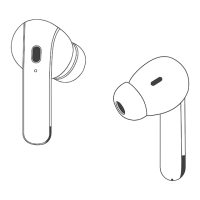
This document is a user manual for the OFNEX X19 wireless earbuds.
Function Description
The OFNEX X19 are wireless earbuds designed for music playback, calls, and voice assistance. They feature Bluetooth 5.3 connectivity and come with a charging case that supports both Type-C and wireless charging. The earbuds are equipped with multi-function buttons (MFB) for various operations, volume control buttons, and built-in microphones. The charging case includes a power display to show its battery percentage, and the earbuds also have a power display.
Important Technical Specifications
- Model Name: X19
- Bluetooth Version: V5.3
- Support: AAC/A2DP/HFP/HSP/AVRCP
- Transmission Range: 33 feet (without obstacle)
- FCC ID: 2ATJ2-X19
- Input: 5V === 1A
- Charging Time: about 2H
- Headphones Battery Capacity: 50mAh
- Charging Case Battery Capacity: 3.7V 600mAh/2.22Wh
- Charging Type: Type-C and Wireless Charging
- Ear Tips: L, M, S, XS sizes included
Usage Features
Product Overview
The device consists of two main components: the charging case and the earbuds.
Charging Case Features:
- Reset Button: Used for factory restore settings.
- Charging Case Power Display: Shows the battery percentage of the charging case (0-100). "0" indicates the case needs charging, while "100" means it's fully charged.
- Type-C Charging Port: For wired charging of the case.
- Charging Pins: Contacts inside the case for charging the earbuds.
Earbud Features:
- Earbud Power Display: Shows the charging status of the earbuds.
- Earbud LED Light/Built-in Mic: Provides visual feedback and enables voice communication.
- Charging Contact: Connects with the charging pins in the case.
- Volume +/- Button: Controls the volume.
- Multi-function Button (MFB): Used for various operations like play/pause, next/last track, answer/end call, reject call, and voice assistance.
- Ear Tips: Customizable for comfort and sound quality.
- Flexible Ear Hook: Helps secure the earbuds in place.
Multi-function Operations
For Music:
- Play/Pause: Click MFB Button Once on L/R Earbud.
- Next Track: Click "+" once on L/R Earbud.
- Last Song: Click "-" once on L/R Earbud.
- Volume+: Long Press "+" Button on L/R Earbud.
- Volume-: Long Press "-" Button on L/R Earbud.
For Call:
- Answer/End Call: Click MFB Button Once on L/R Earbud.
- Reject Call: Long Press MFB Button 2s on L/R Earbud.
Voice Assistance (Non-Playing and Non-Calling):
- Siri (or other voice assistants): Double-click MFB Button on L/R Earbud.
Note: The X19 is equipped with an advanced chip for single-ear control, allowing all functions to be controlled from one earbud.
How to Charge
Type-C Charging:
- Place earbuds into the charging case.
- Connect the charging case to a 5V/1A adapter (not included) using the included USB-C charging cable. The USB-C charging cable is in the black paper box.
Wireless Charging:
- Place the charging case on a wireless charging pad (NOT Included).
- It is recommended to use a wireless charging pad with Qi certificate.
- The fully charged charging case can recharge twins earbuds for 3-4 times without being plugged into power supply.
LED Power Display
- Charging Case Power Display (100): Shows the remaining battery percentage of the charging case from 0-100. "0" means the charging case needs charging, while "100" means the charging case is fully charged.
- Earbud Charging Status: Flash down and up when an earbud is charging; Stop flashing when an earbud is fully charged.
- Earbud's LED light: Red light up means "being charged", Red light go off means "fully charged".
How to Power On/Off & Pair
Automatically Power On/Off & Pairing (Make sure the earbuds and charging case have power):
- Take out earbuds from the charging case; the earbuds will auto power on and enter pairing mode.
- For first-time pairing: Activate Bluetooth setting on your phone, search and connect "X19".
- For the second time use, when you take out the earbuds from the charging case, they will connect to your device automatically.
- Note: If the earbuds are not connected to your device over 5 minutes, the earbuds will power off automatically.
- Put the earbuds back into the charging case; the earbuds will disconnect & power off automatically.
Manually Power On/Off:
- Power On: If the earbuds are out of the charging case and power off, just press & hold (both earbuds) for 2s, they will power on.
- Power Off: Disconnect the Bluetooth on your device, press & hold either earbud for 5s, both earbuds will power off at the same time.
Pair with Other Device
- X19 Sports Headphones have a memory connect function; they always auto connect to the last paired device.
- To pair with another device, you should disconnect "X19" from the last paired device, then search and connect "X19" on your new device.
Single Mode
- You can leave one earbud in the charging case and use one earbud alone.
- Only take one earbud out of the charging case, then search & connect "X19" on your device.
- When in Dual mode, put one earbud into the charging case.
Factory Restore Setting
When should I reset?
- When only one side plays music.
- When you can't find "X19" on your device.
- When connection issues occur.
How to reset?
- Delete all "X19" on your phone and deactivate the Bluetooth setting.
- Put the two earbuds in the charging case, keep them in the charging status.
- Long press the Reset Button on the charging case for about 10s; the LED display will flash 3 times and the earbuds will flash red and green alternately, which means both earbuds have reset completely.
- Now, pick up the earbuds to turn them on, activate the Bluetooth setting on your device and select "X19" to connect; it should work properly.
- If not, please put the earbuds back to the charging case and repeat the steps above.
How to Sync Volume on Android
- To protect users from potential hearing damage, Android's limit on max volume is quite low for Bluetooth audio devices.
- If you feel the volume is too low, please access developer options and enable absolute volume, so you'll be able to max the volume at your own volition and to the full capabilities of your Bluetooth earphones.
- (Scan the QR code to watch a video to learn more details.)
Maintenance Features
Caution
- Protective Film: Please remove the protective film before use, otherwise the headphone will not be able to start and charge. (Tear off the protective film from the earbud charging contacts).
- Ear Tips: Choose suitable ear tips & wear correctly to enhance sound quality. (L, M, S, XS sizes available).
- Cleaning Charging Contacts: Please clean the magnet charging contact on the earbud and charging pin on the charging case with alcohol wipes if the headphones can't be charged. (To fix charging issue).
- Cleaning Protective Grille: Please clean the protective grille of both earbuds if the sound becomes low. (To make sound louder).
Customer Service
- Email: service@ofnex.com
- Phones: (857) 663-7819 (Mon. - Fri., 11 am - 8 pm EDT)
- Web: www.ofnex.com
FCC Caution
Any Changes or modifications not expressly approved by the party responsible for compliance could void the user's authority to operate the equipment. This device complies with part 15 of the FCC Rules. Operation is subject to the following two conditions: (1) This device may not cause harmful interference, and (2) this device must accept any interference received, including interference that may cause undesired operation.

 Need help?

 To Next Page
 General