The OFNEX N17 True Wireless Earbuds are a pair of Bluetooth earbuds designed for audio playback and calls, featuring a compact design and a charging case with a digital power display.
Function Description:
The N17 earbuds are designed for wireless audio streaming and hands-free calling. They support various Bluetooth profiles including AVRCP, HFP, HSP, and A2DP, ensuring compatibility with a wide range of devices. The earbuds feature a multi-function button (MFB) on each earbud for controlling playback, calls, and voice assistance. The charging case not only protects and charges the earbuds but also provides a digital display of its remaining battery percentage. The earbuds themselves have LED lights to indicate their charging status.
Important Technical Specifications:
- Model Name: N17
- FCC ID: 2A9T5-N7
- Bluetooth Version: V5.3
- Supported Profiles: AVRCP/HFP/HSP/A2DP
- Headphones Battery Capacity: 45mAh
- Charging Case Battery Capacity: 3.7V 400mAh/1.48Wh
- Input: 5V-1A
- Charging Time: Approximately 2 hours for the charging case.
- Transmission Range: ≤33 feet (without obstacle)
- Wireless Charging Support: Yes (charging pad not included)
- Charging Port: USB-C
Usage Features:
Power On/Off & Pairing:
- Automatic Power On/Off & Pairing:
- To power on and enter pairing mode, simply open the lid of the fully charged charging case. The earbuds will automatically power on.
- For first-time pairing, activate Bluetooth on your phone, search for "N17," and connect.
- For subsequent use, opening the lid of the charging case will automatically connect the earbuds to your previously paired device.
- To power off and disconnect, place the earbuds back into the charging case and close the lid.
- Manually Power On/Off:
- If the earbuds are out of the charging case and off, press and hold both earbuds for 2 seconds to power them on.
- To manually power off, disconnect Bluetooth on your device, then press and hold either earbud for 5 seconds. Both earbuds will flash red and power off.
- The earbuds will automatically power off if not connected to a device for over 5 minutes.
Pairing with Other Devices:
- To pair with a new device, disconnect "N17" from the last paired device, then search and connect "N17" on the new device.
- Alternatively, press the reset button on the charging case for 5 seconds to reset the earbuds, then search and connect "N17" on the new device.
Mono Mode:
- You can use one earbud independently while the other remains in the charging case.
- To enter mono mode from dual mode, place one earbud into the charging case.
- Alternatively, take only one earbud out of the charging case, then search and connect "N17" on your device.
- In single mode, L/R earbuds only support playing the next song and cannot control volume.
Call Control:
- Answer Call: Tap (L/R) earbud once.
- End Call: Tap (L/R) earbud once.
- Reject Call: Long press (L/R) earbud for 2 seconds.
Voice Assistance:
- Activate Siri (or other voice assistant): Tap (L/R) earbud thrice.
Music Mode Control:
- Play/Pause: Tap (L/R) earbud once.
- Next Track: Tap R earbud twice.
- Last Song: Tap L earbud twice.
- Volume+: Press & hold R earbud.
- Volume-: Press & hold L earbud.
Charging:
- Charging Earbuds: Remove the protective film from the earbuds, then insert them correctly into the charging case. They will automatically start charging.
- Charging Case (USB-C): Use the provided Type-C cable with a 5V/1A adapter (not included) to charge the case. A USB-C charging cable is included in the packing box.
- Wireless Charging: Place the charging case on a wireless charging pad (not included). It is recommended to use a wireless charging pad with a QI certificate.
LED Power Display:
- The charging case displays the remaining battery percentage from 0-100. "0" indicates the case needs charging, while "100" means it's fully charged.
- The earbud charging indicator flashes down and up when an earbud is charging and stops flashing when fully charged.
- Earbud's LED light: Red light indicates "being charged," and the red light turning off means "fully charged."
Factory Restore Setting (Reset):
- When to reset: If only one side plays music, if "N17" cannot be found on the device, or if both earbuds fail to pair with each other or experience connection issues.
- How to reset:
- Delete all "N17" entries from your phone's Bluetooth settings and deactivate Bluetooth.
- Place both earbuds in the charging case.
- Long press the Reset Button on the bottom of the charging case for about 5 seconds. The LED display will flash 3 times, indicating a complete reset.
- Pick up the earbuds, activate Bluetooth on your device, and select "N17" to connect.
Sync Volume on Android:
- If the volume is too low, access developer options on your Android device and enable "absolute volume" to utilize the full capabilities of the earbuds.
Maintenance Features:
Caution & Cleaning:
- Protective Film: Before first use, remove the protective film from the earbuds, otherwise, they will not charge.
- Charging Contacts: If the headphones cannot be charged, clean the magnet charging contact on the earbud and the charging pin on the charging case with alcohol wipes.
- Protective Grille: If the sound becomes low, clean the protective grille of both earbuds.
Wearing Correctly:
- Choose suitable ear tips and wear the earbuds correctly to enhance sound quality. The manual provides illustrations for correct and incorrect wearing.
Customer Service:
- Email: support@ofnex.com
- Phone: (857) 688-5733
- Web: www.ofnex.com
- OFNEX offers support to solve product problems within 24 hours.

 Need help?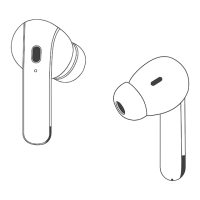

 To Next Page
 General