When should I reset?
* When only one side play music.
* When you can't find "N17" on the device.
* When both earbuds fail to pair with each other or occur connection
related issues.
How to reset?
1. Delete all "N17" on your phone and deactive the bluetooth setting.
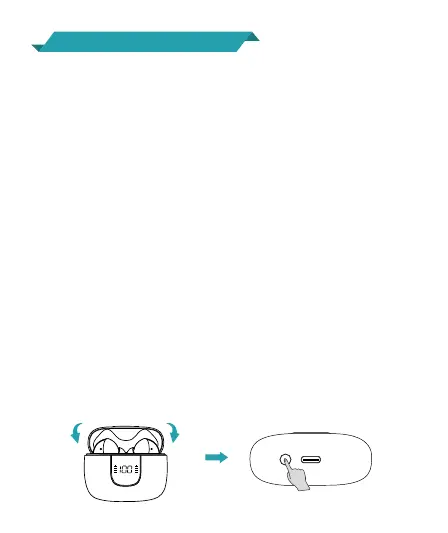
2. Put the two earbuds in the charging case, keep them in the
charging statu.
3. Long press the Reset Button on the bottom of the charging case
for about 5s, the LED display will flash 3 times, which means both
earbuds have reset completely.
4. Now, pick up the earbuds to turn them on, activate the bluetooth
setting on your device and select "N17" to connect, it should work
properly.
If not, please put the earbuds back to the charging case and repeat
the steps above.
10
R
R
%
L
R
10
Factory Restore Setting


 To Next Page