Bluetooth
*
connection
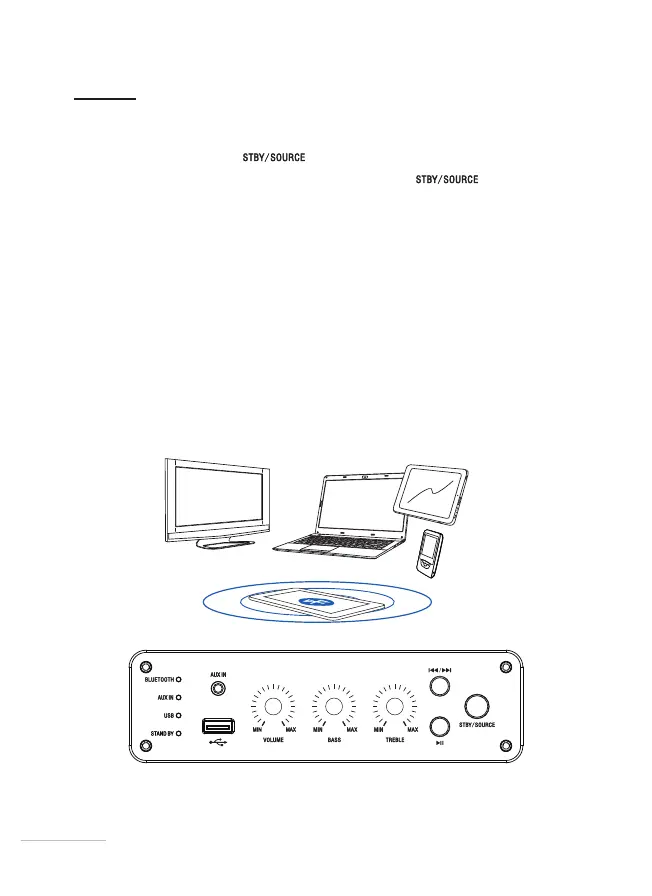
1. Briey press the button to turn on your speaker.
2. To select the Bluetooth* mode, press the button
until the white
Bluetooth* indicator light goes on.
3. You will hear a beep and the indicator light will ash. The speaker is ready to
be paired.
4. Access the Bluetooth* menu of your audio source device to start searching
for the device. Refer to the manual of your audio source for more details on
Bluetooth*searching.
5. Your device appears in the list of devices, appearing as “Oglo SB120”. If your
device asks you for an ID code, type in “0000” or the code that appears on the
screen of your audio source, then conrm.
6. You will hear a beep and the Bluetooth* indicator light will stop ashing.
7. Your audio source is now paired with the speaker.
2626


 To Next Page