68
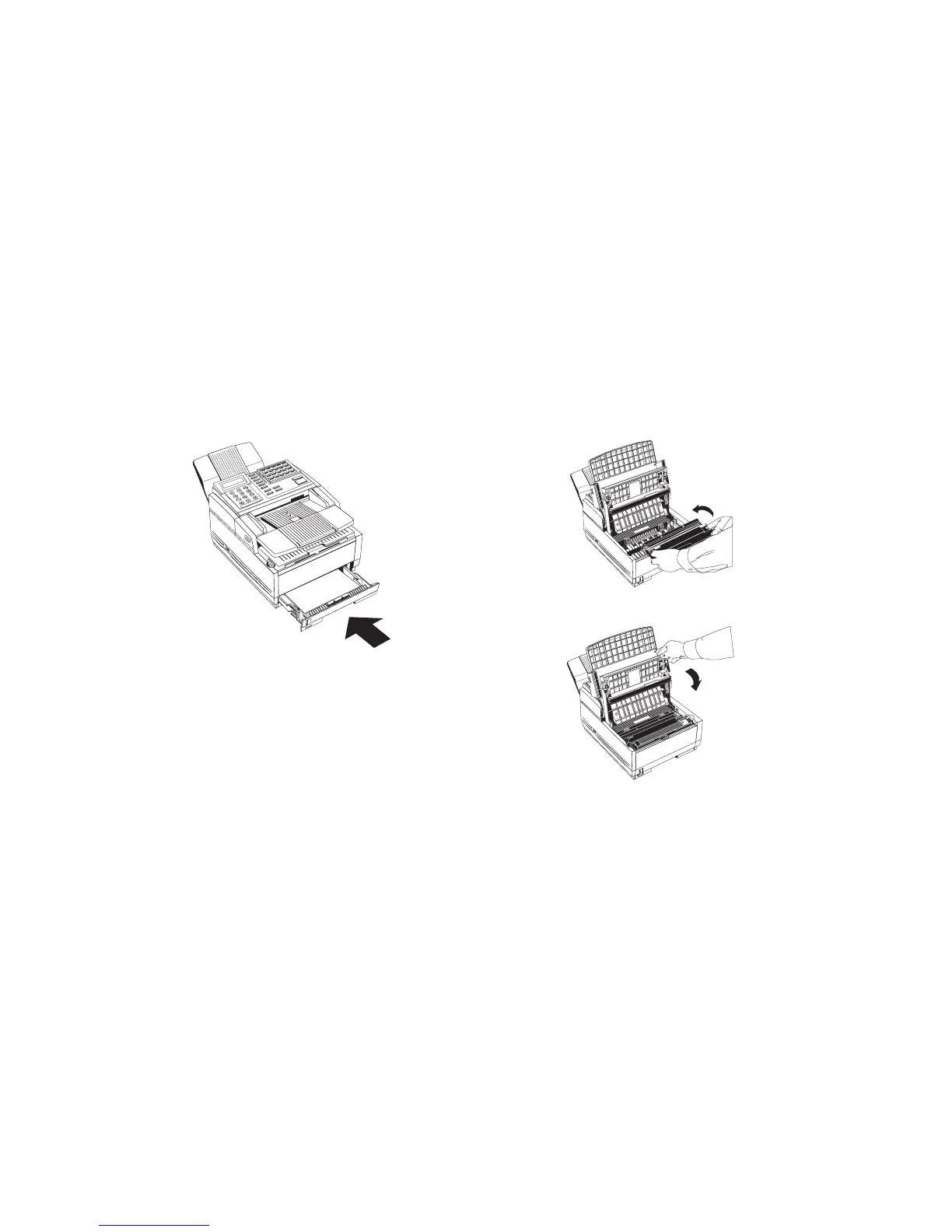
8. Slide the paper cassette all the way back into your fax
machine.
9. Place the image drum unit back into your fax machine. To
ensure that the image drum is positioned correctly, press
down firmly on both of the locations on the image drum
marked “PUSH”.
10. Close the copy stacker and push down on it until you hear a
click. Be sure both slides are latched.
11. Close the document table.
1
A
B
C
2
D
E
F
3
G
H
I
4
J
K
L
5
M
N
6
P
R
S
7
T
U
V
8
W
X
Y
9
*
O
Q
Z
0
#
AUTOR
EC
SEARCH
S
E
L
E
C
T
F
U
NC
TI
O
N
AUTODIAL
HYPHEN
REDIAL
COPY
HOOK
V.REQUE
ST
PHO
T
O
EXFINE
FINE
STD
LIGHT
NORMAL
DARK
ALA
RM
STOP
ST
ART
PU
S
H
P
USH
1
A
B
C
2
D
E
F
3
G
H
I
4
J
K
L
5
M
N
6
P
R
S
7
T
U
V
8
W
X
Y
9
*
O
Q
Z
0
#
A
U
T
O
R
E
C
S
E
A
R
C
H
S
E
L
E
C
T
F
U
N
C
T
I
O
N
A
U
T
O
D
I
A
L
H
Y
P
H
E
N
R
E
D
I
A
L
C
O
P
Y
H
O
O
K
V
.
R
E
Q
U
E
S
T
P
H
O
T
O
E
X
F
I
N
E
F
I
N
E
S
T
D
L
I
G
H
T
N
O
R
M
A
L
D
A
R
K
A
L
A
R
M
S
T
O
P
S
T
A
R
T


 To Next Page