7
3.Operating and Programming
3.2 Quick Start
1
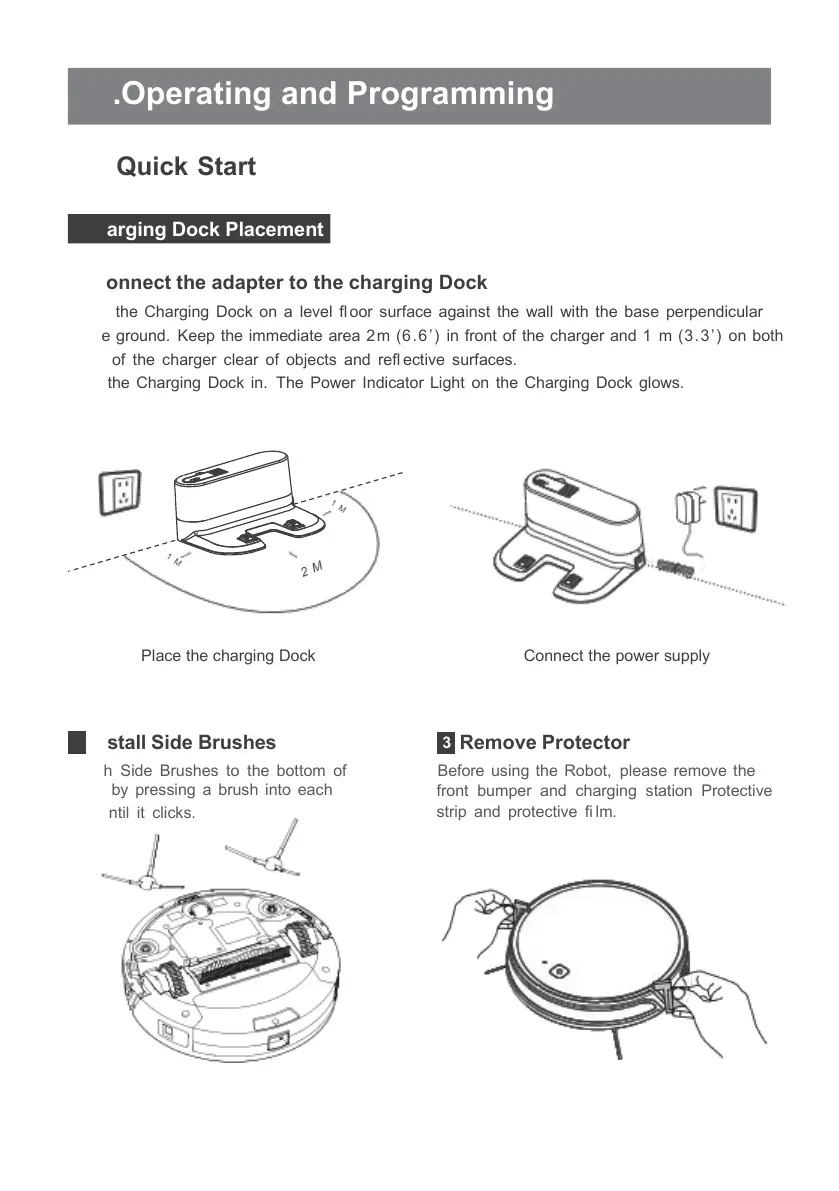
Connect the adapter to the charging Dock
Place the Charging Dock on a level fl oor surface against the wall with the base perpendicular
to the ground. Keep the immediate area 2m (6.6 ’ ) in front of the charger and 1 m (3.3’) on both
sides of the charger clear of objects and refl ective surfaces.
Plug the Charging Dock in. The Power Indicator Light on the Charging Dock glows.
Place the charging Dock Connect the power supply
2
Install Side Brushes
Attach Side Brushes to the bottom of
robot by pressing a brush into each
slot until it clicks.
3
Remove Protector
Before using the Robot, please remove the
front bumper and charging station Protective
strip and protective fi lm.



 To Next Page