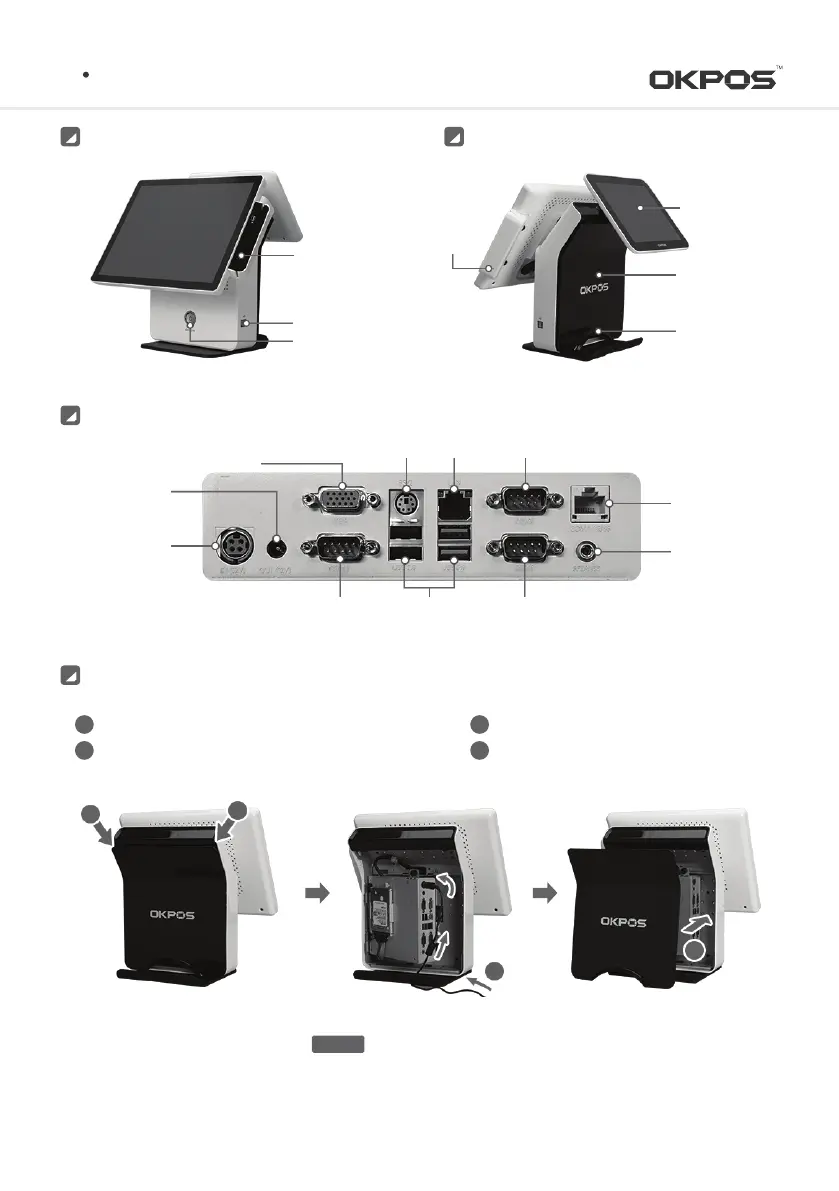
Cable Holder
Stand
Rear Cover
Dual Monitor
(optional)
MSR Reset
Button
MSR
2 X USB Port
Power Button
RearFront
K POS
I/O Port
Serial Port
(RJ45-COM4)
DC-IN Power
(12V)
DC-OUT Power
(12V)
VGA Port
USB PortSerial Port(DSUB9-COM3)
Speaker Port
PS/2 Mouse, Keyboard LAN
Serial Port(DSUB9-COM1)
Serial Port(DSUB9-COM2)
System Installation and Turn-on/off
Install the Stand-Rear-Cover
Turn on the system with the Power On button
Push down Stand-Rear-Cover and remove
Put the power adapter cable to the arrow
indicated, and insert into the power port
1
2
3
4
1
1
2
3
Make sure the adapter direction before plugging in
CAUTION
12
Service Manual



 To Next Page