K POS
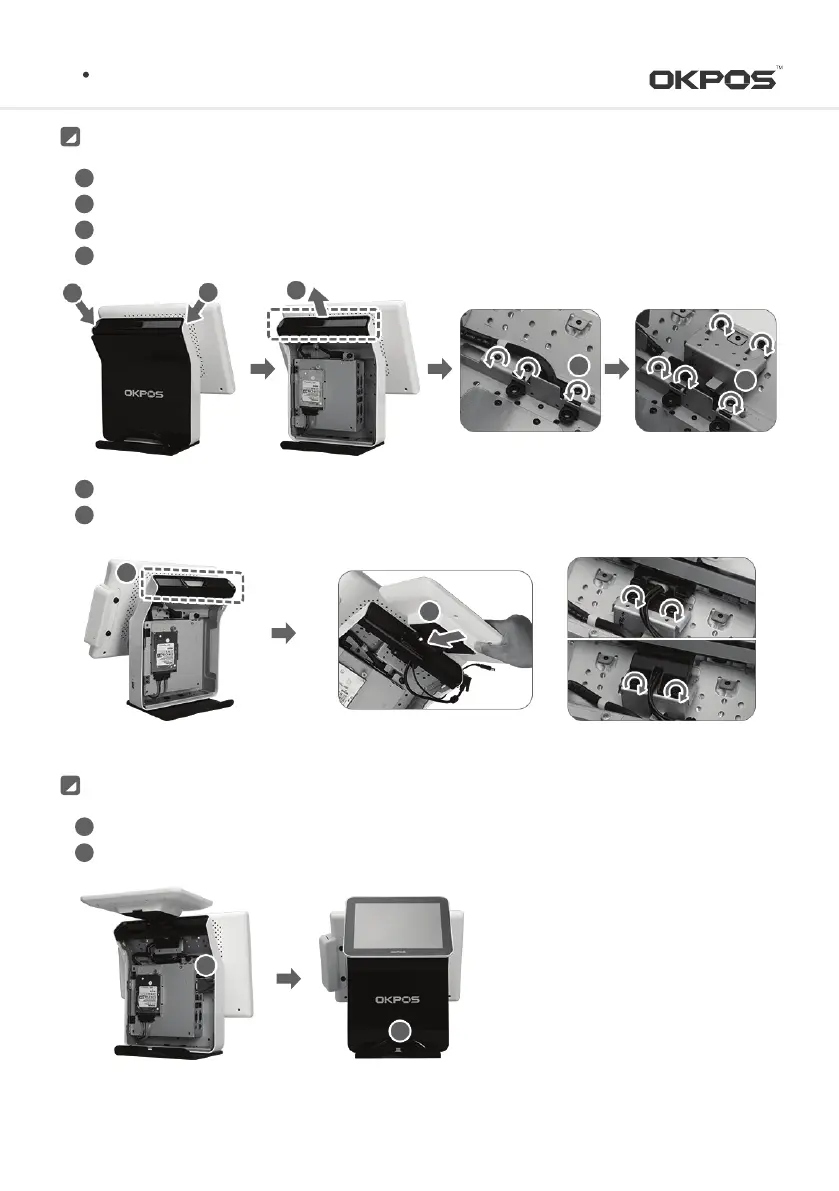
Remove the stand rear cover by pulling After inserting both hands’ fingers into the upper part of Stand Rear Cover (
①)
Remove the dual monitor cover by lifting up like the arrow
②
Unfasten the screws of clamp and to fix hinges like the arrow
③
Fasten the screws of clamp and to fix hinges after placing the dual monitor holder in a right way like the arrow
④
1
2
3
4
4
3
2
1
1
Installation
Install dual monitor cover on the position of
⑤
Fasten the screws after inserting dual monitor hinges into the holes of dual monitor cover like the arrow
⑥
5
6
9.7inch
15inch
6
5
Install dual monitor rear cover after connecting VGA and power cables.
Reassemble the cable cover after connecting power adaptor cable
1
2
Connecting Cable
2
1
13
Service Manual



 To Next Page