EasyManua.ls Logo

Okuma OSP-U100M - Page 200

Okuma OSP-U100M
511 pages
Print Icon
To Next Page IconTo Next Page
To Previous Page IconTo Previous Page
Loading...
4203-E
P-179
SECTION
1
DATA
SETTING
5-2-2.
Fixed
Address
ATC
Specifications
To
select
a
tool
from
the
tools
in
the
magazine
using
a
tool
number
command,
it
is
necessary
to
set
the
correspondence
between
the
tool
numbers
and
the
toolpot
numbers.
If
an
interference
occurs
between
the
tools
stored
in
the
two
adjacent
toolpots
due
to
their
diameters,
set
the
safety
adaptor
in
toolpots
at
both
sides
of
the
toolpot
which
holds
a
large-diameter
tool.
This
prevents
an
occurrence
of
interference
between
the
tools
during
tool
setting
operations.
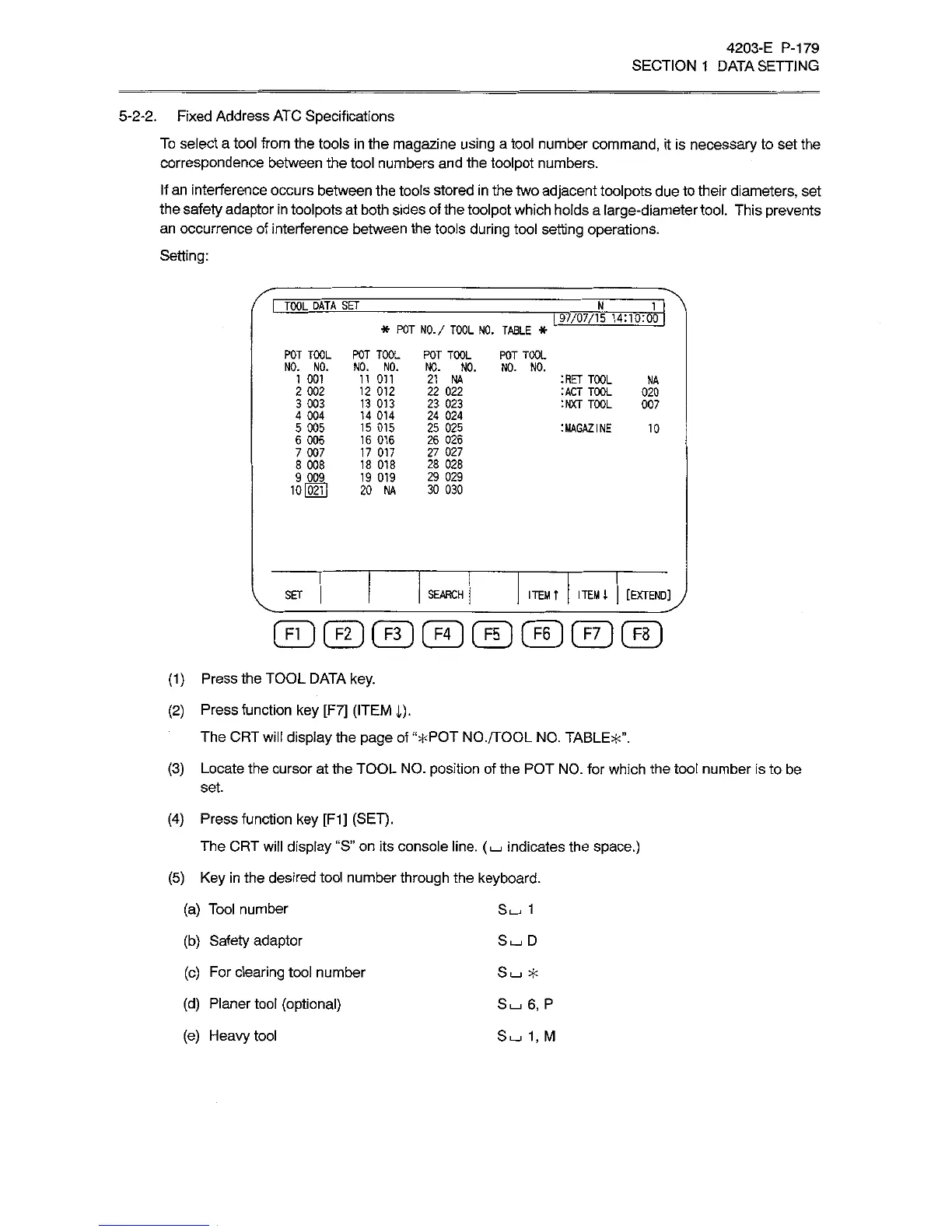
Setting:
i
TOOL
DATA~SEf
N_
1
I
97/07/15
14:10:00
*
POT
NO./
TOOL
NO.
TABLE
*
POT
TOOL
NO.
NO.
11
011
12
012
13
013
14
014
15
015
16
016
17
017
18
018
19
019
20
NA
POT
TOOL
NO.
NO.
1
001
2
002
3
003
4
004
5
005
6
006
7
007
8
008
9
009
10l02ll
POT
TOOL
POT
TOOL
NO.
NO.
NO.
NO.
21
NA
22
022
23
023
24
024
25
025
26
026
27
027
28
028
29
029
30
030
TOOL
:ACT
TOOL
:NXT
TOOL
NA
020
007
:MAGAZINE
10
ITEM
t
ITEM
4
[EXTEND]
SEARCH
SET
(ZD©©©®©®©
(1)
Press
the
TOOL
DATA
key.
(2)
Press
function
key
[F7]
(ITEM
1).
The
CRT
will
display
the
page
of
“*POT
NO./TOOL
NO.
TABLE*”.
(3)
Locate
the
cursor
at
the
TOOL
NO.
position
of
the
POT
NO.
for
which
the
tool
number
is
to
be
set.
(4)
Press
function
key
[F1]
(SET).
The
CRT
will
display
“S”
on
its
console line.
(I_I
indicates
the
space.)
(5)
Key
in
the
desired
tool
number
through
the
keyboard.
(a)
Tool
number
(b)
Safety
adaptor
(c)
For
clearing
tool
number
(d)
Planer
tool
(optional)
(e)
Heavy
tool
Sÿ
1
Su_.
D
SL-I
*
S
6,
P
Sÿ
1,
M