EasyManua.ls Logo

Okuma OSP-U100M - Program Editing Operations

Okuma OSP-U100M
511 pages
Print Icon
To Next Page IconTo Next Page
To Previous Page IconTo Previous Page
Loading...
4203-E
P-211
SECTION
2
PROGRAM
OPERATION
5.
Program
Editing
In
the
program
edit
mode,
modification,
insertion,
deletion,
and
others
can
be
conducted
for
on
programs
stored
in
the
memory.
(1)
Programs
are
edited
in
units
of
file.
(2)
Program
editing-related
terms
are
defined
as
follows:
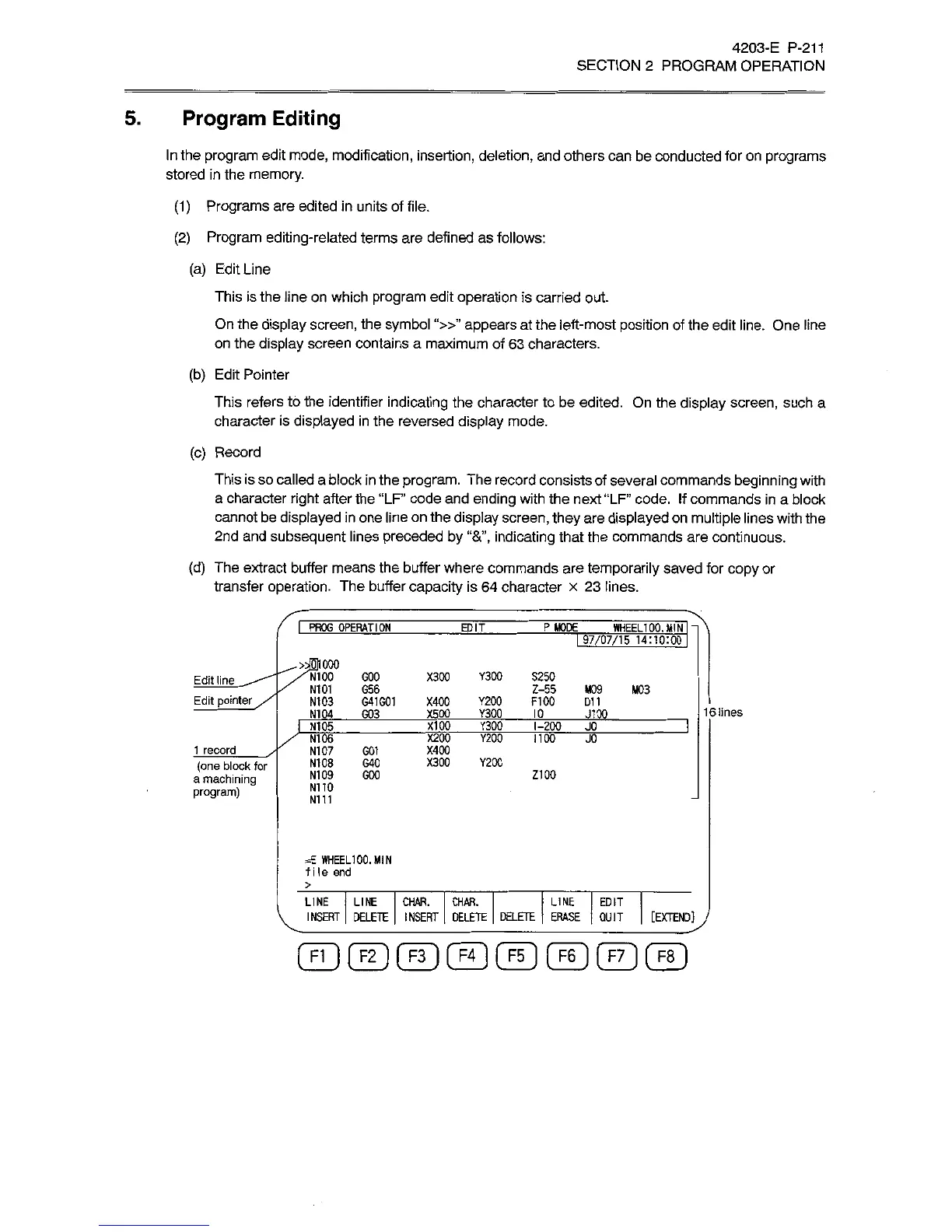
(a)
Edit
Line
This
is
the
line
on
which
program
edit
operation
is
carried
out.
On
the
display
screen,
the
symbol
“»”
appears
at
the
left-most
position
of
the
edit
line.
One
line
on
the
display
screen
contains
a
maximum
of
63
characters.
(b)
Edit
Pointer
This
refers
to
the
identifier
indicating
the
character
to
be
edited.
On
the
display
screen,
such
a
character
is
displayed
in
the
reversed
display
mode.
(c)
Record
This
is
so
called
a
block
in
the
program.
The
record
consists
of
several
commands
beginning
with
a
character
right
after
the
“LF
code
and
ending
with
the
next
“LF”
code.
If
commands
in
a
block
cannot
be
displayed
in
one
line
on
the
display
screen,
they
are
displayed
on
multiple
lines
with
the
2nd
and
subsequent
lines
preceded
by
indicating
that
the
commands
are
continuous.
(d)
The
extract
buffer
means
the
buffer
where
commands
are
temporarily
saved
for
copy
or
transfer
operation.
The
buffer
capacity
is
64
character
x
23
lines.
I
PROG
OPERATION
EDIT
P
MODE
WHEEL100.
MIN
I
~|
1
97/07/15
14:10:00
I
''V'NIOO
GOO
/
N101
G56
N103
G41G01
N104
G03
000
X300
Y300
S250
Edit
line
Z-55
M09
M03
X400
Y200
FI
00
D11
X500
Y300
1
0
Edit
pointer
16
lines
J100
I
NT
05
XI
00
Y300
1-200
JO
/
N106
N107
G01
N108
G40
N109
GOO
X200
Y200
1100
JO
X400
1
record
X300
Y200
(one
block
for
a
machining
program)
Z100
N110
N111
=E
WHEEL100.
MIN
f
i
le
end
>
LINE
LINE
CHAR. CHAR.
INSERT
|
DELETE
|
INSERT
|
DELETE
DELETE
ERASE
|
QUIT
LINE
EDIT
[EXTEND]ÿ/
©©©©©©©©

Related product manuals