10
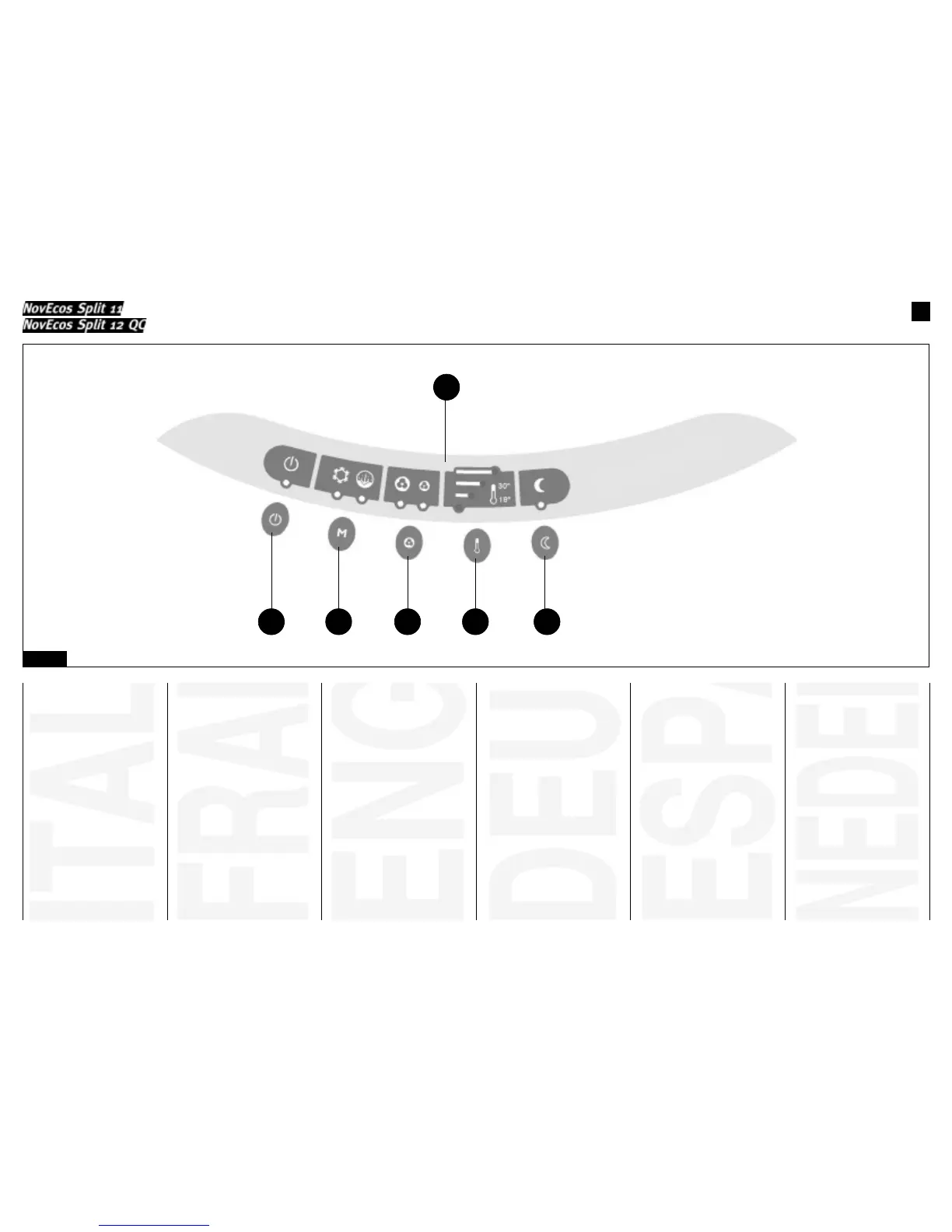
PANNELLO COMANDI
1) Tasto Stand-by;
2) Tasto selezione funzioni (raf-
freddamento, deumidificazione, ven-
tilazione);
3) Tasto selezione velocità di ven-
tilazione;
4) Tasto selezione temperatura;
5) Tasto "automatico notturno";
6) Display.
TABLEAU DE COMMANDE
1) Touche de stand-by;
2) Touche de sélection des fonctions
(refroidissement, déshumidification,
ventilation);
3) Touche de sélection de la vitesse
de ventilation;
4) Touche de sélection de la
température;
5) Touche "automatique nocturne";
6) Ecran.
CONTROL PANEL
1) Stand-by key;
2) Function selection key (cooling,
dehumidification, ventilation);
3) Ventilation speed selection key;
4) Temperature selection key;
5) "Automatic night-time" key;
6) Display.
STEUERTAFEL
1) Stand-By-Taste;
2) Funktionswähltaste (Kühlung,
Entfeuchtung, Ventilator);
3) Taste zum Einstellen der
Ventilatorgeschwindigkeit;
4) Taste zum Einstellen der
Temperatur;
5) Taste "Nacht-Automatik";
6) Display.
PANEL DE MANDOS
1) Tecla Stand-by;
2) Tecla de selección de funciones
(refrigeración, deshumidificación,
ventilación);
3) Tecla de selección de la velocidad
de ventilación;
4) Tecla de selección de la tempera-
tura;
5) Tecla "automático nocturno";
6) Display.
BEDIENINGSPANEEL
1) Stand-by toets;
2) Functiekeuzetoets (koelen,
ontvochtigen, ventilatie);
3) Keuzetoets ventilatiesnelheid;
4) Temperatuurkeuzetoets;
5) Toets "automatische
nachtfunctie";
6) Display.
Fig. 8
1
6
2 3 4 5


 To Next Page
 Loading...