23
O P U S | M E L O D Y U S E R G U I D E
1. If possible, connect your Opus to your network using an ethernet cable. This will
result in faster music transfer from your PC to your Opus.
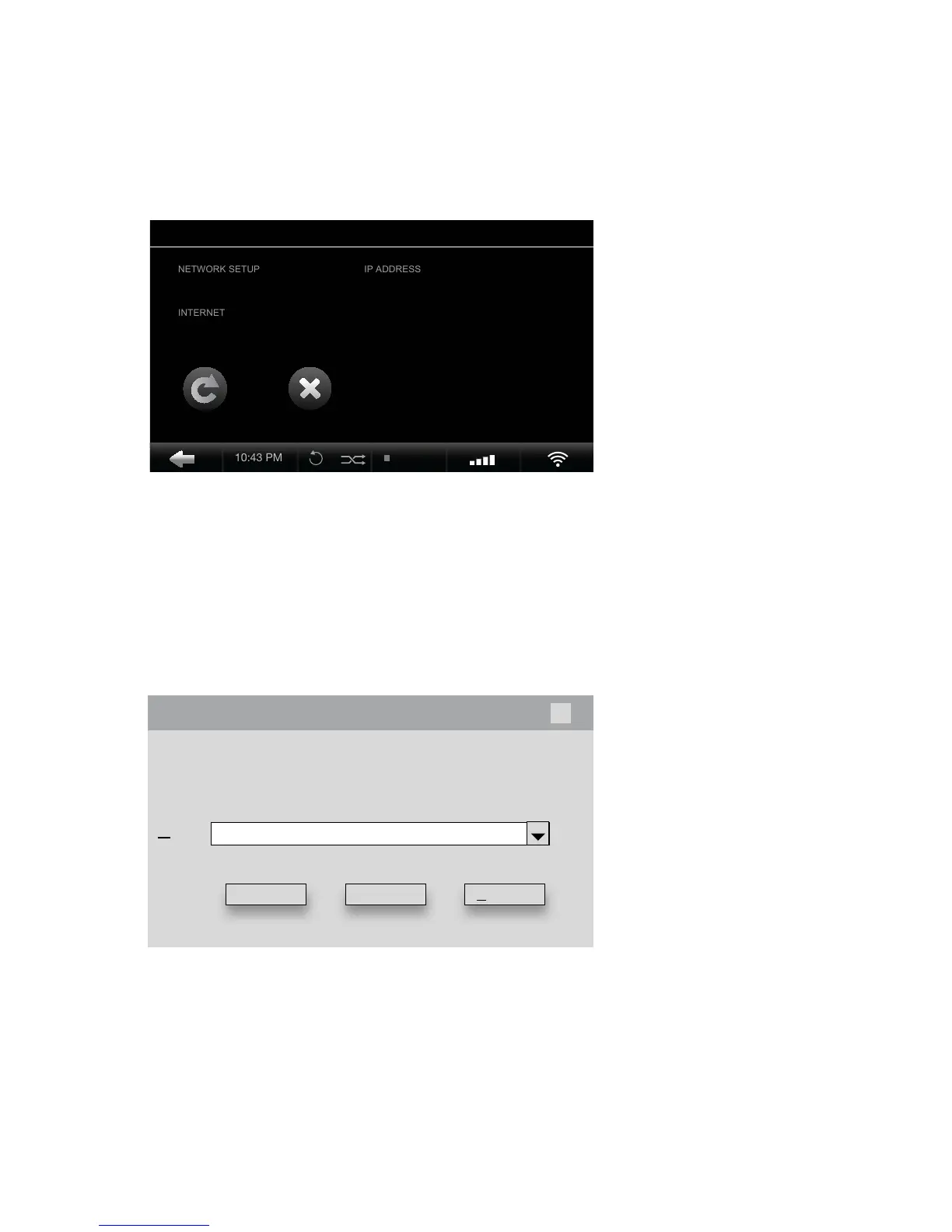
Settings > Network Settings > Network Information
Windows Icon + “R”
2. Go to Network Information on your Opus and note the Opus IP address.
3. On your PC keyboard press Windows + R to access the IP Address pop-up
screen or click your PC Start Menu followed by the Command Prompt.
4. An Import Folder is published on the home network once active. The
Import Folder is a default conguration by Opus as a Windows le server.
5. Drag and drop individual les or complete folders into the Import Folder.
Files are automatically tagged, organized and led within the Opus system.
10:25 PM
REFRESH CLOSE
WIRELESS xx.x.x.xx
AVAILABLE
FORMAT QUALITY 320GB 500GB 750GB 1000GB/1TB
O P U S F E A T U R E S
Import From PC
Open:
Run
\\ x x.x.x.xx
x
Type the name of a program, folder, document, or Internet
resource, and Windows will open it for you.
OK Cancel Browse...


 To Next Page