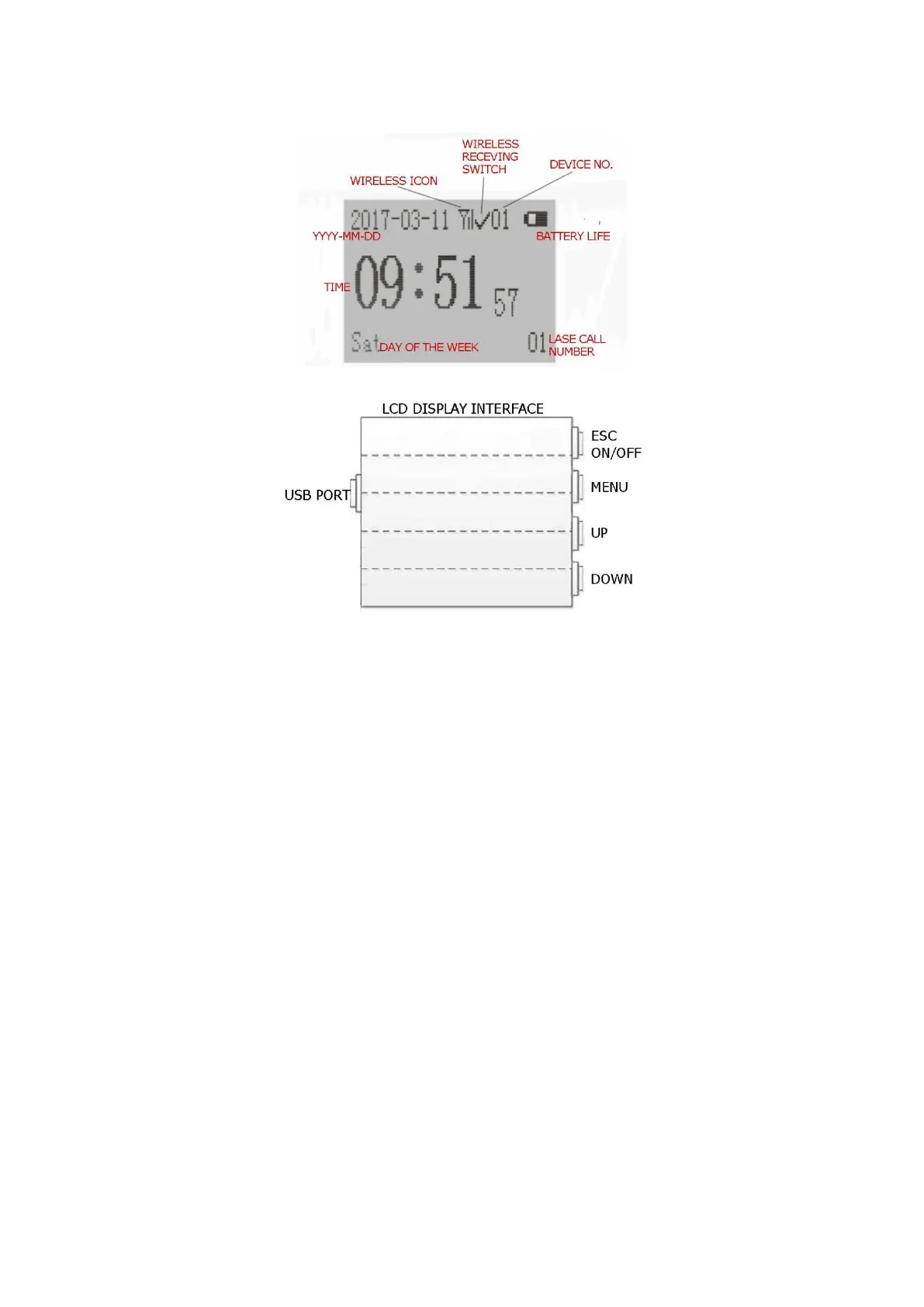
Watch Handing and Operation
1. LCD Display Interface
(1) Main Interface Operating Instruction
① When watch is under the main interface mode, other buttons are invalid except
“MENU”.
② Press “MENU” button to open the main Settings menu interface and
corresponding sub-menu interface.
③ Press “UP” and “DOWN” button to scroll through the main setting menu and select the
desired option of the menu.
④ Press “ESC button returns to the main or previous menu interface.
⑤ Long press “ESC” button for 2 seconds, open the Shortcut Menu:
• Receiving Switch (ON/OFF) - Choose whether you want to disconnect the sensor or not.
• Shutdown - Shut down the watch.
• Reboot - Restart the watch.
2. Main Setting Menu
Press the “MENU” button to open the main Settings menu interface.
(1) Main Settings Menu Interface
① Menu List
1) Pairing
2) QueryLog
3) DevNo.Setting


 To Next Page