F1
HELP
ON - OFF
BUZZER
ALARM
EVENTS
FAU LT
EVENTS
ESC
AB C DE FGHI J KL M NO
PQ R ST UV WX Y ZÃ Ä ÈË
ÎÐ Ó ÖØ Ù# ( )? %& ! +-
space
ENTER
21
5
4
87
0
3
6
9
yes no
PROGRAM
MODE SIGNALERROR
POWER
LIGHT SIGNAL CONTROL UNIT
OL-E
1
2
3
4
5
6
7
8
9
10
11
12
Page 6 from 18
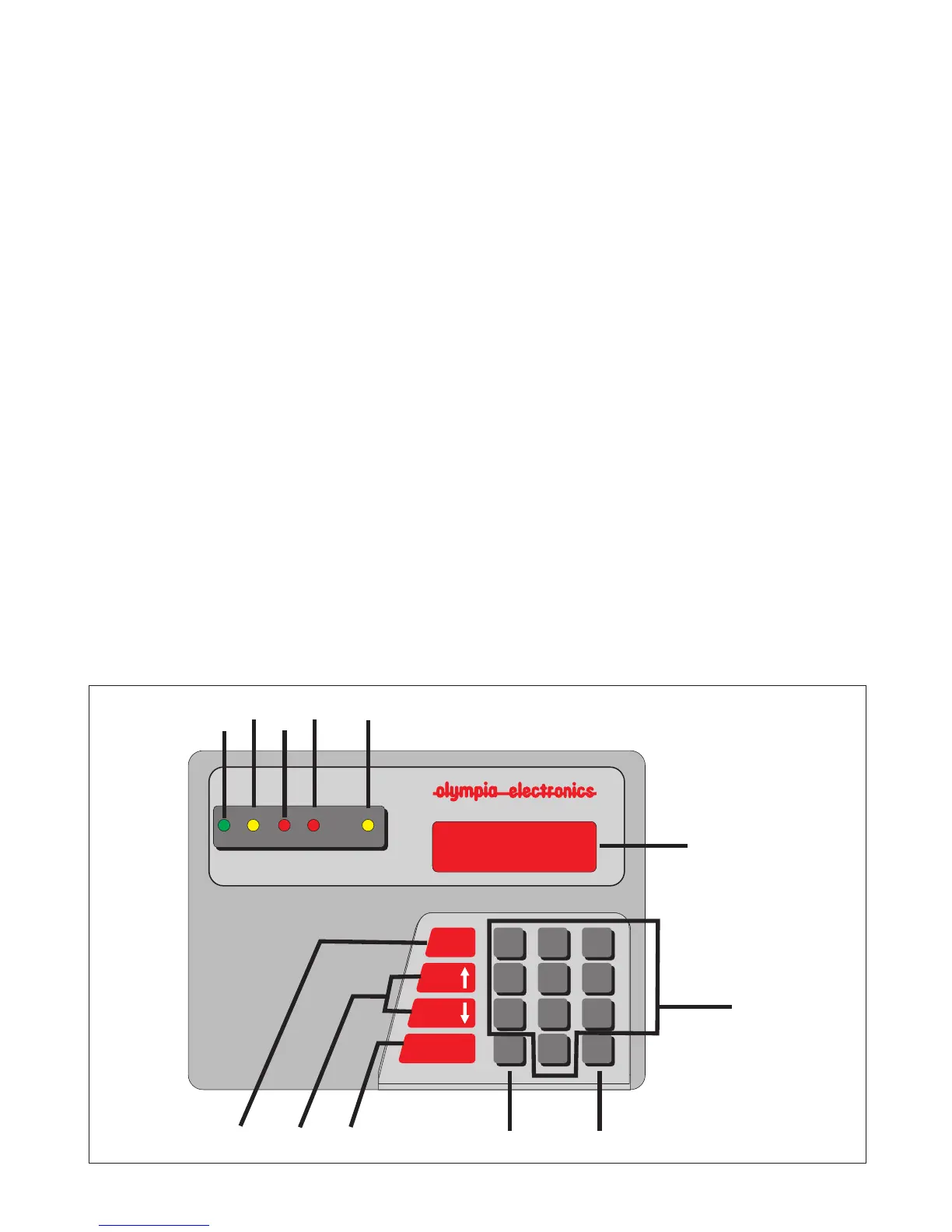
Fig.4 Keys and indications
4. KEYBOARD DESCRIPTION.
KEYS
4.1. The numeric keys 1, 2, 3, 4, 5, 6, 7, 8, 9, 0 are used to enter numbers.
4.2. The ESC key is used for cancelling and operation or exiting a menu.
4.3. The ENTER key is used to confirm an operation.
4.4. The F1 key show us the faults of the communications (if there are any) and
the keyboard software version.
4.5. The Up and Down arrow keys (ALARM EVENTS & FAULT EVENTS) show
us the inputs which have been activated . Also with these keys we can scroll
through the menus.
4.6. The ON-OFF BUZZER, HELP key is used to eliminate/reset individual calls.
INDICATORS
4.7. The POWER LED is lighted when the panel is supplied with 230V AC.
4.8. The ERROR LED is lighted when there is fault in the communications.
4.9. The PROGRAM LED is lighted when we are programming the panel.
4.10.The MODE LED is lighted when the system is in presence operation
mode.
4.11.The SIGNAL LED is lighted when the panel has accepted more than one
signals.
4.12. The LED Display shows the number of the room -zone that issued the
call. It is also used to display the menus used for programming.
921746000_09_003


 To Next Page