11EN
Shooting movies (n mode)
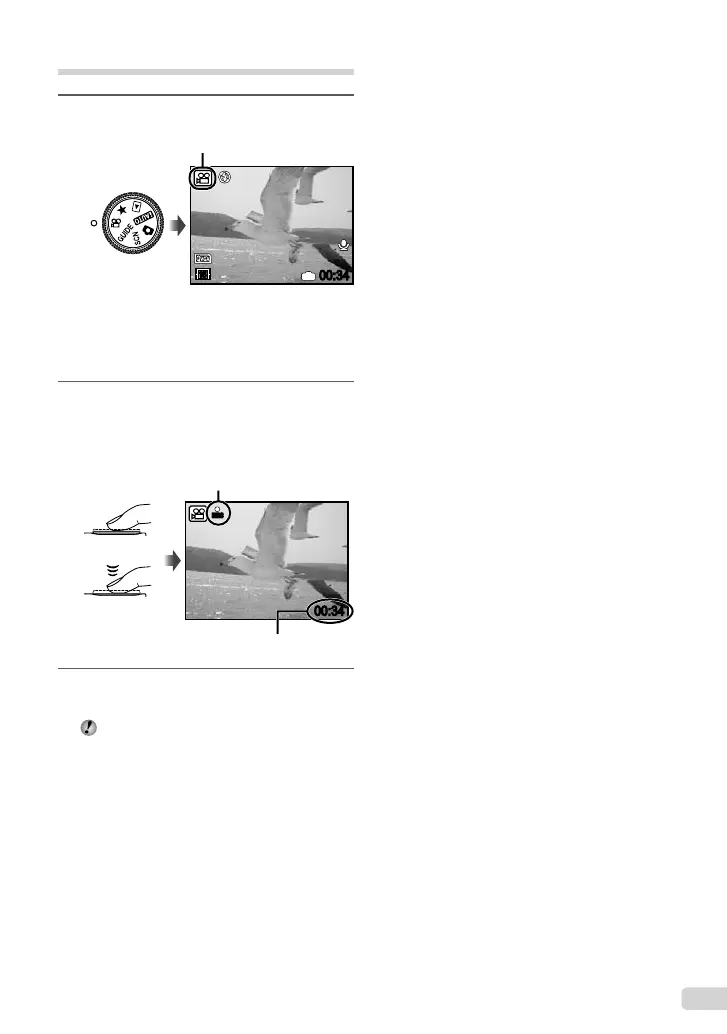
1
Set the mode dial to n.
A mode indicator
00:34
IN
15
Using the zoom
You cannot use the optical zoom while shooting
a movie. Please use the [DIGITAL ZOOM]
(p. 30)
2
Press the shutter button halfway
down to focus on the subject, and
gently press the button all the way
down to start recording.
Press halfway
Press fully
00:34
REC
Lights red during shooting
Remaining recording time (p.65)
3
Gently press the shutter button all the
way down to stop recording.
Audio is recorded simultaneously.
bookmyu1060SWBMen.indb11bookmyu1060SWBMen.indb11 2008/07/0210:53:302008/07/0210:53:30


 To Next Page