9EN
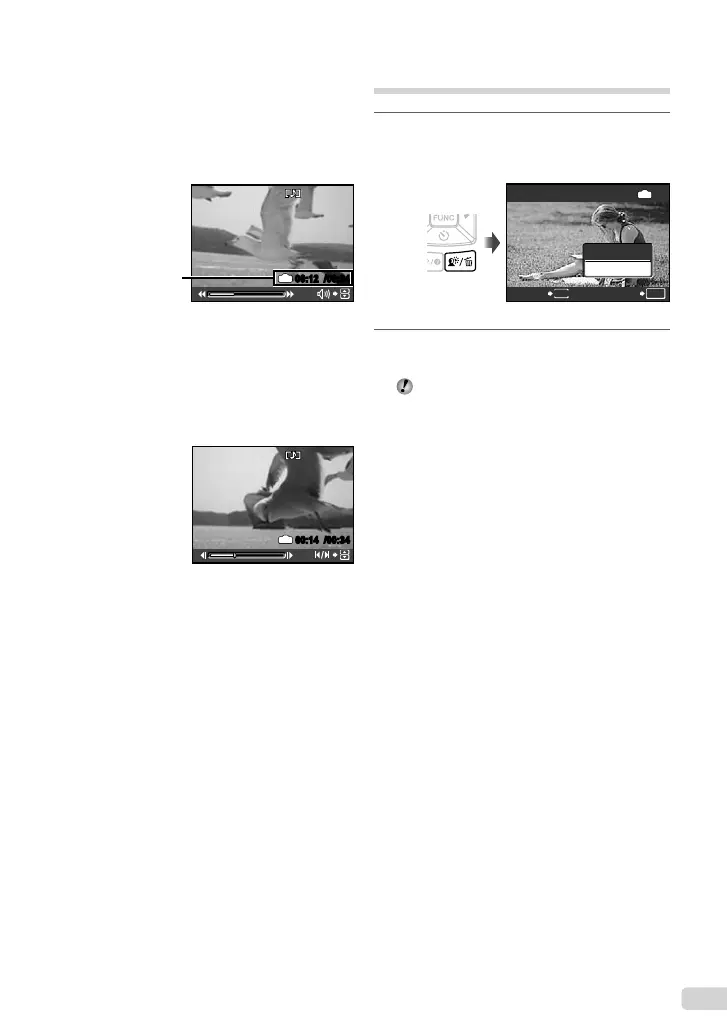
Operations during movie playback
Volume: During playback, press 12.
Fast-forward/rewind: Select with 34. Each
time a button is pressed, the playback speed
cycles through 2x, 20x, and standard (1x)
speed in the direction of the pressed button.
Pause: Press the button.
2008.10.26 12:30
100-0004
00:12
/
00:34
IN
During playback
Elapsed time/
Total recording time
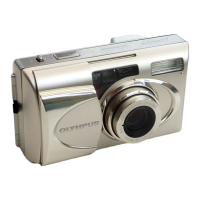
First (last) frame/frame advance:
While paused, press 1 to display the fi rst
frame, and press 2 to display the last frame.
Pressing 3 makes the camera to play back in
a reverse motion, and pressing 4 makes the
camera to play back normally. Press the n
button to resume playback.
2008.10.26 12:30
100-0004
00:14
/
00:34
IN
During pause
To stop movie playback
Press the m button.
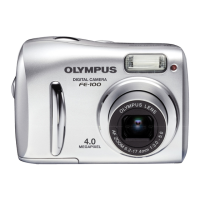
Erasing images during playback
(Single image erase)
1
Press the S button when the
playback image to be erased is
displayed.
ERASE
OK
IN
NO
YES
SETCANCEL
MENU
2
Press 1 to select [YES], and press
the button.
[S ERASE] (p. 41)
bookmyu1060SWBMen.indb9bookmyu1060SWBMen.indb9 2008/07/0210:53:282008/07/0210:53:28



 To Next Page