44
2
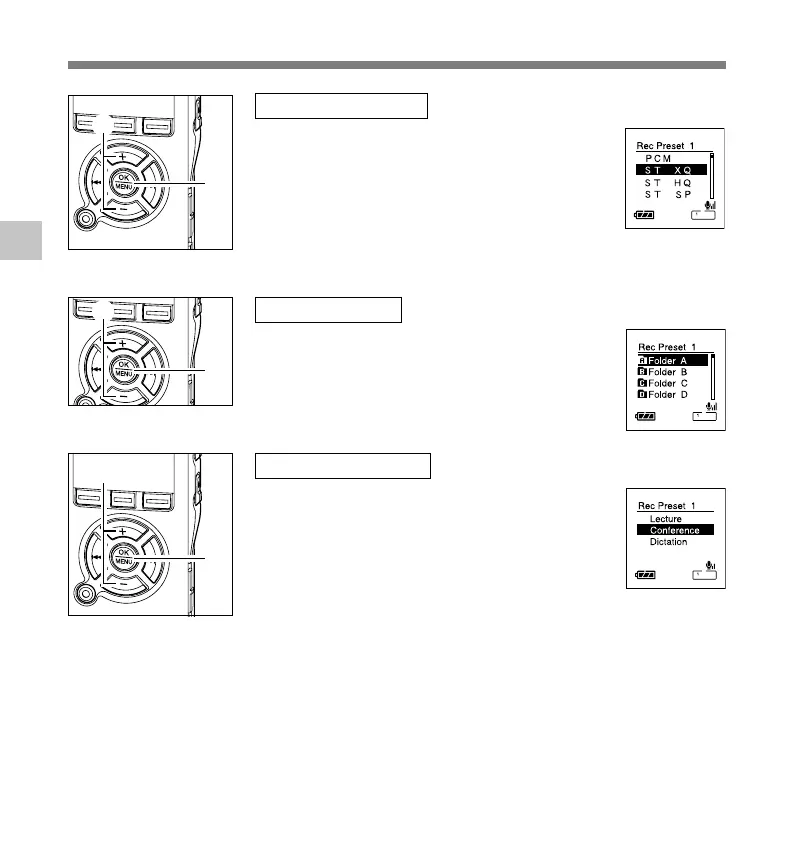
[Rec Mode] setting
Regardless of the regular Rec mode (☞ P32), timer
recording will start in a set recording mode.
1 Press the
+ or – button to select a recording
mode.
2 Press the OK button to exit [Rec Mode]
selection.
[Folder] setting
1 Press the
+ or – button to select the folder in
which the recording will be saved.
2 Press the OK button to exit [Folder] selection.
[Mic Sense] setting
Regardless of the recorder’s microphone sensitivity
setting (☞ P35), timer recording will start at a set
microphone sensitivity.
1 Press the
+ or – button to choose from
[Lecture], [Conference], and [Dictation].
2 Press the OK button to exit [Mic Sense] selection.
Timer Recording
2
1
2
1
2
1
Timer Recording (Timer Rec)



 To Next Page