1
Quick Start Guide ENGLISH
The OLYMPUS EP50 color camera
1 Scope of supply
2 Specifications
Resolutions and frame rates
Camera with protective cap HDMI cable
SD card for image saving USB mouse
Power supply unit Quick Start Guide
USB Ethernet adapter
You require a power supply unit and a power cord to power the camera. The
power supply unit is supplied with the camera. The country-specific power
cord is not included in the delivery. Please contact your OLYMPUS sales
representative in this regard.
A USB WLAN adapter is required to operate the camera in WLAN mode. This
adapter is not included in the delivery. Please contact your OLYMPUS sales
representative in this regard.
Technical data OLYMPUS EP50
Chip type CMOS
Chip size 1/1.8 inch
Effective area (width x height) 7.410 mm x 4.980 mm
Pixel size 2.4 µm x 2.4 µm
Maximum resolution 2592 x 1944 pixels
Bit depth 24 bit
Interfaces HDMI, SD card, USB (for mouse and WLAN adapter or Ethernet adapter,
not for USB data storage devices or for connection to a computer)
Camera mount Standard C-Mount
Acquisition mode Image
format
Resolution Frame rate Exposure
times
Live and Movie
(in WLAN mode and LAN
mode)
16:9 1920 x 1080 pixels
(Full HD)
up to 25 frames per
second
(depending on network
environment)
1 ms - 918 s
Live (via HDMI cable) 16:9 1920 x 1080 pixels
(Full HD)
60 frames per second 1 ms - 918 s
Movie (via OSD software) 16:9 1920 x 1080 pixels
(Full HD)
30 frames per second 1 ms - 918 s
Snapshot 4:3 2592 x 1944 pixels --- 1 ms - 918 s

 Need help?
 General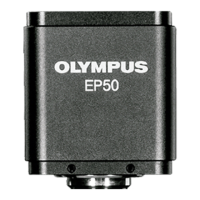

 To Next Page