2
ENGLISH Quick Start Guide
3 Intended use
This camera is intended to be used for the acquisition of digital
images, but not for clinical diagnostic purposes.
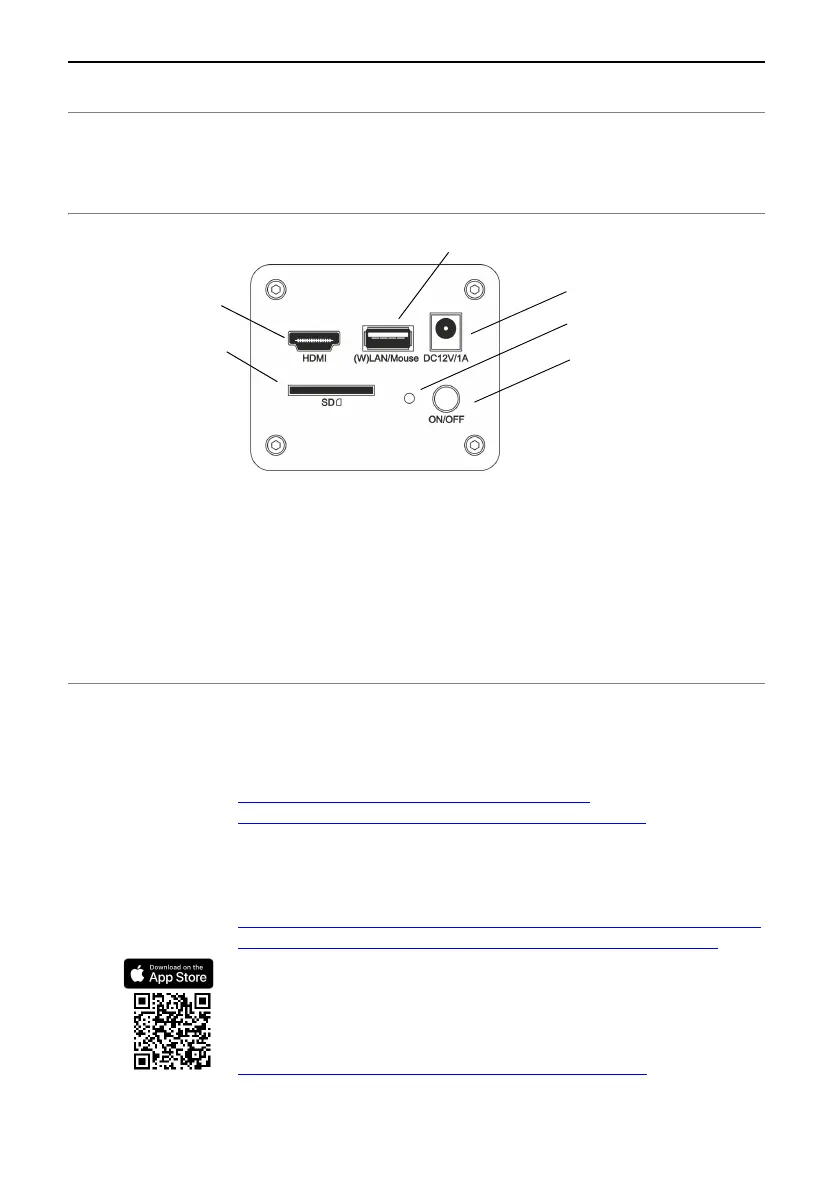
4 Ports on the back of the camera
Status of the LED on
the back of the
camera
Red LED lights up continuously = camera is off
Blue LED flashes 1x per second = camera initialization
Blue LED flashes 4x per second = camera transfers data
(in WLAN mode and LAN mode)
Blue LED lights up continuously = camera is ready. This status
only occurs when the camera is used with the OSD software.
OSD stands for On-Screen Display.
5 Further information
Installation Manual
For the OLYMPUS EP50 camera, an installation manual is
available. It contains more detailed information, for example, the
chapter “Notes on conformity and disposal”. Please download the
PDF file from one of these websites:
https://www.olympus-ims.com/en/resources/
https://www.olympus-lifescience.com/en/resources/
Software and app
Software EPview (for Windows PCs)
Please download the free EPview software from one of these
OLYMPUS websites:
https://www.olympus-ims.com/en/service-and-support/downloads/
https://www.olympus-lifescience.com/en/support/downloads/
App EPview (for mobile devices)
Install the free OLYMPUS EPview app. Use one of the two links
listed below.
Apple App Store
https://itunes.apple.com/app/EPview/id1372702702
SD card
LED
On/Off
Power supply
USB mouse, USB WLAN adapter or USB Ethernet adapter
HDMI cable


 To Next Page