9
En
SETTING FREQUENTLY USED FUNCTIONS
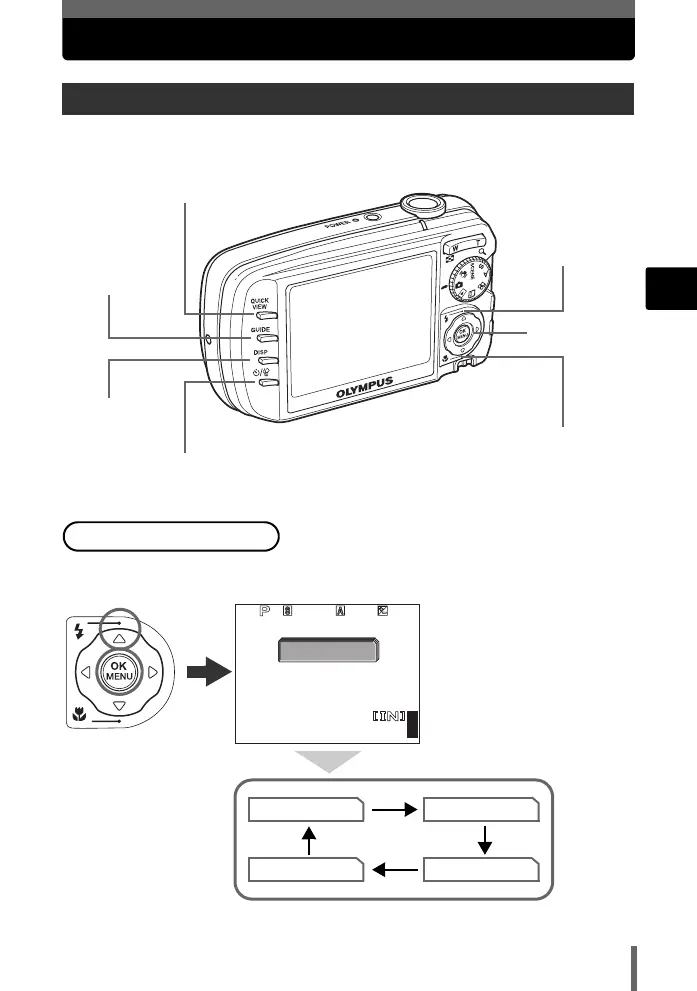
This camera features buttons for setting functions directly.
Press O# repeatedly in shooting mode to set the flash mode.
g Advanced Manual “Flash shooting” (P. 41)
Direct buttons
O#(Flash mode)
button
Y/S(Self-timer/Single-frame erase) button
QUICK VIEW button
GUIDE button
DISP button
Z button
N&(Macro) button
To set the flash mode
AUTO
44
3264
×
2448
HQ
1/2000
F2.8
0.0
AUTO
!
#
$
d4244_e_basic_00_bookfile_7.book Page 9 Tuesday, May 10, 2005 5:09 PM



 To Next Page