EasyManua.ls Logo

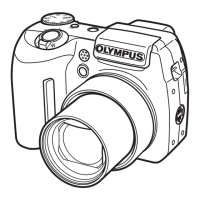
Olympus DIGITAL CAMERA SP-320 - User Manual

Olympus DIGITAL CAMERA SP-320
191 pages
Print Icon
To Next Page IconTo Next Page
Loading...
Thank you for purchasing an Olympus digital camera. Before you start to use your
new camera, please read these instructions carefully to enjoy optimum performance
and a longer service life. Keep this manual in a safe place for future reference.
We recommend that you take test shots to get accustomed to your camera before
taking important photographs.
In the interest of continually improving products, Olympus reserves the right to update
or modify information contained in this manual.
DIGITAL CAMERA
Advanced
Manual
Detailed explanations of all the
functions for getting the most out
of your camera.
SP-320
Online Pictures
Basic Operation
Basic Shooting
Advanced Shooting
Playing Back
Printing
Camera Settings

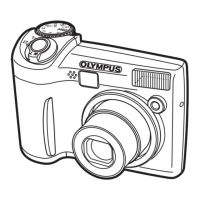
Table of Contents

Questions and Answers

  • J
    Jessica ElliottAug 15, 2025
    What to do if my Olympus SP-320 Digital Camera says 'BATTERY EMPTY'?
    • E
      Elizabeth CarpenterAug 16, 2025
      If your Olympus Digital Camera displays 'BATTERY EMPTY', it means the batteries are empty. To resolve this, insert new batteries or charge the batteries.
  • J
    Jaime CastilloAug 18, 2025
    What to do if my Olympus Digital Camera says 'CARD FULL'?
    • M
      Monica ConnerAug 18, 2025
      If your Olympus Digital Camera displays 'CARD FULL', it indicates that the card has no available memory and cannot store any new data. You should replace the card or erase unwanted data. Before erasing, it's recommended to download important pictures to a computer.
  • B
    Brenda GibbsAug 21, 2025
    What to do if my Olympus Digital Camera says 'MEMORY FULL'?
    • T
      tgrayAug 21, 2025
      If your Olympus Digital Camera displays 'MEMORY FULL', the internal memory has no available memory and cannot store any new data. Insert a card to back up all data or erase unwanted data. It is recommended to download important pictures to a computer before erasing.
  • H
    Heidi RodriguezAug 25, 2025
    Why does my Olympus SP-320 say 'CARD ERROR'?
    • J
      Joseph RogersAug 26, 2025
      If your Olympus Digital Camera displays a 'CARD ERROR', it means there is a problem with the card. The suggested solution is that this card cannot be used, so you should insert a new card.
  • L
    lisaphillipsAug 27, 2025
    What to do if my Olympus Digital Camera says 'NO PICTURE'?
    • E
      Edward HolderAug 27, 2025
      If your Olympus Digital Camera displays 'NO PICTURE', it means there are no pictures in the internal memory or on the card. To fix this, record pictures.
  • T
    Tyler NelsonAug 30, 2025
    How to fix 'This card cannot be used' error on my Olympus SP-320 Digital Camera?
    • C
      Cole MurphyAug 30, 2025
      If your Olympus Digital Camera says that the card cannot be used or is not formatted, format the card or replace it. Select [POWER OFF] and press Z. Insert a new card. Select [FORMAT] and press Z. Note that all data on the card will be erased.
  • K
    Kara JonesSep 2, 2025
    Why does my Olympus SP-320 Digital Camera say 'WRITE-PROTECT'?
    • K
      karen17Sep 3, 2025
      If your Olympus Digital Camera displays 'WRITE-PROTECT', it means writing to the card is prohibited. The recorded image has been protected (read-only) on a computer. Download the image to a computer and cancel the read-only setting.
  • A
    Angela BeckerSep 5, 2025
    What does 'PICTURE ERROR' mean on my Olympus Digital Camera?
    • M
      Mike MorrisonSep 5, 2025
      If your Olympus Digital Camera displays 'PICTURE ERROR', there is a problem with the selected picture, and it cannot be played back on the camera. Use image processing software to view the picture on a computer. If that cannot be done, the image file is damaged.
  • M
    Michael GravesSep 9, 2025
    How to fix 'error in the internal memory' on my Olympus Digital Camera?
    • K
      kelseymooreSep 9, 2025
      If your Olympus Digital Camera indicates an error in the internal memory, select [MEMORY FORMAT] and press Z. Note that all data in the internal memory will be erased, including frames and titles used to compose images. Use OLYMPUS Master to add them in again.
  • C
    cannonkimberlySep 12, 2025
    What to do if my Olympus SP-320 says 'CARD-COVER OPEN'?
    • A
      Angela TaylorSep 12, 2025
      If your Olympus Digital Camera displays 'CARD-COVER OPEN', it means the card cover is open. Close the card cover.

Summary

1 Basic Operation

Menus

Guides users on accessing and navigating the camera's menu system for settings.

2 Tips Before You Start Taking Pictures

If the Correct Focus Cannot Be Obtained

Explains the focus lock procedure to overcome focusing difficulties.

3 Basic Shooting Functions

Selecting a Scene Mode According to the Situation

Introduces SCENE mode and details various scene modes for automatic optimal settings.

4 Advanced Shooting Functions

Changing the Aperture Value for Shooting Pictures

Explains manual aperture control for depth of field adjustment.

Adjusting the White Balance

Explains how to adjust white balance for accurate color reproduction under different lighting.

6 Playback

Erasing Pictures

Explains how to erase pictures individually or all at once.

7 Settings

Customizing the Camera (MY MODE SETUP;SHORT CUT;CUSTOM BUTTON)

Details options for customizing camera functions via My Mode, shortcuts, and custom buttons.

10 Appendix

Troubleshooting

Provides solutions for common camera error messages and their causes.

Safety Precautions

Covers important safety guidelines for camera usage and handling.

Olympus DIGITAL CAMERA SP-320 Specifications

General IconGeneral
BrandOlympus
ModelDIGITAL CAMERA SP-320
CategoryDigital Camera
LanguageEnglish

Related product manuals